Send Downtime Alerts to Teams, Google Chat, Discord or Your Own Code
mySites.guru runs an Uptime Monitor against the sites you have connected, and when it detects that one is down, it notifies you. It notifies you again when the site comes back. By default that notification is an email, which is fine if you read email the moment it arrives, and most of us do not, least of all at three in the morning. The uptime monitoring page covers the rest of the feature.
Until now the only other option was the mySites.guru Slack app. We looked at every account that runs uptime monitors, and just over 1.5% had it connected. The other 98% or so heard about downtime from their inbox, which is how an uptime alert turns into something you read at breakfast.
Those down and up notifications can now also go to any webhook URL you paste in. There are five formats: one for Slack and the tools that read Slack’s format (Mattermost and Rocket.Chat), one each for Discord, Microsoft Teams and Google Chat, and signed JSON for n8n, Zapier, Make or your own code. The down and up emails keep arriving as before.
Five formats behind one URL box
The setting is a card called “Webhook: send Uptime Monitor alerts to any URL” on the Integrations tab of your notification settings. Paste the incoming webhook URL your chat app gave you and the format picks itself from the address: a hooks.slack.com URL selects Slack, a Teams Workflows URL selects Teams, a discord.com/api/webhooks/ URL selects Discord, a chat.googleapis.com URL selects Google Chat, and anything else falls back to JSON. You can change it by hand if the guess is wrong.
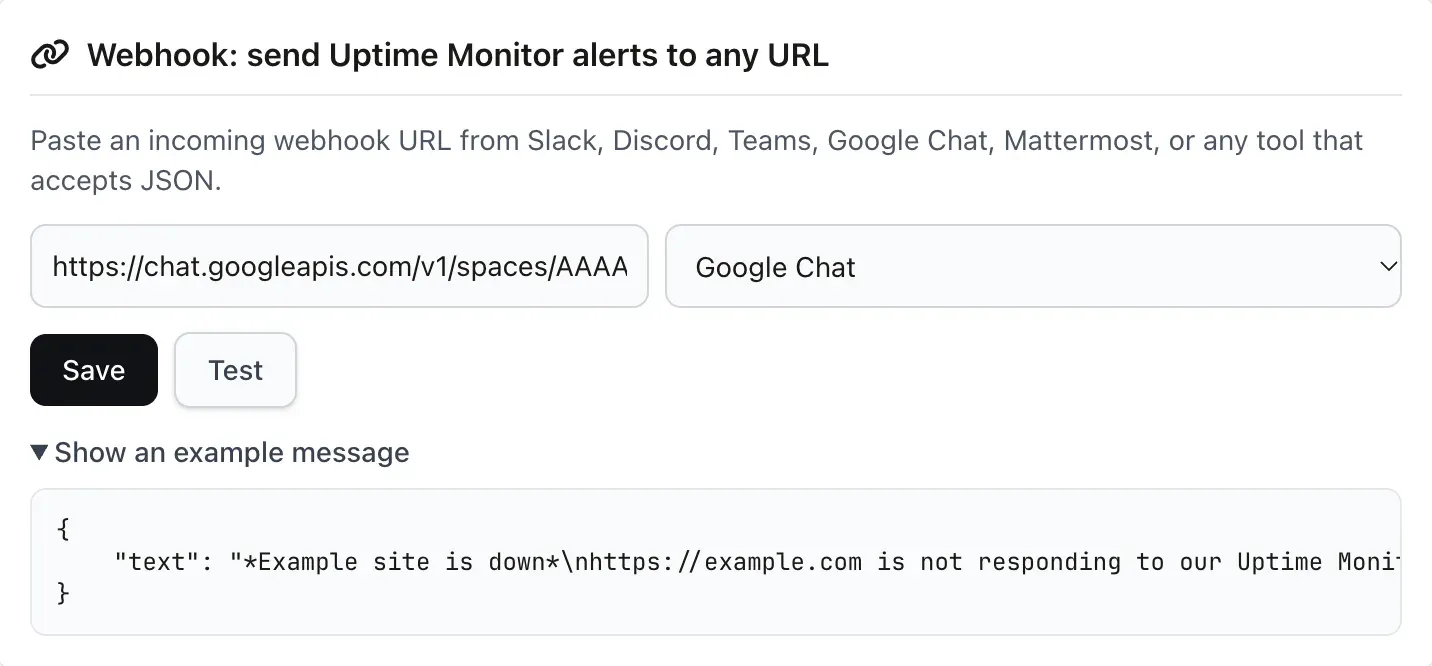
The Test button posts a test message using whatever is in the boxes right now, so you can check a URL before you save it. “Show an example message” displays the exact body we will send in the selected format, which saves guessing what will turn up in the channel.
- Slack-compatible
- For Slack, Mattermost and Rocket.Chat. A colour-coded attachment with the site, the server and the time we checked.
- Discord
- An embed, red for down and green for back up, with mentions switched off.
- Microsoft Teams (Workflows)
- An Adaptive Card for the Workflows webhook trigger that replaced Office 365 connectors.
- Google Chat
- A text message with a bold headline, the site details and a Manage site link.
- JSON
- A documented body with a signature header, for n8n, Zapier, Make and your own code.
The URL has to be https:// on port 443 or 8443, with no username or password in it. We also check where the host resolves on every save, every test and every delivery, and we will not post to private or internal network addresses, because a webhook is a URL you choose that our servers then call.
Microsoft Teams after the Office 365 connector shutdown
Microsoft retired Office 365 connectors in Teams, including the old Incoming Webhook connector. The deadline moved several times after the first announcement in July 2024, and the final switch-off was scheduled for 18 to 22 May 2026. If an old tool of yours still posts to a webhook.office.com connector URL, that is the kind of URL the shutdown was aimed at.
The replacement is Workflows. In Teams, add the Send webhook alerts to a channel template, choose the team and channel, and copy the URL it gives you. That URL goes into the mySites.guru card, and we post an Adaptive Card to it in the shape Microsoft’s Workflows webhook documentation expects: a bold title coloured by event, a line of detail, and the site, server and check time as facts.
A Workflows webhook cannot set its own bot name or icon, so the alert appears in the channel as a Workflows post. There is no setting for it on our side or Microsoft’s.
Why does Google Chat get plain text?
Google Chat’s incoming webhook accepts only the fields in its own message format, and in our testing it answered anything else with an HTTP 400 error. None of the Slack, Discord or Teams shapes get through, so the Google Chat format is a {"text": "..."} message written in Chat’s own formatting markup: the headline in *bold*, a line of detail, the site, server and check time, and a <url|Manage site> link straight to the site in mySites.guru.
That text value, with its line breaks shown as real lines, reads:
*Example site is down*
https://example.com is not responding to our Uptime Monitor.

Site: https://example.com
Checked: 2026-09-28 14:18 UTC
<https://manage.mysites.guru/en/sites/manage/example|Manage site>
To create the URL, open the space in Google Chat, then the space menu, Apps & integrations, Add webhooks, as described in Google’s webhook quickstart. The URL includes a key and a token, so treat it like a password: anyone holding it can post into that space.
Google allows one message per second per space, shared by every webhook in it. The limit shows up when a whole server goes down and takes twenty client sites with it: the alerts arrive in a burst and Google slows some of them with a 429 response. We treat a 429 as temporary and retry it, so the later alerts in a burst usually arrive a little late instead of going missing.
Site names are text we did not write, so we also break up any *, _, ~, backtick, < or > in them before they reach Chat. A site called <https://example.com|Click here> stays visible as text and never becomes a link someone else chose.
Slack, Mattermost, Rocket.Chat and Discord
The Slack-compatible format uses Slack’s older message attachments rather than Block Kit. Slack still supports attachments and calls them legacy, but Mattermost’s incoming webhooks ignore Block Kit and read attachments, and Rocket.Chat accepts the same Slack-style attachment fields. One payload works in all three. The attachment is red for down, green for back up and blue for a test.
If you already use the mySites.guru Slack app, which you connect from the same Integrations tab, you do not need a webhook for Slack. The webhook is for a second destination, or for a team that lives somewhere else.
Discord gets an embed with the same colours, and we set Discord’s allowed mentions to an empty list, so a site named @everyone cannot ping everyone on your server. The Slack family gets the same protection a different way, with an invisible zero-width space after each @, so @channel or @here in a site name stays as plain text.
How do I verify a signed alert in n8n or my own code?
Each request we send has an X-MySites-Signature header containing sha256= followed by the hex HMAC-SHA256 of the X-MySites-Timestamp value, a full stop, and the raw request body, keyed with your signing secret. Compute the same value on your side, compare the two with a constant-time function, and reject a timestamp more than five minutes old so a captured request cannot be replayed later.
The scheme is close to how Stripe signs its webhooks, and the sha256= prefix matches GitHub’s X-Hub-Signature-256. GitHub signs the body only; putting the timestamp inside the signed string is what makes the five-minute window enforceable.
Each request also has an X-MySites-Event header, which is monitor.down, monitor.up or test. X-MySites-Delivery holds a UUID that stays the same across retries, so a receiver can drop a duplicate. User-Agent is mySites.guru-Webhook/1.0.
The JSON format sends this body:
{
    "event": "monitor.down",
    "delivery_id": "4f03fa9d-26a1-4590-83cc-332e25e986ac",
    "occurred_at": "2026-09-28T14:18:00+00:00",
    "source": "mySites.guru",
    "site": {
        "id": "example",
        "name": "Example site",
        "url": "https://example.com",
        "server_hostname": null,
        "manage_url": "https://manage.mysites.guru/en/sites/manage/example"
    }
}
server_hostname is always present and is null when we do not know the server, so your code does not need to treat the key as optional. Checking the signature in PHP is short:
$expected = 'sha256=' . hash_hmac('sha256', $timestamp . '.' . $rawBody, $secret);

$tooOld   = abs(time() - (int) $timestamp) > 300;

if ($tooOld || ! hash_equals($expected, $signatureHeader)) {
    http_response_code(401);
    exit;
}
And in Node, for example inside an n8n Code node:
const crypto = require('crypto');

const expected = 'sha256=' + crypto
  .createHmac('sha256', secret)
  .update(`${timestamp}.${rawBody}`)
  .digest('hex');

const ok = expected.length === signatureHeader.length
  && crypto.timingSafeEqual(Buffer.from(expected), Buffer.from(signatureHeader));

if (!ok || Math.abs(Date.now() / 1000 - Number(timestamp)) > 300) {
  throw new Error('Rejected: bad signature or old timestamp');
}
The signature has to be computed over the bytes we sent, not over JSON your tool has already parsed and re-encoded. In n8n, turn on the Raw Body option on the Webhook node. In Zapier, use Catch Raw Hook rather than Catch Hook, because only the raw version keeps the headers and the unchanged body. Make’s Custom webhook receives the alert with no extra setup.
The signing secret is created on your first save and appears on the card whenever the JSON format is selected, with Show, Copy and Regenerate buttons. All five formats are signed, but chat apps ignore the header, so the secret only matters to code you write. Regenerating it breaks any receiver still checking against the old one, and the card asks you to confirm first.
What happens when the webhook stops answering?
A delivery that fails for a temporary reason (a network error, a timeout, or an HTTP 408, 429 or any 5xx) is retried after 30 seconds, then 60, then 120: four attempts in all. Any other 4xx response is treated as final. So is a redirect, which we never follow, because following one would send your alert to an address we have not checked.
After 10 failed deliveries in a row, the webhook pauses itself. The card then shows it as paused with a Resume button, and a “Last sent” line under the buttons shows when the most recent delivery went out and what came back.
We do not email you when a webhook pauses. An alerting feature that sends email because its own alerting has broken is how an inbox fills with noise on a bad night. Your down and up emails are separate and keep arriving whatever the webhook is doing, so pausing a webhook never leaves you blind.
Team accounts and who gets which alert
Each user has one webhook, and the people who receive an alert are the same people the Slack app notifies: the account owner, plus any team members who have access to that site. A team member limited to a handful of client sites only gets alerts for those sites, so a freelancer on your team can point their own Discord at just the sites they look after.
If three people on the same account paste the same Slack channel URL, the alert is posted once. You can save a webhook on any account, but alerts are only sent, and Test only works, while the account has an active subscription.
For everything else about how the monitor decides a site is down, and why an alert sometimes fires for a site that looks fine to you, read why you’re getting downtime alerts. If you want to pull data rather than have it pushed, the mySites.guru API and its one-call site summary cover that side.
Further Reading
- Retirement of Office 365 connectors within Microsoft Teams, Microsoft’s own timeline of the connector shutdown and every deadline change.
- Create incoming webhooks with Workflows for Microsoft Teams, the replacement setup and its payload limits.
- Send messages to Google Chat with incoming webhooks, Google’s quickstart, including the per-space rate limit.
- Verify webhook signatures manually, Stripe’s explanation of the timestamp-plus-body signing scheme our JSON format follows.
- Discord’s allowed mentions object, the field that stops a webhook message pinging everyone.
Frequently Asked Questions
Which chat apps can receive mySites.guru uptime alerts?
Do mySites.guru alerts still reach Microsoft Teams now that Office 365 connectors are retired?
How do I check an uptime webhook really came from mySites.guru?
Will I stop getting uptime emails if I add a webhook?
What happens if my webhook URL stops working?
Can each team member send uptime alerts to a different channel?
 Written and edited by a human, with AI assistance. Our approach to AI