SiteGround Is Blocking mySites.guru Again, and Its Support Can't Agree Why

Since 21:09 UTC on Wednesday 21 October 2026, SiteGround’s Anti-Bot AI has been serving its captcha page to the one address mySites.guru connects to your site from. Audits, backups and connection checks against SiteGround-hosted sites fail, the dashboard shows them as disconnected, and the same sites load perfectly in a browser the whole time. This has happened before, and the mechanism has not changed since July.
Nothing is wrong with your site and nothing has changed at our end. The block is a decision SiteGround’s system made about our published IP address, on SiteGround’s servers, and only SiteGround can undo it. What has changed since July is how much of it we can now show, and how many different explanations SiteGround’s support team has given our shared customers in a single week.
What Changed on 21 October
Our audit log records the first captcha served to our worker IP, 178.62.5.35, at 21:09 UTC on Wednesday 21 October. On the Monday and Tuesday before it, not one audit of a SiteGround-hosted site received a captcha. By Saturday morning most of them did.
Audits of SiteGround-hosted sites that got a captcha instead of the site
Share of each day's audits, October 2026. The first captcha was served at 21:09 UTC on 21 October.
Every one of those captchas named the same address. The challenge is a redirect to /.well-known/sgcaptcha/ whose query string includes ipr:178.62.5.35 or ipc:178.62.5.35, so SiteGround’s own response says which address it is judging. Between 09:55 and 10:02 UTC on Saturday we requested the same sites, in the same minute, from our uptime IP (165.227.239.229), from 178.62.5.35, and from a home broadband connection: only the requests from 178.62.5.35 were challenged. Sending a Chrome browser User-Agent from 178.62.5.35 was challenged as well, and sites that were challenged stayed challenged on every request in repeated tests minutes apart. SiteGround is judging the address, and it does so on shared hosting in the US, UK/EU and Asia and on its cloud servers alike.
Currently known hostnames that are blocking us at the time of writing this post
These are the SiteGround servers whose most recent answer to our worker, at the time of writing, was the captcha instead of the site. If your site is on one of them, it is affected. Hostnames are listed, not sites or customers. A server drops off this list as soon as SiteGround exempts our address on it, so treat it as a snapshot, not a permanent record.
Pulled from our connection records at 24 October 2026 at 10:58 UTC.
SiteGround shared hosting508 servers
- am5.siteground.biz
- am7.siteground.biz
- am9.siteground.biz
- am11.siteground.biz
- am14.siteground.biz
- am18.siteground.biz
- am19.siteground.biz
- am22.siteground.biz
- ams2.siteground.eu
- ams5.siteground.eu
- ams7.siteground.eu
- ams8.siteground.eu
- ams9.siteground.eu
- ams10.siteground.eu
- ams20.siteground.eu
- ams22.siteground.eu
- ams27.siteground.eu
- ams30.siteground.eu
- ams34.siteground.eu
- ams35.siteground.eu
- ams37.siteground.eu
- ams40.siteground.eu
- es2.siteground.eu
- es4.siteground.eu
- es12.siteground.eu
- es14.siteground.eu
- es15.siteground.eu
- es19.siteground.eu
- es39.siteground.eu
- es41.siteground.eu
- es50.siteground.eu
- es57.siteground.eu
- es58.siteground.eu
- es65.siteground.eu
- es68.siteground.eu
- es71.siteground.eu
- es73.siteground.eu
- es74.siteground.eu
- es80.siteground.eu
- es87.siteground.eu
- es89.siteground.eu
- es1001.siteground.eu
- esm11.siteground.biz
- esm23.siteground.biz
- esm27.siteground.biz
- esm30.siteground.biz
- esm32.siteground.biz
- esm37.siteground.biz
- gcam1003.siteground.biz
- gcam1011.siteground.biz
- gcam1016.siteground.biz
- gcam1019.siteground.biz
- gcam1020.siteground.biz
- gcam1053.siteground.biz
- gcam1055.siteground.biz
- gcam1068.siteground.biz
- gcam1070.siteground.biz
- gcam1071.siteground.biz
- gcam1073.siteground.biz
- gcam1075.siteground.biz
- gcam1092.siteground.biz
- gcam1094.siteground.biz
- gcam1097.siteground.biz
- gcam1103.siteground.biz
- gcam1112.siteground.biz
- gcam1121.siteground.biz
- gcam1125.siteground.biz
- gcam1133.siteground.biz
- gcam1148.siteground.biz
- gcam1149.siteground.biz
- gcam1156.siteground.biz
- gcam1157.siteground.biz
- gcam1161.siteground.biz
- gcam1163.siteground.biz
- gcam1181.siteground.biz
- gcam1183.siteground.biz
- gcam1184.siteground.biz
- gcam1187.siteground.biz
- gcam1195.siteground.biz
- gcam1198.siteground.biz
- gcam1201.siteground.biz
- gcam1203.siteground.biz
- gcam1213.siteground.biz
- gcam1224.siteground.biz
- gcam1241.siteground.biz
- gcam1242.siteground.biz
- gcam1243.siteground.biz
- gcam1250.siteground.biz
- gcam1252.siteground.biz
- gcam1259.siteground.biz
- gcam1261.siteground.biz
- gcam1264.siteground.biz
- gcam1265.siteground.biz
- gcam1272.siteground.biz
- gcam1276.siteground.biz
- gcam1278.siteground.biz
- gcam1283.siteground.biz
- gcam1288.siteground.biz
- gcam1294.siteground.biz
- gcam1300.siteground.biz
- gcam1304.siteground.biz
- gcam1306.siteground.biz
- gcam1307.siteground.biz
- gcam1309.siteground.biz
- gfram1002.siteground.biz
- gfram1003.siteground.biz
- giow1015.siteground.us
- giow1027.siteground.us
- giow1076.siteground.us
- giow1077.siteground.us
- giow1090.siteground.us
- giow1092.siteground.us
- giow1097.siteground.us
- giow1107.siteground.us
- giow1119.siteground.us
- giow1123.siteground.us
- giow1125.siteground.us
- giow1131.siteground.us
- giowm1061.siteground.biz
- giowm1067.siteground.biz
- giowm1077.siteground.biz
- giowm1081.siteground.biz
- giowm1082.siteground.biz
- giowm1083.siteground.biz
- giowm1084.siteground.biz
- giowm1089.siteground.biz
- giowm1091.siteground.biz
- giowm1095.siteground.biz
- giowm1096.siteground.biz
- giowm1098.siteground.biz
- giowm1101.siteground.biz
- giowm1104.siteground.biz
- giowm1105.siteground.biz
- giowm1110.siteground.biz
- giowm1113.siteground.biz
- giowm1117.siteground.biz
- giowm1121.siteground.biz
- giowm1125.siteground.biz
- giowm1131.siteground.biz
- giowm1136.siteground.biz
- giowm1142.siteground.biz
- giowm1144.siteground.biz
- giowm1147.siteground.biz
- giowm1150.siteground.biz
- giowm1152.siteground.biz
- giowm1164.siteground.biz
- giowm1177.siteground.biz
- giowm1180.siteground.biz
- giowm1183.siteground.biz
- giowm1185.siteground.biz
- giowm1186.siteground.biz
- giowm1188.siteground.biz
- giowm1191.siteground.biz
- giowm1193.siteground.biz
- giowm1195.siteground.biz
- giowm1197.siteground.biz
- giowm1199.siteground.biz
- giowm1232.siteground.biz
- giowm1233.siteground.biz
- giowm1246.siteground.biz
- giowm1253.siteground.biz
- giowm1255.siteground.biz
- giowm1258.siteground.biz
- giowm1263.siteground.biz
- giowm1270.siteground.biz
- giowm1278.siteground.biz
- giowm1279.siteground.biz
- giowm1281.siteground.biz
- giowm1283.siteground.biz
- giowm1284.siteground.biz
- giowm1297.siteground.biz
- giowm1298.siteground.biz
- giowm1301.siteground.biz
- giowm1310.siteground.biz
- giowm1317.siteground.biz
- giowm1354.siteground.biz
- giowm1355.siteground.biz
- giowm1356.siteground.biz
- giowm1357.siteground.biz
- gmadm1035.siteground.biz
- gnld5.siteground.eu
- gnld1006.siteground.eu
- gnld1007.siteground.eu
- gnld1009.siteground.eu
- gnld1020.siteground.eu
- gnld1024.siteground.eu
- gnld1034.siteground.eu
- gnld1039.siteground.eu
- gnld1044.siteground.eu
- gnld1046.siteground.eu
- gnld1047.siteground.eu
- gnld1051.siteground.eu
- gnld1053.siteground.eu
- gnldm1.siteground.biz
- gnldm3.siteground.biz
- gnldm1001.siteground.biz
- gnldm1005.siteground.biz
- gnldm1014.siteground.biz
- gnldm1015.siteground.biz
- gnldm1016.siteground.biz
- gnldm1022.siteground.biz
- gnldm1024.siteground.biz
- gnldm1030.siteground.biz
- gnldm1034.siteground.biz
- gnldm1043.siteground.biz
- gnldm1045.siteground.biz
- gnldm1051.siteground.biz
- gnldm1052.siteground.biz
- gnldm1059.siteground.biz
- gnldm1065.siteground.biz
- gnldm1084.siteground.biz
- gnldm1096.siteground.biz
- gnldm1097.siteground.biz
- gnldm1099.siteground.biz
- gnldm1107.siteground.biz
- gnldm1108.siteground.biz
- gnldm1109.siteground.biz
- gnldm1111.siteground.biz
- gnldm1112.siteground.biz
- gnldm1116.siteground.biz
- gnldm1117.siteground.biz
- gnldm1120.siteground.biz
- gnldm1121.siteground.biz
- gsgpm1019.siteground.biz
- gsgpm1023.siteground.biz
- gsgpm1032.siteground.biz
- gsyd1.siteground.net
- gsyd2.siteground.net
- gsyd3.siteground.net
- gsyd1003.siteground.net
- gsyd1004.siteground.net
- gsydm1.siteground.biz
- gsydm1001.siteground.biz
- gsydm1008.siteground.biz
- gsydm1011.siteground.biz
- gsydm1015.siteground.biz
- gsydm1016.siteground.biz
- gsydm1019.siteground.biz
- gsydm1024.siteground.biz
- gsydm1026.siteground.biz
- gsydm1030.siteground.biz
- gsydm1032.siteground.biz
- gsydm1033.siteground.biz
- gsydm1034.siteground.biz
- gsydm1036.siteground.biz
- gsydm1042.siteground.biz
- gsydm1045.siteground.biz
- gsydm1052.siteground.biz
- gsydm1056.siteground.biz
- gsydm1057.siteground.biz
- gsydm1066.siteground.biz
- gsydm1085.siteground.biz
- gsydm1087.siteground.biz
- gtxm1002.siteground.biz
- gtxm1007.siteground.biz
- gtxm1015.siteground.biz
- gtxm1020.siteground.biz
- gtxm1022.siteground.biz
- gtxm1024.siteground.biz
- gtxm1025.siteground.biz
- gtxm1027.siteground.biz
- gtxm1041.siteground.biz
- gtxm1045.siteground.biz
- gtxm1050.siteground.biz
- gtxm1053.siteground.biz
- gtxm1054.siteground.biz
- gtxm1055.siteground.biz
- gtxm1065.siteground.biz
- gtxm1072.siteground.biz
- gtxm1074.siteground.biz
- gtxm1076.siteground.biz
- gtxm1080.siteground.biz
- gtxm1082.siteground.biz
- gtxm1083.siteground.biz
- gtxm1095.siteground.biz
- gtxm1098.siteground.biz
- gtxm1099.siteground.biz
- gtxm1104.siteground.biz
- gtxm1113.siteground.biz
- gtxm1119.siteground.biz
- gtxm1120.siteground.biz
- gtxm1127.siteground.biz
- gtxm1136.siteground.biz
- gtxm1148.siteground.biz
- gtxm1149.siteground.biz
- gtxm1155.siteground.biz
- gtxm1160.siteground.biz
- gtxm1167.siteground.biz
- gtxm1169.siteground.biz
- gtxm1177.siteground.biz
- gtxm1178.siteground.biz
- gtxm1181.siteground.biz
- gtxm1184.siteground.biz
- gtxm1193.siteground.biz
- gtxm1195.siteground.biz
- gtxm1198.siteground.biz
- gtxm1211.siteground.biz
- gtxm1219.siteground.biz
- gtxm1244.siteground.biz
- gtxm1247.siteground.biz
- gtxm1248.siteground.biz
- gtxm1254.siteground.biz
- gtxm1260.siteground.biz
- gtxm1261.siteground.biz
- gtxm1263.siteground.biz
- gtxm1264.siteground.biz
- gtxm1272.siteground.biz
- gtxm1282.siteground.biz
- gtxm1285.siteground.biz
- gtxm1286.siteground.biz
- gtxm1295.siteground.biz
- gtxm1302.siteground.biz
- gtxm1304.siteground.biz
- gtxm1310.siteground.biz
- gtxm1317.siteground.biz
- gtxm1319.siteground.biz
- gtxm1320.siteground.biz
- gtxm1333.siteground.biz
- gtxm1334.siteground.biz
- gtxm1350.siteground.biz
- guk1001.siteground.eu
- guk1006.siteground.eu
- guk1009.siteground.eu
- guk1012.siteground.eu
- guk1018.siteground.eu
- guk1021.siteground.eu
- gukm1002.siteground.biz
- gukm1009.siteground.biz
- gukm1016.siteground.biz
- gukm1017.siteground.biz
- gukm1018.siteground.biz
- gukm1035.siteground.biz
- gukm1044.siteground.biz
- gukm1055.siteground.biz
- gukm1058.siteground.biz
- gukm1060.siteground.biz
- gukm1066.siteground.biz
- gukm1067.siteground.biz
- gukm1072.siteground.biz
- gukm1074.siteground.biz
- gukm1078.siteground.biz
- gukm1081.siteground.biz
- gukm1083.siteground.biz
- gukm1084.siteground.biz
- gvam1000.siteground.biz
- gvam1001.siteground.biz
- gvam1003.siteground.biz
- gvam1006.siteground.biz
- gvam1008.siteground.biz
- gvam1009.siteground.biz
- gvam1012.siteground.biz
- gvam1013.siteground.biz
- gvam1016.siteground.biz
- gvam1018.siteground.biz
- gvam1019.siteground.biz
- gvam1021.siteground.biz
- gvam1022.siteground.biz
- gvam1027.siteground.biz
- gvam1036.siteground.biz
- gvam1039.siteground.biz
- gvam1043.siteground.biz
- gvam1045.siteground.biz
- gvam1050.siteground.biz
- gvam1051.siteground.biz
- gvam1052.siteground.biz
- gvam1053.siteground.biz
- gvam1055.siteground.biz
- gvam1057.siteground.biz
- gvam1059.siteground.biz
- gvam1061.siteground.biz
- gvam1062.siteground.biz
- gvam1064.siteground.biz
- gvam1068.siteground.biz
- gvam1073.siteground.biz
- gvam1079.siteground.biz
- gvam1080.siteground.biz
- gvam1081.siteground.biz
- gvam1082.siteground.biz
- gvam1087.siteground.biz
- gvam1090.siteground.biz
- gvam1092.siteground.biz
- gvam1093.siteground.biz
- gvam1098.siteground.biz
- gvam1104.siteground.biz
- gvam1105.siteground.biz
- gvam1106.siteground.biz
- gvam1117.siteground.biz
- gvam1118.siteground.biz
- gvam1119.siteground.biz
- gvam1125.siteground.biz
- gvam1127.siteground.biz
- gvam1128.siteground.biz
- gvam1136.siteground.biz
- gvam1142.siteground.biz
- gvam1144.siteground.biz
- gvam1146.siteground.biz
- gvam1147.siteground.biz
- gvam1155.siteground.biz
- gvam1165.siteground.biz
- gvam1167.siteground.biz
- gvam1168.siteground.biz
- gvam1174.siteground.biz
- gvam1175.siteground.biz
- gvam1179.siteground.biz
- gvam1180.siteground.biz
- gvam1190.siteground.biz
- gvam1191.siteground.biz
- gvam1195.siteground.biz
- gvam1198.siteground.biz
- gvam1214.siteground.biz
- gvam1218.siteground.biz
- gvam1220.siteground.biz
- gvam1223.siteground.biz
- gvam1230.siteground.biz
- gvam1232.siteground.biz
- gvam1237.siteground.biz
- gvam1238.siteground.biz
- gvam1244.siteground.biz
- gvam1246.siteground.biz
- gvam1249.siteground.biz
- gvam1253.siteground.biz
- gvam1254.siteground.biz
- gvam1256.siteground.biz
- gvam1259.siteground.biz
- gvam1262.siteground.biz
- gvam1263.siteground.biz
- gvam1264.siteground.biz
- gvam1265.siteground.biz
- gvam1266.siteground.biz
- gvam1268.siteground.biz
- gvam1269.siteground.biz
- gvam1270.siteground.biz
- gvam1271.siteground.biz
- gvam1272.siteground.biz
- gvam1279.siteground.biz
- gvam1281.siteground.biz
- gvam1284.siteground.biz
- gvam1286.siteground.biz
- gvam1297.siteground.biz
- gvam1299.siteground.biz
- gvam1302.siteground.biz
- gvam1303.siteground.biz
- gvam1305.siteground.biz
- it3.siteground.eu
- it5.siteground.eu
- it7.siteground.eu
- it9.siteground.eu
- it11.siteground.eu
- it17.siteground.eu
- it19.siteground.eu
- it24.siteground.eu
- it30.siteground.eu
- it42.siteground.eu
- itm16.siteground.biz
- itm17.siteground.biz
- sgp24.siteground.asia
- sgp35.siteground.asia
- sgp37.siteground.asia
- sgp39.siteground.asia
- sgp73.siteground.asia
- sgp75.siteground.asia
- sgp1011.siteground.asia
- sm1.siteground.biz
- uk1.siteground.eu
- uk4.siteground.eu
- uk5.siteground.eu
- uk6.siteground.eu
- uk7.siteground.eu
- uk8.siteground.eu
- uk12.siteground.eu
- uk13.siteground.eu
- uk19.siteground.eu
- uk23.siteground.eu
- uk28.siteground.eu
- uk29.siteground.eu
- uk33.siteground.eu
- uk34.siteground.eu
- uk37.siteground.eu
- uk38.siteground.eu
- uk42.siteground.eu
- uk47.siteground.eu
- uk50.siteground.eu
- uk53.siteground.eu
- uk54.siteground.eu
- uk55.siteground.eu
- uk61.siteground.eu
- uk64.siteground.eu
- uk67.siteground.eu
- uk70.siteground.eu
- uk80.siteground.eu
- uk82.siteground.eu
- uk1003.siteground.eu
- uk1005.siteground.eu
- uk1010.siteground.eu
- ukm1.siteground.biz
- ukm2.siteground.biz
- ukm4.siteground.biz
- ukm6.siteground.biz
- ukm13.siteground.biz
- ukm15.siteground.biz
- ukm16.siteground.biz
- ukm17.siteground.biz
- ukm19.siteground.biz
- ukm26.siteground.biz
- ukm27.siteground.biz
- ukm36.siteground.biz
- ukm1000.siteground.biz
- ukm1003.siteground.biz
SiteGround Cloud75 servers
- c8682.sgvps.net
- c9131.sgvps.net
- c9240.sgvps.net
- c10920.sgvps.net
- c11298.sgvps.net
- c11841.sgvps.net
- c12156.sgvps.net
- c12434.sgvps.net
- c13461.sgvps.net
- c13924.sgvps.net
- c16207.sgvps.net
- c16582.sgvps.net
- c18326.sgvps.net
- c18980.sgvps.net
- c20604.sgvps.net
- c21129.sgvps.net
- c27166.sgvps.net
- c27234.sgvps.net
- c29956.sgvps.net
- c31371.sgvps.net
- c31762.sgvps.net
- c34483.sgvps.net
- c36910.sgvps.net
- c46175.sgvps.net
- c50732.sgvps.net
- c51544.sgvps.net
- c57996.sgvps.net
- c59952.sgvps.net
- c65024.sgvps.net
- c65203.sgvps.net
- c68402.sgvps.net
- c71544.sgvps.net
- c71749.sgvps.net
- c72535.sgvps.net
- c76232.sgvps.net
- c79564.sgvps.net
- c82822.sgvps.net
- c88351.sgvps.net
- c90516.sgvps.net
- c96166.sgvps.net
- c100917.sgvps.net
- c103441.sgvps.net
- c104589.sgvps.net
- c105002.sgvps.net
- c107598.sgvps.net
- c107804.sgvps.net
- c108831.sgvps.net
- c109509.sgvps.net
- c110052.sgvps.net
- c111201.sgvps.net
- c118726.sgvps.net
- c118836.sgvps.net
- c119702.sgvps.net
- c122245.sgvps.net
- c124661.sgvps.net
- c1100518.sgvps.net
- c1102671.sgvps.net
- c1103144.sgvps.net
- c1103869.sgvps.net
- c1106797.sgvps.net
- c1108819.sgvps.net
- c1109597.sgvps.net
- c1112131.sgvps.net
- c1115077.sgvps.net
- c1115895.sgvps.net
- c1119735.sgvps.net
- c1120699.sgvps.net
- c1123418.sgvps.net
- c1123930.sgvps.net
- c1124033.sgvps.net
- c1130878.sgvps.net
- c1131765.sgvps.net
- c1134510.sgvps.net
- c1136607.sgvps.net
- c1137865.sgvps.net
What SiteGround Support Has Told Customers This Week
Customers have been writing to us all week, one of them with more than 50 sites showing as disconnected, and some of them had already asked SiteGround first. The answers they brought back differ from agent to agent, and in two cases contradict each other within the same week. Here is each one, set against what our logs, our live tests and SiteGround’s own ticket replies show.
The IP is not blocked.”
Requests from 178.62.5.35 were served the captcha on every attempt on 24 October while the same sites, requested in the same minute from our uptime IP and from a home connection, loaded normally. The day before, another SiteGround agent quoted our challenged requests from SiteGround's own logs and said the address is restricted in their firewall.
Our tests from 178.62.5.35 on 24 October, and a SiteGround ticket a customer forwarded to us
mySites.guru is doing something malicious.”
There is no malicious or suspicious traffic from mySites.guru, ever. Every request is the mySites.guru connector, installed by the site owner, talking to a site its owner connected.
mySites.guru requests look like suspect traffic.”
Suspect traffic hides where it comes from, and ours declares itself several ways at once. Every request leaves from one declared address, 178.62.5.35, the one mySites.guru has connected from since 2012. It names itself in its User-Agent (mySites/6.0 (+https://mysites.guru/bot/)) and includes an X-Questions header with a contact email, and connector requests are signed with Web Bot Auth against a public key published at manage.mysites.guru/.well-known/http-message-signatures-directory, so any firewall can verify cryptographically that a request came from us. SiteGround knows this address and this service better than most: its then CTO approached us in 2012, and SiteGround was itself a paying mySites.guru subscriber, through its own company accounts, from November 2012 to February 2019.
mySites.guru is overloading our servers.”
mySites.guru is not overloading anyone's servers. Audits run one at a time per server, never two against the same server at once, and an uptime check is a single request.
Our audit scheduler, which allows one audit per server at a time
mySites.guru has changed its IP address.”
Every connection to a customer site leaves through one egress proxy at 178.62.5.35, and uptime checks come from 165.227.239.229. Both addresses are published in plain text and have not changed in over a decade.
We cannot whitelist IP addresses.”
Another SiteGround agent offered to whitelist the IP for a site the same week, subject to the customer confirming "the security threats the website might be exposed to", and asked for individual tickets for sites in different accounts.
A SiteGround ticket a customer forwarded to us
mySites.guru just needs to solve the captcha.”
mySites.guru is an automated service: there is no person and no browser at our end to solve a captcha. SiteGround's own help page says the captcha exists to distinguish human visitors from bots, and an automated service is by definition the bot it challenges.
This only affects your account.”
By Saturday morning 49% of the SiteGround-hosted sites we connect to had been served the captcha at least once, on hundreds of SiteGround servers, across shared hosting in the US, UK/EU and Asia and SiteGround's cloud servers.
Our audit and connection logs, 21 to 24 October 2026
We can only whitelist per site, per account, not globally.”
Imunify360 already allowlists mySites.guru globally, from a whitelist file that names manage.mysites.guru/ips as its source and is rebuilt automatically. Other firewalls do the same from published lists, so per-site allowlisting is a SiteGround choice, not a technical necessity.
178.62.5.35 is currently restricted within our firewall due to suspicious requests submitted to other websites hosted on our end.”
The requests that agent pasted from SiteGround's logs were our connector's POST to bfPing.php, the connection check mySites.guru makes to confirm it can reach the customer's own site, answered with status 202. There is no suspicious traffic from mySites.guru: every request is the connector the site owner installed, talking to the site its owner connected.
SiteGround's own log lines, quoted in a ticket a customer forwarded to us
mySites.guru should throttle its requests to avoid bursts of concurrent POSTs from one IP, and send complete, standard HTTP headers.”
The log extract another SiteGround agent pasted on 24 October covers one site over 48 minutes and shows seven requests: four from our worker address (three connection checks to bfPing.php and one POST to bfReports.php) and three uptime HEAD requests from 165.227.239.229, five minutes apart. Audits already run one at a time per server, so there is no burst to space out. All seven identify themselves with the mySites User-Agent, visible in SiteGround's own log lines, and our requests also send the X-Questions contact header. Connector requests are signed too (Web Bot Auth, Signature-Agent: sig1="https://manage.mysites.guru").
SiteGround's own log lines, quoted in a ticket a customer forwarded to us
178.62.5.35 was previously blocked because it triggered emails from more than 15 different websites in a very short time. This activity pattern resembled contact form abuse.”
At the start of each audit the site sends one short test email, through its own mail settings, to our address AuditMailerTest@myjoomla.io, to check that the site can send email at all. That is one email per site per audit, addressed to us, with no contact form involved, so 15 sites audited in one evening produce 15 emails. SiteGround gave the same explanation in July 2025 and then, after several days of monitoring, confirmed our IP "has not entered our WAF a single time".
Two of those answers cannot both be true. On 23 October an agent wrote that “the IP 178.62.5.35 is currently restricted within our firewall due to suspicious requests submitted to other websites hosted on our end”, and pasted our challenged requests from SiteGround’s logs to show it. On 24 October another agent wrote “Since I am not seeing these requests in our logs at the moment, it would be best to check directly with the mysites.guru support team”, and asked the customer to come to us for a list of IP addresses and our User-Agent string. One agent could see the requests and was restricting them. The next could not see them and sent the customer away. Both were describing the same address.
How to Recognise mySites.guru Traffic
mySites.guru is a reputable, long-standing service, connecting from the same IP address to hundreds of thousands of sites.We are not new, malicious, or scary.
The request to come to us for a list of IP addresses and a User-Agent string is odd, because mySites.guru may be the easiest automated client on the internet to identify. Every connection to a customer site, whether it is an audit, a backup, an update, a snapshot or a connection check, leaves through one egress proxy at 178.62.5.35, whichever internal server raised it. Uptime checks come from one second address, 165.227.239.229. Both are published in plain text at manage.mysites.guru/ips and have not changed in over a decade.
Every request says who sent it. Connector traffic and uptime checks both identify themselves as mySites/6.0 (+https://mysites.guru/bot/), which points at a page that explains every request we make and how to verify it. SiteGround’s own log lines quoted our User-Agent back to the customer, so it was in front of the agent who asked for it. Every request also includes the header X-Questions: Please email phil@phil-taylor.com, so anyone reading a server log can reach a human with a question in one step. Connector requests are also signed with Web Bot Auth, with Signature-Agent: sig1="https://manage.mysites.guru", so a firewall that checks signatures can verify them against our public key. SiteGround does not check signatures today, so this does not change the block.
Worker traffic
Audits, backups, updates, snapshots and connection checks
178.62.5.35
User-Agent
mySites/6.0 (+https://mysites.guru/bot/)
Uptime checks
Is the site up and answering
165.227.239.229
User-Agent
mySites/6.0 (+https://mysites.guru/bot/)
- Sent on every request
- X-Questions: Please email phil@phil-taylor.com
- Both addresses, as text
- https://manage.mysites.guru/ips
- What each request does
- https://mysites.guru/bot/
- Guide for web hosts
- https://manage.mysites.guru/info-for-webhosts
- Signed worker requests
- Signature-Agent: sig1="https://manage.mysites.guru"
Hosts have a page of their own, too. manage.mysites.guru/info-for-webhosts is written for the people who run firewalls: the two addresses, the User-Agents to look for in an access log, the connector paths that must stay reachable, and what to do if an account blocks by country. Server firewalls are not the only thing that can close those paths: Akeeba Admin Tools’ .htaccess Maker does it too, unless the connector has an exception. It needs no login, contains no customer data, and is safe to paste into any ticket. When a support agent asks you for “a full list of all IP addresses or CIDR ranges” and “the exact User-Agent string”, that page is the answer.
The traffic is also gentle by design. Audits run one at a time per server: mySites.guru never runs two audits against the same server at once, so a server with many connected sites sees one audit, then the next. The request SiteGround quoted as suspicious was a POST to /plugins/system/bfnetwork/bfnetwork/bfPing.php on a Joomla site (on WordPress the same file is /wp-content/plugins/mywpguru/bfnetwork/bfPing.php), which is the connector’s connection check, the request we make to confirm we can still reach a site. It is one of many: audits, backups, updates and snapshots each call other files in the connector’s folder (plugins/system/bfnetwork/ on Joomla, wp-content/plugins/mywpguru/ on WordPress), so an exemption for that one URL leaves everything else blocked. A connection check, from a published address, with a named User-Agent and a contact email in its headers, to a connector the site owner installed, is the least suspicious thing in any server log. SiteGround is not the first host to misread our connector: OVH once flagged one of its files as malware.
The noindex Problem Should Worry Every SiteGround Customer
Set mySites.guru aside for a moment, because the captcha response itself should concern anyone with a site on SiteGround. This is what it looks like:
HTTP/2 202
server: nginx
content-type: text/html
content-length: 166
sg-captcha: challenge
x-robots-tag: noindex
cache-control: no-store,no-cache,max-age=0
The body is a tiny HTML page with a meta refresh to /.well-known/sgcaptcha/. The sg-captcha: challenge header names the system. The x-robots-tag: noindex header is the problem. Google’s documentation says what that header means: when Googlebot crawls a page and extracts a noindex tag or header, “Google will drop that page entirely from Google Search results”, and that applies to the X-Robots-Tag header exactly as it does to the meta tag.
The captcha page therefore tells Google to remove the URL it was served for. Whether that ever happens depends on whether SiteGround’s Anti-Bot AI ever decides Googlebot is a bot. On SiteGround’s own Anti-Bot AI launch post, a staff member wrote in May 2017 that “The Google Bot will never be challenged with a captcha page by our system”, and another wrote in December 2019 that “Currently, you cannot opt-out of it”. The first is a promise about an automated judgement, and the second says the customer cannot step outside it. This week that judgement decided a fixed, published, decade-old service IP was suspicious.
A captcha that says noindex is a de-indexing tool pointed at your own site
SiteGround’s Anti-Bot AI answers anything it decides is a bot with a page whose headers say noindex. Google’s rule is that a page served with noindex is dropped from search. If Googlebot is ever on the wrong side of that decision for your site, Google is told to drop your pages, and you have no setting to prevent it: the Anti-Bot AI cannot be turned off by the customer, and the Block Traffic tool in Site Tools can only block, never allow.
It did not have to be a guessing game. Google publishes Googlebot’s IP ranges as JSON files precisely so that hosts and firewalls can recognise it automatically rather than infer it from behaviour. We have no evidence that Googlebot is being challenged today. The risk is that the same system that decided our address was suspicious this week answers with noindex, and the only thing between a SiteGround customer and a de-indexed site is that system never making the same call about Google. What a crawler is served is what Google believes your site is.
What Happened to Vocational Media in 2024
Jon Payne, founder of Vocational Media Group, wrote up the whole episode in March 2024, and at the start none of it looked like a hosting problem. One of his WordPress sites, with a domain authority in the mid-30s and usually 1,000 to 2,000 visits a day, had been losing traffic and rankings for a while. He put it down to Google’s Helpful Content update until he noticed, by chance, that its homepage was not in Google at all.
Search Console showed the indexed-page count falling over the preceding weeks and the “crawled, not indexed” count rising to match. URL Inspection on the homepage said it was excluded because of a robots noindex directive. The page source had none: RankMath was outputting an explicit index directive, and robots.txt was clean. The page was asking to be indexed, and Google was reporting that it had asked not to be.
The second clue was in the list of pages under “Excluded by noindex tag”. Most of the site was there, not just the homepage, and mixed in among them were URLs of the form /.well-known/sgcaptcha/?r=/page-url-here&y=ipc:.... He worked out that “sg” stood for SiteGround, and then remembered that a couple of months earlier he had occasionally seen a SiteGround “verifying you are human” screen when he visited his own site. It flashed up for a second or less before the site loaded, so he had dismissed it.
That redirect is also why he could not simply view the captcha page’s source. The only other account of the problem he could find was a thread on SlickStack, where someone had posted the captcha page’s code, and it “HAS A META NOINDEX TAG IN IT” (his capitals): a meta robots noindex, nofollow. That explained the mechanism. Googlebot requested a page, SiteGround’s Anti-Bot AI decided it was a bot and served the captcha page instead, and Google took that page, noindex and all, as the real one and dropped the URL. The homepage and the most popular pages went first because Google crawls them most often; quieter pages stayed indexed until their turn came round.
His Search Console performance report shows what that did to the traffic. Daily clicks held at around 1,000 to 1,500 through January and into mid-February, slid to about 600 by the start of March, recovered briefly, then fell to between roughly 100 and 300 a day for the second half of March, about a tenth of where they started.
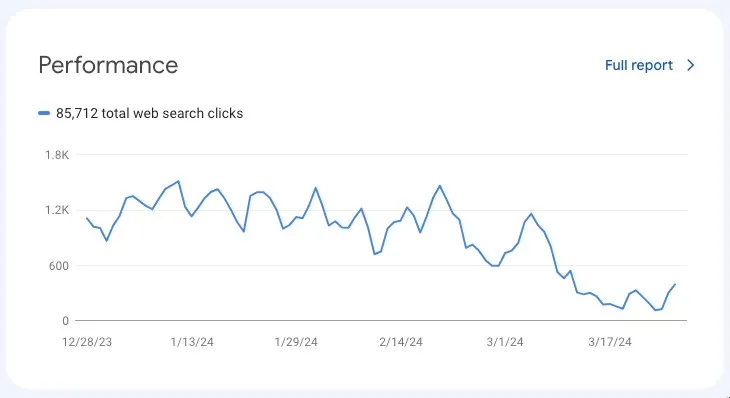
Why the filter fired at Googlebot on his sites, when as far as he could tell it does not on most SiteGround sites, he never established. His theory was that it happens when a SiteGround site also sits behind Cloudflare, or runs Ezoic ads, or both, and that the way those services route traffic trips SiteGround’s brute-force detection. SiteGround support thought it was Ezoic. He did not know which, and said so. A second site of his turned out to have the same problem.
The fix had to come from SiteGround. Its support team disabled the Anti-Bot AI on his hosting account; he then cleared the SiteGround and Ezoic caches and asked Google to recrawl the homepage and four other top pages, which came back indexed. The indexed-page count tells the rest: 270 pages on 27 December 2023, 227 on 27 January, 96 on 27 February and 62 on 27 March 2024, then, with the fix applied on 28 March, 296 pages the next day and 401 by 3 April. He does not know how long the site had been in that state before December, because Search Console only shows three months. One site lost most of its Google presence for about a quarter of a year, possibly longer, and he wrote that he would not sleep well knowing one manually disabled setting, if switched back on, would do it again. The same captcha page had also been making Google Analytics report organic visits as direct traffic, and disabling it fixed that too.
What tripped the filter on Vocational Media’s sites is Jon Payne’s best guess, and this week’s target is a published service address rather than Googlebot, but the same system made both decisions, and the customer still has no switch of their own for it.
How to Get the Block Lifted
This is not a mySites.guru issue to solve. This is a SiteGround issue, and only they can solve it.
The fix is a ticket to SiteGround support asking for both mySites.guru addresses to be exempted from the Anti-Bot AI on every site in your account. There is no self-service route: SiteGround’s Block Traffic tool in Site Tools can block IPs, ranges or countries, and has no allow option at all, so nothing you can do in Site Tools will stop the captcha. Use the Copy button and paste this into the ticket:
Subject: Please exempt two IPs from the Anti-Bot AI / SG-Captcha on all my sites
Hello,
I use mySites.guru, a third-party service I chose and installed, to manage and monitor my websites hosted with you. Since 21 October your Anti-Bot AI has been serving its SG-Captcha challenge (HTTP 202, sg-captcha: challenge) to the address mySites.guru connects from, so it cannot reach my sites.
The sites in this account are: [list every domain in this SiteGround account, one per line]
Please exempt these two IP addresses from the Anti-Bot AI / SG-Captcha on every site in my account, not only on one site, not only for one URL such as bfPing.php (mySites.guru uses many files in its connector folder), and not only by adding them to the Blocked Traffic list in Site Tools, which cannot allow anything:
178.62.5.35 (audits, backups, updates, snapshots, connection checks) 165.227.239.229 (uptime monitoring)
These are mySites.guru's fixed, published outgoing addresses and have not changed in over a decade. They are published in plain text here, so your firewall can read them from the list rather than per site: https://manage.mysites.guru/ips
mySites.guru's connectivity requirements for web hosts, including the addresses, user agents and connector paths, are here: https://manage.mysites.guru/info-for-webhosts
You can find the traffic in your logs by its User-Agent "mySites/6.0 (+https://mysites.guru/bot/)" and by the header "X-Questions: Please email phil@phil-taylor.com" on every request. Our requests are also signed with Web Bot Auth; the public key is at https://manage.mysites.guru/.well-known/http-message-signatures-directory
Background on this block, including what other SiteGround agents have said about it this week: https://mysites.guru/blog/siteground-blocking-mysites-guru-again/
Please confirm both addresses are exempt from the Anti-Bot AI itself on all sites in this account.
Thank you.
Ask for the addresses to be exempted, not a URL. An agent may offer to allow only the address in the log extract, usually bfPing.php, but that file is only the connection check; audits, backups and updates use other files in the same connector folder and would still get the captcha.
If you manage sites in more than one SiteGround account, send one ticket from each, because SiteGround will not act across accounts from a single ticket. List all the domains in that account in the ticket. How many tickets you then need depends on who answers: on 24 October a SiteGround agent told one of our customers that domains under the same hosting plan can go in one ticket and be whitelisted together in one pass, and on 25 October a Technical Support Supervisor told a customer to “open a separate support inquiry for each affected site”. Start with one ticket per account, and if an agent insists on one per site, send those too. Once applied, the exemption works. On 24 October SiteGround pasted its access logs for a customer’s site and both our addresses were getting HTTP 200, and on 25 October the supervisor confirmed both addresses “are whitelisted in the AntiBot CAPTCHA protection” for the site, so that “even if our system flags these IPs as suspicious in the future, their requests to this specific website will not be challenged.”
If an agent asks you to “confirm the security threats the website might be exposed to” before whitelisting, as one did this week, the answer is short. The only thing being exempted is two published addresses of a service you chose to connect to your own site, whose every request identifies itself and includes a contact email. Nothing else changes, and the Anti-Bot AI keeps judging every other visitor exactly as before.
SiteGround Could Fix This Once, for Everyone
None of this needs a ticket at all, because the thing SiteGround’s agent called impossible is a standard feature of other security products, and one of them already does it for us. Imunify360 keeps a global whitelist of known services as one plain-text file per service in a public directory at files.imunify360.com/static/whitelist/v2/. At the time of writing there are 131 of them, covering search engines, CDNs, payment gateways and uptime monitors: Cloudflare, Fastly, Google, Bing, Braintree, Adyen, Better Uptime and HetrixTools among them. mySites.guru has its own file, mysitesguru.txt. Its first line is # https://manage.mysites.guru/ips, naming our published page as its source, and it was last regenerated at 14:09 UTC on 23 October 2026, the same day a SiteGround agent told a customer that whitelisting had to be done site by site. Imunify360 builds its trusted list from these files automatically and rebuilds it when the lists update, as its support team explained to one of our customers in October 2026.
Imunify360 is not alone. Fetching an allow list from a URL and refreshing it on a timer is a documented feature of firewalls and bot filters across the industry:
- pfSense
- Its URL Table aliases are firewall rules fed from a remote text file: "URL Table type aliases contain one or more URLs which return a plain text a list of entries, plus an update interval which indicates how frequently the firewall should re-fetch the URL contents."
- OPNsense
- Its URL Table alias is defined in its manual as "A table of IP addresses that are fetched on regular intervals."
- CSF firewall
- Its GLOBAL_ALLOW setting will "download a centralized copy of an IP ALLOW, DENY, or IGNORE list from a URL", and the default config suggests 3600 seconds, once an hour, for the LF_GLOBAL refresh interval.
- Cloudflare verified bots
- Cloudflare's anti-bot system recognises a legitimate service from the service's own published list: "The bot owner can host a public list of IP ranges ... Cloudflare fetches and uses this list directly for validation."
- Wordfence
- The WordPress firewall allowlists known external services out of the box: "To avoid unintentional blocking of some external services such as Facebook, Wordfence allows these services." and "Some services are allowlisted by default." The list itself is sent to each site from Wordfence's servers, as the plugin source shows. Plugin authors get a hook for exactly our situation too: they can add their server addresses through a filter "if they have an external server, for example, that needs to communicate with their plugin. This prevents any unintended blocking that could prevent their plugin from operating normally."
- Microsoft Azure service tags
- A service tag stands in for a service's address ranges in a firewall rule, and "Microsoft manages the address prefixes encompassed by the service tag and automatically updates the service tag as addresses change."
- AWS WAF
- Amazon's own security blog "describes how to automatically update AWS WAF IP sets with the most recent AWS IP ranges for AWS services."
- Google Cloud Armor
- Its named IP lists allowed CDN providers by their published ranges: "Cloud Armor automatically synchronizes information from CDN providers on a daily basis." Google has since deprecated the feature, which makes it evidence that the pattern is established rather than a recommendation.
The pattern has two sides, and the services being allowlisted hold up their end. They publish their addresses for exactly this purpose, and most of them say so in the same breath:
- Google crawlers
- Google publishes Googlebot's ranges as JSON so that "you can identify Googlebot by IP address by matching the crawler's IP address to the lists of Google crawlers' and fetchers' IP ranges".
- Bing
- Bingbot's address ranges, published as JSON at a fixed URL.
- Stripe
- Stripe publishes the addresses its webhooks come from and notes that "these IP lists are available in other formats for import into iptables or similar tools".
- GitHub
- GitHub documents its addresses for firewall rules: "You can retrieve a list of the IP addresses for your GitHub environment from the meta API endpoint."
- UptimeRobot
- An uptime monitor, like ours, that invites you to "Download all IPs for allow-listing in .txt , JSON or directly from DNS".
- Pingdom
- Publishes its probe servers as a feed and says why: "You can use the IP numbers to open up for them in your firewall."
- mySites.guru
- Our two addresses in plain text, at the same URL, unchanged in over a decade.
Both sides already exist for mySites.guru: the list is published, and at least one security suite reads it. A single entry in SiteGround’s Anti-Bot AI, read from manage.mysites.guru/ips, would end this for every SiteGround customer who uses mySites.guru, with no tickets and no customer asked to confirm security threats they are not creating. Per-site, per-account allowlisting is a limit SiteGround has chosen.
We are not the only service on the wrong side of that choice. Other management and monitoring platforms have been hit by the same 202 captcha and told the same thing: ask SiteGround to whitelist your IP. Each of them connects from a known address, and their customers end up writing the same ticket, one site at a time, to lift a block that a published list would have prevented. SiteGround built the Anti-Bot AI to protect its customers from bots. Right now it stands between those customers and the services they chose to protect their sites with, and only SiteGround can change that.
SiteGround Knows Exactly Who We Are
This is not a dispute between strangers. In June 2012, in mySites.guru’s first year, SiteGround’s affiliate team asked me to recommend their hosting. I told them a lot of SiteGround customers were already coming to us to fix hacked Joomla sites on their servers, and the next morning SiteGround’s then CTO wrote to me, asking for more detail about the sites we were seeing and to exchange ideas. SiteGround then became a paying mySites.guru subscriber itself, through its own company accounts, for more than six years:
SiteGround as a paying mySites.guru subscriber
In those early years SiteGround’s founders were among the people we worked with to make our audits run well on mass-market shared hosting, which is a large part of why mySites.guru behaves the way it does on shared servers today.
The captcha is not new either. In July 2025 SiteGround’s support told us the challenge was down to email sent from customers’ sites, then confirmed after several days of monitoring that our IP “has not entered our WAF a single time”. It came back in July 2026, which is the earlier post, and again on 21 October. Each time it is the same address, the same service, and a host that has known both for over a decade.
Where This Leaves Us
The block is a SiteGround decision, made by SiteGround’s Anti-Bot AI on SiteGround’s servers, and only SiteGround can reverse it. mySites.guru has run out of things to change at our end. We connect from two fixed addresses that have not moved in over a decade and publish them in plain text at manage.mysites.guru/ips. Our requests name the service in their User-Agent and include a contact email in their headers, connector requests are signed with Web Bot Auth, and we run one audit per server at a time. Imunify360 already reads that published list and allowlists us globally. Over the years we have also tried to arrange a standing allowlist with SiteGround directly, without success.
mySites.guru protects more than 90,000 sites and makes well over a million connections to them a day, all from those two published addresses, all on behalf of site owners who connected their own sites. That is the record of a well-behaved automated service, the kind a bot filter should recognise from a published list rather than challenge. Until SiteGround makes that change, the only route is the ticket above, sent one account at a time, by customers who did nothing wrong, to unblock a service that did nothing wrong either.
Update, 24 October: We Solved the Captcha Ourselves
One of the answers SiteGround’s support gave customers this week was that mySites.guru should solve the captcha. So we did. Working through SiteGround’s challenge script with Claude, Anthropic’s AI model, we reverse engineered the proof-of-work behind the captcha page and built a solver into mySites.guru.

The challenge is simpler than the robot on the page suggests. A challenged request gets HTTP 202 and a page that refreshes to /.well-known/sgcaptcha/. That page gives the browser a challenge string and a difficulty, currently 21 bits. Eight background workers in the browser append a counter to the string and hash it with SHA-1 until the first 21 bits of the hash are zero, which takes about two million attempts on average. The browser sends the winning string back and receives an _I_ cookie, valid for 30 days across the whole domain and tied to the IP address that did the work.
mySites.guru now does the same work on its own servers, in PHP, in about a second, then keeps that cookie and sends it with every request to the site until it expires. We proved it end to end today from our production network, on a SiteGround site that had been showing as disconnected all week. It reaches every connection with our next release, and from then on audits, backups and updates on SiteGround-hosted sites reconnect without a support ticket.
Each site’s challenge is solved once, with only a handful of solves running at any moment across all of our servers, so the work cannot pile up on SiteGround’s machines or ours. If SiteGround makes the puzzle harder or changes it, our connections fall back to the same error you see today, and we can switch the solver off in seconds.
What we asked of SiteGround above still stands. A captcha that answers with noindex is a risk to your search rankings whoever it challenges, and a host that has known our address for over a decade should not need a puzzle to recognise it. The ticket is no longer needed to reconnect your sites, but it is still how you get our two addresses exempted for good.
Update, 25 October: Now It’s the Test Email
On 25 October a SiteGround Technical Support Supervisor gave one of our customers a fourth explanation this week. On 23 October the IP was “restricted … due to suspicious requests submitted to other websites”. On 24 October another agent was “not seeing these requests in our logs”. The supervisor’s version: “The IP address 178.62.5.35 was previously blocked there because it triggered emails from more than 15 different websites in a very short time. This activity pattern resembled contact form abuse, which triggered the protective block.” Which websites, the supervisor could not say, “as they are not managed by you”.
We can make a good guess at which emails those were, because they come to us. At the start of every audit, the site being audited sends one short test message, through its own mail settings, to our address AuditMailerTest@myjoomla.io, so the audit can report whether the site can send email at all. We wrote about that test in 2022. It is one email per site per audit, addressed to us and no one else. No contact form is involved, and audits run one at a time per server. A customer with 15 or so sites on SiteGround whose audits run across one evening produces 15 or so of these emails, one from each site, which matches the pattern the supervisor described. SiteGround also gave this explanation in July 2025, when it blamed “the intense usage of source=phpmail” and then, after several days of monitoring, confirmed our IP “has not entered our WAF a single time”.
If this is what tripped the block, then by SiteGround’s own definition ordinary behaviour gets you banned. Someone who buys from a few shops hosted at SiteGround in one evening gets an order confirmation from each one: emails from many sites, triggered by one IP, in a short time. An agency owner who logs in to several of their own sites, each running the Akeeba Admin Tools Joomla extension, gets a login alert from every one of them, all triggered from the same home IP, and that is now the address on the block list. Websites send emails when requests arrive. That is what they are for.
We have changed our product anyway. mySites.guru no longer asks sites on SiteGround servers to send the test email at all (the Email Configuration result was already hidden for SiteGround sites). We should not have to, because the email goes to us, from a site its owner connected. But of this week’s four explanations it is the only one with anything of ours to remove, so we have removed it.
The same reply ended with a request that contradicts the day before. On 24 October an agent said all the domains under one hosting plan could go in one ticket and be whitelisted together. On 25 October the supervisor wrote: “If you experience this issue on any of the other websites you manage, please open a separate support inquiry for each affected site, and we will whitelist the IPs there as well.” Both answers came from SiteGround about the same address within a day of each other, and the customer is left to guess which process is the real one.
Timeline
SiteGround's CTO asks for our view
A day after SiteGround's affiliate team asked us to recommend its hosting, and we replied that many of the hacked Joomla sites we fixed were on SiteGround servers, its then CTO wrote asking for "more detailed feedback about the clients you get from our servers".
SiteGround becomes a paying subscriber
First payment from SiteGround's own company account. Payments continue in every year until 2019.
SiteGround's last subscription payment
More than six years as a paying mySites.guru customer.
Ultrafast PHP and caching break a site
We traced a customer's fault to SiteGround's caching layers and its own build of PHP, and advised switching back to standard PHP.
"Too many open files" under Ultrafast PHP
Several sites failed with this error until they were moved back to standard PHP.
No MySQL 8 for Joomla 5
A SiteGround server still ran MySQL 5.7 when Joomla 5 required MySQL 8.0.13, with no date for an upgrade.
HTTP 202 instead of 200
SiteGround answered uptime checks with 202 Accepted instead of the page, which a monitor cannot treat as up.
Expired certificate in a SiteGround chain
A SiteGround staging domain served a certificate chain that included an expired certificate.
SG Security blocks the connector
Its directory hardening .htaccess blocks PHP inside the plugins folder. A one-file exception was not enough, because the whole connector folder must be reachable.
SG Security and Ultrafast PHP again
The same hardening rules blocked an agency's sites; we removed them and reset our proxy's DNS cache. The file came back on other sites in November 2024 and March 2025.
Captcha wave
Our worker IP started getting redirected to /.well-known/sgcaptcha/, and customers' uptime logs filled with false outages.
Two reasons in one reply
SiteGround said our IPs "were blocked due to multiple failed login attempts across different servers", that the captcha targets "IPs sending emails via PHP forms", and that "we do not currently offer an IP whitelist feature."
We change our product for SiteGround
For SiteGround-hosted sites we hid the email test result from audits and stopped checking the admin login pages, to remove anything SiteGround had objected to.
Escalated to DevOps
After the captcha returned on 4 July, SiteGround said it had "escalated the issue to our DevOps team."
"Has not entered our WAF a single time"
SiteGround blamed the challenge on "the intense usage of source=phpmail" and promised "no challenge will be imposed on the static IP address you use."
Blamed for emails sent by sites
SiteGround said our uptime IP "triggered multiple PHP mail script executions". The emails were sent by the sites themselves, triggered by any request at all, including a visitor loading the home page.
Uptime IP blocked "multiple times"
A customer was told the captcha now runs on every site and cannot be disabled, and that our uptime IP had been blocked "multiple times".
Sites disconnected overnight
Customers' SiteGround sites returned the sgcaptcha redirect, naming our IP, to every connection.
Audits blamed for server load
An agency was told our audits overloaded a shared server. We run one audit per server at a time.
We stop 202s causing false alerts
We changed the uptime monitor so SiteGround's 202 responses stopped sending customers false downtime alerts. The final change went live on 20 January 2026.
"More than 30 requests for 3 seconds"
Customers were told SiteGround cannot whitelist our IPs, and another that our addresses made "more than 30 requests for 3 seconds" and we should "set up a larger interval".
Captcha wave, and our first post
Agencies lost every SiteGround connection overnight. We published SiteGround's Captcha Is Blocking mySites.guru - again with a ticket template.
"Flooding the server"
SiteGround told a customer our monitoring was flooding a server. SiteGround's own log line showed our check waiting 44.985 seconds for one HEAD request on a server that was already failing.
An AI assistant blames our connector
SiteGround's assistant told a customer the fault was "an outdated or mismatched mySites.guru/Akeeba connection". The error it was looking at was the sgcaptcha redirect.
Captcha wave returns
Our worker IP is challenged on SiteGround servers across every platform. By Saturday morning 79% of our audits of SiteGround sites get the captcha.
Outage blamed on us, publicly
A shared server failed and SiteGround told the customer our monitoring was "flooding the server"; the claim went to Reddit, and we answered there.
Contradictory answers
One agent: our IP "is currently restricted within our firewall due to suspicious requests submitted to other websites", whitelisting per site only. The next day, another: "I am not seeing these requests in our logs".
We solve the captcha ourselves
We reverse engineered the SHA-1 proof-of-work behind SiteGround's captcha and passed it from our production network in about a second. mySites.guru keeps the 30-day pass it earns and sends it with every connection to that site.
Blamed for emails sent by sites, again
A SiteGround supervisor said our IP "triggered emails from more than 15 different websites in a very short time", resembling "contact form abuse", and asked for "a separate support inquiry for each affected site", the day after another agent said one ticket covers a whole hosting plan.
Test email switched off for SiteGround
From our next release mySites.guru no longer asks sites on SiteGround servers to send the audit test email, the only email an audit causes, which goes to our own address.
Further Reading
- SiteGround: I am seeing a CAPTCHA page on my website - SiteGround's own explainer: the captcha exists to tell human visitors from bots
- SiteGround: New Anti-Bot AI - the 2017 launch post, where staff state Googlebot will never be challenged and that there is no opt-out
- Google: Block Search indexing with noindex - what Google does when it finds a noindex tag or X-Robots-Tag header
- Vocational Media: the phantom noindex tag from SiteGround's captcha - a first-hand account of a site losing most of its indexed pages to the captcha
- Google: Verifying Googlebot and other Google crawlers - the published IP ranges hosts can match against automatically
- Cloudflare: IP validation for verified bots - how one anti-bot system fetches a bot owner's published IP list and uses it directly
Frequently Asked Questions
Why does mySites.guru show my SiteGround site as disconnected when it loads fine in my browser?
Which IP addresses does mySites.guru connect from?
Is mySites.guru sending suspicious traffic to SiteGround?
Can the SiteGround captcha affect my Google ranking?
Can I allow the mySites.guru IPs myself in SiteGround Site Tools?
Do I need a separate SiteGround ticket for each site?
 Written and edited by a human, with AI assistance. Our approach to AI