Import Sites From DirectAdmin Into mySites.guru
Until now, getting the sites on a DirectAdmin server into mySites.guru meant the connector zip and the connect wizard, site by site. You can now import sites from DirectAdmin instead, in Beta. Paste one DirectAdmin login key, limited to the commands mySites.guru needs and locked to one IP address, and mySites.guru finds every Joomla and WordPress site on the server.
Tick the sites you want, press Connect, and the connector is installed for you. If your sites are on cPanel, the WHM and cPanel import is the same flow with an API token. The short film below plays both routes: one token or key for a whole server, and one admin login for a single site.
Transcript
Forty client sites. Forty plugin uploads. Download the connector, sign in, upload it, activate it. Then the next site.
Now mySites.guru connects them for you, two ways. Sites on a cPanel or DirectAdmin server? Paste one API token. We find the Joomla and WordPress sites on it from their file and folder names. Tick the ones you want, press Connect, and we add them one at a time.
Just one site? Enter its admin login instead. We sign in, install the connector, connect the site and sign out. Your login is used once, then deleted.
One token or one login, and we do the rest. mySites.guru.
Import Every Joomla and WordPress Site on a DirectAdmin Server
The import starts on the Add Site page and takes seven steps, and you only leave mySites.guru for one of them.
Open Add Site and look under Other for the strip that reads "Sites on a cPanel or DirectAdmin server?", then press Import sites.
When mySites.guru can already tell that most of your sites run on DirectAdmin, the strip says how many and its button reads Import from DirectAdmin.
In the Connect a server dialog, choose DirectAdmin as the Panel, then choose the Key type: Admin or reseller key, or User key.
Create the login key in DirectAdmin.
The dialog lists the steps and the commands to allow, so you do not have to remember them.
Paste the Server hostname, the DirectAdmin username and the Login key into the dialog, then press Connect.
Label and Key expires are optional.
Discover then looks through each domain on the server for Joomla and WordPress sites.
Tick the sites you want to add.
Press Connect.
Up to 50 sites per Connect.
Discover recognises a site by two file patterns. A configuration.php next to an administrator/ folder is a Joomla site, and a wp-config.php next to a wp-includes/ folder is a WordPress site. It looks in each domain’s public_html folder, which on DirectAdmin is /home/<user>/domains/<domain>/public_html. It checks only that the files exist and never opens them, so the database password in each one stays on the server.
How the Connector Gets Installed Without a Download
Connect installs the connector through DirectAdmin’s own file manager, using the filemanager and filemanager-actions commands on your key. The connector is uploaded and unpacked on the server, and nothing is downloaded to your machine.
Every call comes from the mySites.guru worker at 178.62.5.35, never from your browser or our web servers. It makes one call at a time per server, however many of your sites that server hosts. If a server answers that it is too busy, mySites.guru leaves it alone for 10 minutes.
Choosing an Admin, Reseller or User Key
Create the key that matches what you look after. An admin key covers every user on the server, a reseller key covers only that reseller’s users, and a user key covers one account and nothing about the server it sits on.
| Key | What it covers | Server load and services |
|---|---|---|
| Admin key | Every user on the server | Shown |
| Reseller key | Only that reseller's users | Shown |
| User key | One account only | Not shown |
An admin or reseller key acts for each user through DirectAdmin’s login-as. You can also connect both kinds for the same account, and mySites.guru then uses the user key for that account and the other key for the server.
DirectAdmin does not have to be on its usual port. mySites.guru connects on the port in the address you paste into Server hostname, for example https://server.example.com:2222, and uses 2222 unless you give another. Any port from 1024 to 65535 is accepted, apart from the common database and cache ports (3306, 5432, 6379, 11211, 9200 and 27017). cPanel is the opposite: fixed to 2087 for WHM and 2083 for cPanel.
Creating the DirectAdmin Login Key
You create the login key in DirectAdmin itself, limited to the commands you allow and the IP addresses you allow. DirectAdmin documents it under Creating a Login Key, and the Connect a server dialog shows these eight steps for an admin or reseller key while you work through them.
Sign in to DirectAdmin as the admin, or as the reseller whose users mySites.guru should see.
Open User Level > Login Keys and create a key.
Name it
mysites-guru.Under the commands to allow, pick only the twelve commands below.
Never leave the list empty: an empty list allows every command, and mySites.guru rejects that key.
Under the allowed IP addresses enter
178.62.5.35/32, the only address mySites.guru calls from.Turn off logging in with the key, so it works for the API only.
Pick an expiry date if you want one, then save.
Copy the key and paste it into the dialog.
DirectAdmin shows the key once.
A user key has the same steps, signed in as the user.
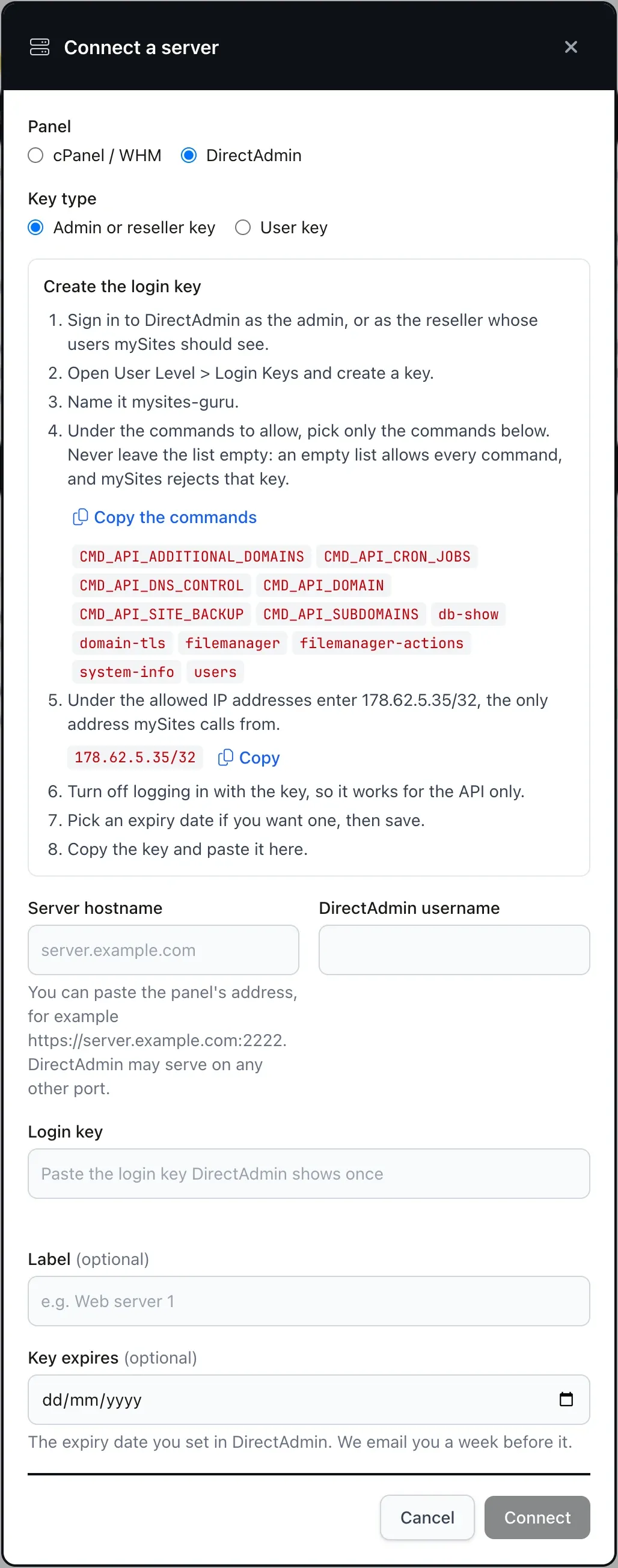
The Copy the commands button in the dialog copies all twelve, one per line. Each command is on the list because a feature needs it, and the table shows which, so you can leave out the commands for a feature you do not want.
| Feature | Commands it needs |
|---|---|
| List users, domains and disk use | users |
| DirectAdmin version, server load, services | system-info |
| PHP per domain | CMD_API_ADDITIONAL_DOMAINS |
| SSL certificates | domain-tls |
| SPF and DKIM | CMD_API_DNS_CONTROL |
| Cron jobs | CMD_API_CRON_JOBS |
| Databases | db-show |
| Discover and connect sites | CMD_API_SUBDOMAINS, filemanager, filemanager-actions |
| Switch PHP | CMD_API_DOMAIN, CMD_API_ADDITIONAL_DOMAINS |
| Run Let's Encrypt | domain-tls |
| Backups | CMD_API_SITE_BACKUP, filemanager, filemanager-actions |
DirectAdmin allows a whole command or none of it
A command covers every action inside it. A key that may use domain-tls to read certificates may also run Let’s Encrypt, and a key that may use filemanager-actions to install the connector may also delete files. Allow a command only for the features you want.
Let mySites.guru Past the Brute Force Monitor
Ask your host to whitelist 178.62.5.35 in DirectAdmin’s brute force monitor before you connect. DirectAdmin blocks an address after repeated failed logins on its panel port, and a block on our worker would stop every mySites.guru customer on that server, not only you. On a server you run yourself, add the address as root to /usr/local/directadmin/data/admin/ip_whitelist, one address per line. An address in that file is never blocked by the brute force monitor.
mySites.guru asks for this even though it stops at the first rejected login. If the server rejects the key, because it was deleted, it expired or its IP list changed, the connection is marked stopped and no more calls are made until you press Test. The brute force monitor sees one failed login, not a string of them, and you get one email.
The same rule covers login-as. If an admin or reseller key acts for a user and DirectAdmin says no, mySites.guru stops acting for users on that connection until you press Test.
Is It Safe to Give mySites.guru a DirectAdmin Login Key?
Yes, when the key is limited to the twelve commands and to our one IP address. The login key is encrypted with Halite (libsodium) before it is stored in the database, and the key that decrypts it is a file on our application servers, which are separate physical machines from the database server. A copy of the database alone cannot decrypt it. Only the last four characters are ever shown, and the full key never appears on a page, in an API reply or in an email.
Nobody should hand an outside company the admin password to a server, even though it is the quick answer, and DirectAdmin has a better one built in. Its own API Access documentation recommends a login key over the main password, because a key can be limited to actions or IPs. A key limited to named commands and one address is the right way to give any outside service access, and mySites.guru is built to work inside that limit.
So mySites.guru rejects a key that allows every command, whether that is an empty command list or one of the “all” options. It never calls CMD_API_SSL, because that command returns the certificate’s private key, and reads certificates through domain-tls instead. It also never does any of these.
- It does not open a DirectAdmin session for you, because it makes API calls only and never a browser login.
- It does not read the contents of your configuration files or send them anywhere.
- It does not make or change login keys on your server.
- It does not change anything you did not ask for, so every change comes from a button you press or a setting you turned on.
Set the allowed IP address yourself
An admin key can act as any user on the server. With these commands, a stolen one could read and change the files and databases of every site on the server and plant a backdoor in all of them. The allowed IP addresses limit that: set to 178.62.5.35, the key works only from our worker. mySites.guru cannot set this for you and does not check it, so set it when you create the key.
To take the access away, delete the key under Login Keys in DirectAdmin. The next call is rejected, the connection stops, and you are told. The DirectAdmin Learn More page, linked from the Add Site strip as “What can the login key do?”, has the same detail inside the app.
Is It Safe to Connect My Clients' Sites to mySites.guru?Read the full post
What Else the DirectAdmin Connection Does
Importing sites is the first job, and the key keeps working afterwards. The hub for it is Hosting Panels, which is labelled “Beta testing only”.
- Each server shows its DirectAdmin version, load and services, the accounts on it and which of your sites live in each one.
- Every account shows its disk use, PHP, SSL, databases, cron jobs and mail authentication (SPF and DKIM).
- You can switch a site's PHP version, with Undo if the new one does not suit the site.
- Let's Encrypt can be run for a domain, as a dry run first and at most once per domain per hour.
- A backup can be taken before a core update.
- If you entered the key's expiry date, mySites.guru emails you a week before it.
If you are switching PHP and are not sure where to go, the supported PHP versions post covers which branches are still worth choosing.
NGINX caching, php.ini and ModSecurity are cPanel only, because DirectAdmin has no API for them. The cPanel post covers those.
Quick Add Sites to mySites.guru From WHM/cPanelRead the full post
What Will Discover Not Find on DirectAdmin?
Discover finds Joomla and WordPress sites in each domain’s public_html, and nothing else. Sites under private_html are not searched. A Generic PHP app on the same server is not discovered either, so for one of those you still use the connector zip.
Then there are the sites on a host with no panel you control, where you cannot create a login key at all. The Add Site page has a second shortcut for those, “Auto connection using your credentials”: enter the site’s admin login once and mySites.guru installs the connector itself. The cPanel post explains it under Connect a Joomla or WordPress Site With Just Its Admin Login.
That leaves the connector zip as the fallback. A host who wants to know what those calls look like from their side can read the information for web hosts.
Further Reading
- Securing DirectAdmin: Creating a Login Key - DirectAdmin's own documentation for creating a login key and limiting what it can do.
- DirectAdmin API Access - DirectAdmin's developer documentation, which recommends a login key over the main password.
- Is It Safe to Connect Client Sites to mySites.guru? - what the connector can and cannot do once it is on a site, and how the keys work.
- Quick Add Sites to mySites.guru From WHM/cPanel - the same import for a WHM server or cPanel account, with an API token.
Frequently Asked Questions
Do I still need the connector zip for a site on DirectAdmin?
Which commands does the DirectAdmin login key need?
Can I use a reseller or user key instead of an admin key?
What happens if the login key stops working?
Can mySites.guru read my database passwords through DirectAdmin?
 Written and edited by a human, with AI assistance. Our approach to AI