Crashed Tables, Stuck Locks: Joomla and WordPress Database Checks
mySites.guru already checked the database prefix, leftover backup tables and the database user. It now runs ten more database checks on top of those, on every connected Joomla and WordPress site as part of its snapshot, twice a day and on demand. Most of the problems they find can be fixed from mySites.guru without opening phpMyAdmin at all.
Ten Checks, Split by Where the Problem Lives
Five of the checks look at the tables themselves, so they run on Joomla and WordPress alike. The other five read Joomla’s own content records, so they are Joomla only.
The tables themselves (Joomla and WordPress)
- Tables not using InnoDB: convert them
- Tables not using utf8mb4: convert with a backup, then accept or roll back
- Crashed tables: repair them
- Tables from another install in the same database: listed by prefix
- Database size and the ten largest tables: for information
Joomla's content records (Joomla only)
- Items left checked out: check them in
- Menu items for uninstalled components: move them to the trash
- Articles in a missing category: edit them in Joomla
- Orphaned asset rows: listed for you to judge
- Items in the trash: delete some or empty it
Each check has its own page in the Database Integrity group, with the fix on the same page as the finding.
The Storage Layer Under Joomla and WordPress
I still see Joomla sites, upgraded on every release for a decade, with every core table on MyISAM. Joomla 6.1’s install SQL creates every core table as InnoDB utf8mb4, but Joomla’s update never converts the engine of an existing table, so a site first installed on MyISAM keeps its MyISAM tables through every upgrade. WordPress is no better off, just differently so: its table definitions set no engine at all, so its tables get whatever the server’s default engine was when they were created.
InnoDB has been MySQL’s default engine since MySQL 5.5. It has commit, rollback and crash recovery, and it locks rows rather than whole tables. There is no good reason for a site in 2026 to be running on anything else, and Tables Not Using InnoDB lists every MyISAM and Aria table the site has.
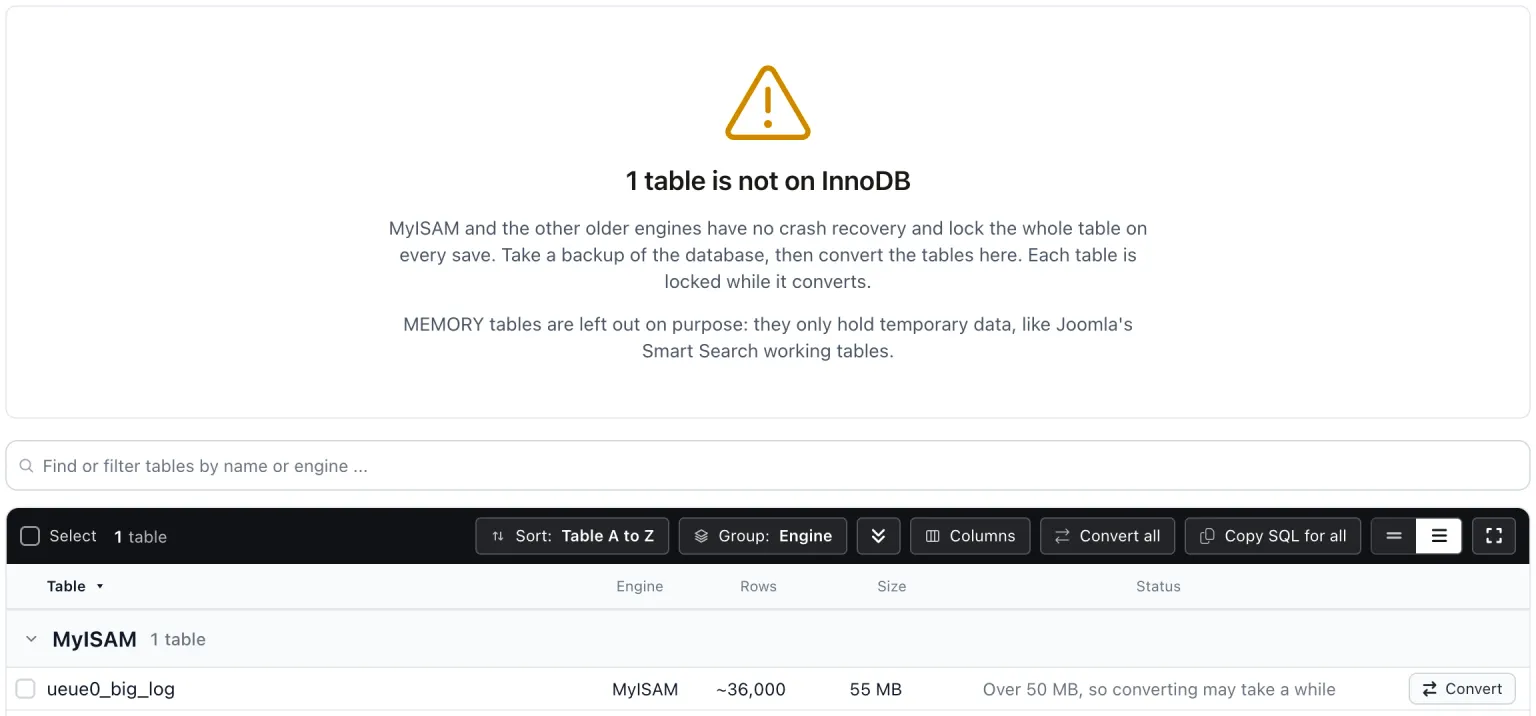
Convert runs ALTER TABLE ... ENGINE=InnoDB, one table per request. Convert one, a selection, or Convert all. There is no size cap, but a large table gets a note that converting may take a while and that the table stays locked until MySQL finishes. If the request times out the row says “Still converting on the server” and a fresh snapshot runs ten minutes later so the count catches up. The connector on the site picks the tables, not the app: it re-reads the table list for every write and acts only on the site’s own tables that the check would report.
The utf8mb4 conversion comes with a review step
The old MySQL “utf8” is utf8mb3. It stores at most 3 bytes per character and cannot store emoji; utf8mb4 stores 4. MySQL has deprecated utf8mb3 and says to expect its removal in a future major release. WordPress moved its tables to utf8mb4 in version 4.2, back in 2015, though it still turns emoji into HTML entities when a column is not utf8mb4. Joomla 3.5 added utf8mb4 support and converted core tables, but fell back to utf8 on servers without utf8mb4 support, which is how some old Joomla sites ended up where they are today.
Tables Not Using utf8mb4 is the check, and its conversion takes more steps than the InnoDB one. A value stored in the wrong encoding comes out mangled after conversion, and you want to see that before you keep it. So Convert first copies the table to a backup table on the site and compares row counts, then converts the table to utf8mb4. The row then reads “Awaiting your review”.

Review shows up to 20 rows with non-ASCII text, before and after side by side, with changes marked. If “Our café menu” has become “Our café menu”, you can see it. Accept deletes the backup copy. Roll back swaps the original back in one step. When several tables are waiting, Accept all and Roll back all are there too. If you are wondering what the collation names mean, the MariaDB versus MySQL post covers them.
Crashed tables, and tables that are not yours
“Table ’…’ is marked as crashed and should be repaired” is the MySQL error, and MyISAM tables get there when the server process is killed in the middle of a write or shuts down unexpectedly. Crashed Database Tables lists them with the server’s own message for each one, and Repair runs REPAIR TABLE. A row leaves the list only once the site reports it repaired.
REPAIR TABLE works on MyISAM (and on MariaDB Aria) but not on InnoDB, which has its own crash recovery. That is one more reason to move everything to InnoDB. MySQL’s manual also says to back up a table before repairing it, because a repair can lose data.
Tables From Another Install In This Database lists tables whose prefix is not the site’s own. WordPress’s own docs say a table prefix lets several installs share one database, and recommend giving each install its own MySQL user. In practice a shared database usually means an old copy of the site, a staging install or a forgotten test install, and all of it is readable by the live site’s database user. This one has no action button: it tells you the other tables are there, and what to do with them is your call.
Database size and the ten largest tables
Database Size And Largest Tables is information only: the space used and the ten largest tables, with the usual reason each one grows. On Joomla that is normally the action log and session tables (Joomla 5 added scheduled tasks to prune them, which only run if someone creates them) and the Smart Search index. On WordPress it is every post revision, stored by default with no UI to delete them, and transients in the options table.
Joomla’s Content Records: Locks, Orphans and the Trash
The second group reads Joomla’s content tables for problems Joomla itself does not report. Joomla core offers Global Check-in, the database schema checker and those optional cleanup tasks. Nothing in it reports engine, charset, crashed tables, shared prefixes, orphaned menu items, missing categories or orphaned assets, and we have not seen a multi-site tool report this structural health for Joomla either.
Items left checked out
The checked-out flag is set when an item is opened for editing and cleared when the form is closed properly. It stays set if the editor uses the browser back button, closes the tab, or the session times out. Everyone who has run a Joomla site has had the “this article is checked out by someone else” moment, and the API plugin post has a real case of a checked-out plugin being skipped by a change for exactly that reason.
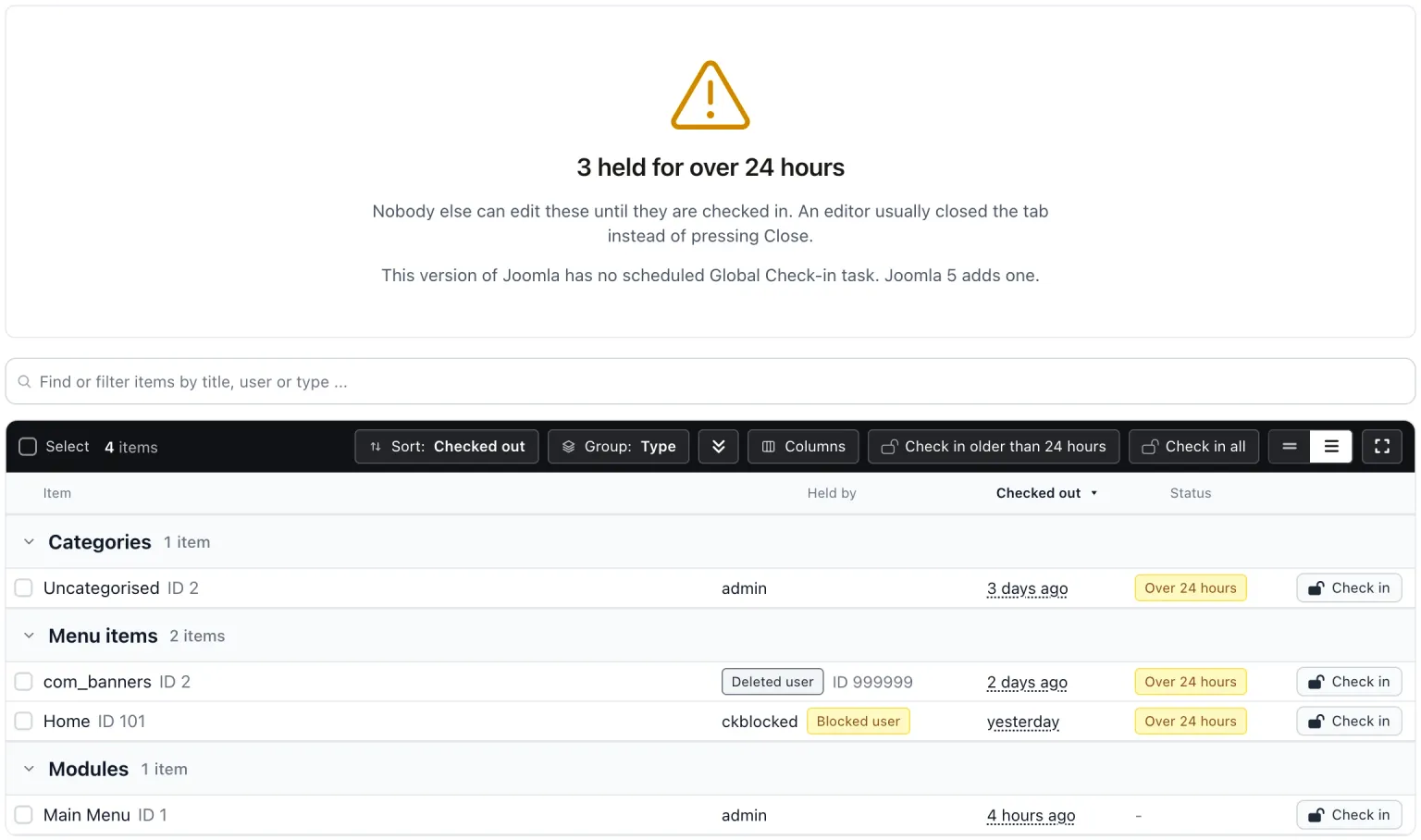
Items Left Checked Out groups them by type and shows who holds each item and for how long. Check in one, Check in older than 24 hours, or Check in all. Joomla’s own Global Check-in at System > Maintenance Panel > Global Check-in checks in everything, including items someone is editing right now, and it is one site at a time. Deleting a leaver with Reassign Content checks their items in as part of the move. Joomla 5.0 added a Global Check-in scheduled task that checks in items held longer than a set number of hours, but only if someone creates the task. On Joomla 5 and later, this check tells you when that task has not been set up.
Menu items, categories and assets that point at nothing
When a Joomla component is uninstalled its menu items stay, and visiting them gives a “404 Component not found” error. Menu Items For Uninstalled Components lists them and moves them to the Joomla trash rather than deleting them. It leaves the home menu item alone, and any item with live child items, and says why on that row.
An article whose category no longer exists shows an empty category path in the article list and a 404 on the front end. Joomla will not delete a category that still holds items, so this comes from direct database edits, restores or migrations rather than normal use. Articles In A Missing Category lists them with an Edit link that signs you into Joomla on that article’s edit screen, because the fix is a human decision about where the article belongs.
Joomla’s #__assets table is a nested set, with lft and rgt values, and deleting rows from it without rebuilding the tree damages the permissions structure, which the scheduled tasks backdoor post goes into. An orphaned asset row on its own does no harm. So Orphaned Asset Rows is a report: asset rows left by deleted content, and articles and categories with no asset row. There is no delete button on purpose.
Emptying the Joomla trash
Joomla’s trash (state -2) keeps items in the database until someone empties it, and Joomla never empties it on its own. Trashed items still hold their alias, which is why Joomla’s own message reads “Another article from this category has the same alias (remember it may be a trashed item)” when a client tries to reuse a URL from an article they deleted months ago.
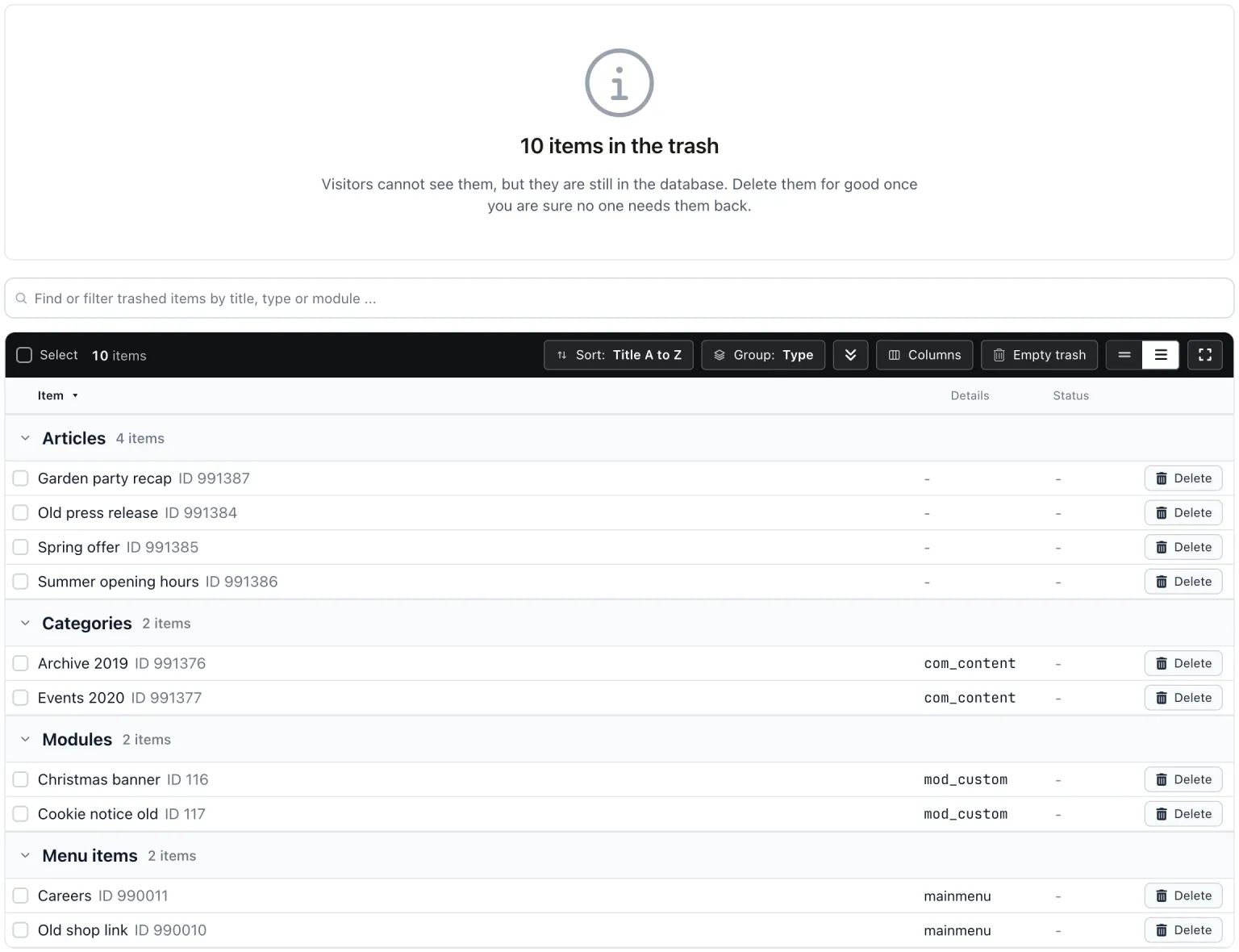
Items In The Trash lists the articles, categories, modules and menu items in the Joomla trash. Delete one, a selection, or Empty trash. Deletes go through Joomla’s own admin models, so Joomla cleans up the related rows itself. Joomla will not delete a category that still holds items or sub-categories, or a menu item with items under it, and its own error message appears on that row.
Checking and Fixing It by Hand
If you look after one site and want to do this yourself, the first two checks are a query against information_schema for the current database.
SELECT TABLE_NAME, ENGINE
FROM information_schema.TABLES
WHERE TABLE_SCHEMA = DATABASE()
  AND ENGINE <> 'InnoDB';

SELECT TABLE_NAME, TABLE_COLLATION
FROM information_schema.TABLES
WHERE TABLE_SCHEMA = DATABASE()
  AND TABLE_COLLATION NOT LIKE 'utf8mb4%';
Back up first. Then convert each table the queries return, using your own prefix in place of jos_:
ALTER TABLE `jos_example` ENGINE=InnoDB;

ALTER TABLE `jos_example`
  CONVERT TO CHARACTER SET utf8mb4
  COLLATE utf8mb4_unicode_ci;
For a table marked as crashed, check it and then repair it, remembering that this only applies to MyISAM and Aria:
CHECK TABLE `jos_example`;
REPAIR TABLE `jos_example`;
Every row on the InnoDB and utf8mb4 pages in mySites.guru has Copy SQL, so if you prefer to run the statement yourself in your own client you can take exactly what the connector would have run and do it by hand.
Back up before every one of these
A utf8mb4 conversion can mangle text stored in the wrong encoding, and MySQL’s manual says a repair can lose data. mySites.guru takes a backup copy before a utf8mb4 conversion for that reason. Do the same when you run it yourself.
Which of Your Sites Fail Each Check?
Each check has a Sites by Tool view in mySites.guru listing every site where it fails, so “which sites are still on MyISAM” is one page rather than a tour of phpMyAdmin logins. The counts are also returned on every snapshot in the mySites.guru API, so you can pull them into your own reporting.
The Rest of the Database Integrity Group
These ten join the older checks in the same group: the default jos_ prefix, leftover bak_ backup tables, a database user that is root, and a database user that can see other databases. The Joomla database security walkthrough covers those four in depth.
How to Check Your Joomla Database Security with mySites.guruRead the full post
See what is in your database
Connect a site and the snapshot runs these ten database checks on it, alongside everything else it looks at. Most of what it finds can be fixed from the same page.
Further Reading
- Introduction to InnoDB, MySQL 8.4 reference manual - MySQL's own description of its default engine: commit, rollback, crash recovery and row-level locking.
- The utf8mb3 character set, MySQL 8.4 reference manual - the deprecation notice for the old three-byte utf8, with removal expected in a future major release.
- REPAIR TABLE statement, MySQL 8.4 reference manual - which engines it works on, and the advice to back up a table before repairing it.
- Global Check-in, Joomla 5 help - Joomla's own one-site answer to locked items, and what it checks in.
- The utf8mb4 upgrade, WordPress core - how WordPress 4.2 moved its tables to utf8mb4 in 2015.
- How to Check Joomla Database Security - the walkthrough of the older Database Integrity checks: prefix, leftover backup tables, root user and database visibility.
Frequently Asked Questions
Why does my upgraded Joomla site still have MyISAM tables?
Is converting a table to utf8mb4 safe?
Can REPAIR TABLE fix an InnoDB table?
What are Joomla's checked-out items and why do they build up?
Do these checks run on WordPress sites too?
 Written and edited by a human, with AI assistance. Our approach to AI