How to Mass Reassign Joomla Content When Deleting Users
A freelance writer finishes their contract. An editor moves on. A contributor account from a project three years ago is still there. You want the account gone, not the sixty articles behind it, and in Joomla those are two different jobs that core has never joined up: delete the account and every article it wrote is left pointing at a user that no longer exists, with no setting to stop it.
mySites.guru has a tool to help with that. Delete the account through it and their articles, categories and anything else on the site they created, last edited or had checked out go to an account you choose, on one site or across every site you manage. It is one piece of Universal User Management, and the rest of that, WordPress included, comes after the Joomla detail.
What happens to a Joomla author’s articles when you delete them?
Nothing happens to them, which is the problem. Deleting a user in Joomla’s User Manager removes the user row and fires the user plugins, and nothing in that path touches a content table. The articles stay published as they were, and the behaviour is the same in Joomla 3.10, 4, 5 and 6.
What goes is the account itself: the user row, its group map, private messages, remember-me keys, and through plugins the sessions, MFA records, profile rows, privacy consents, WebAuthn credentials and custom-field values. Action log entries stay. Everything the user created stays too, with its creator column still holding the deleted id: articles, categories, contacts, banners, news feeds, tags, fields and user notes. Modules and menu items have no creator column, so they are unaffected either way.
In the administrator’s Articles list, an article whose author is gone shows [ None ] in the Author column, because the list left-joins the users table and prints the “none” string when there is no match. Joomla 5.4.0 added a ”- None -” option to the Author filter so you can at least find those orphaned articles after the fact. On 5.3 and earlier there is no filter for them at all.
Joomla has been asked for this since 2017
The reassign-on-delete request is older than most of the sites it affects, and core has turned down or parked every version of it.
"Deleting Users - Reassign content" is closed as not implemented.
"Change user before delete", a reassign step for Joomla 5.0, is closed without being merged.
"Batch - change authors for articles / categories" asks for a batch author change.
#45026 converted to a discussion
The feature request leaves the issue tracker, still unimplemented.
PR #48014 closed unmerged
It would have made the current user the author when saving an orphaned article.
Core has no batch “change author” either. The Articles Batch dialog offers language, access level, category (move or copy), tag and workflow stage, and that is still the list in 7.0-dev. The one supported route is the “Created By” field on an article’s Publishing tab, one article at a time, and it only appears for accounts that have user management permission on the site. If the account should stay, mySites.guru can now reassign their content without deleting the user, across every site at once.
Each of those tickets asks for a fix on one site. The case an agency actually hits is one writer with accounts on twelve client sites, each with a few dozen articles, and a per-site feature in core would still leave you doing it twelve times. Twelve sites times a few dozen articles through the Publishing tab is an afternoon, and the alternative is SQL. mySites.guru is the only tool that does all twelve at once.
The only tool that does this across all your Joomla sites at once
Joomla core cannot pass a deleted author’s content to someone else even on one site, and no other Joomla management tool does it across many. mySites.guru finds the writer on all your connected sites, whether you look after twelve or several thousand, and deletes those accounts in one batch. On each site their articles, categories and anything else they created or last edited move to the account you name, in the same database transaction as the delete. You search once and confirm once with your password, instead of spending an afternoon per site in the Publishing tab or running SQL on each one.
The manual route is SQL, per author, per site
If you are doing this by hand, the only practical option is to update the creator columns before the account goes:
UPDATE #__content SET created_by = 42 WHERE created_by = 117;
UPDATE #__categories SET created_user_id = 42 WHERE created_user_id = 117;
Here 117 is the departing author’s id and 42 is the account receiving the content. #__ is the site’s table prefix placeholder, which you replace with the real prefix on that site (jos_, or whatever the installer chose). Then you delete the user. Repeat for every author and every site, with the ids looked up fresh each time because they differ on every install. That pair of statements covers articles and categories only; to do the whole job by hand you would also have to find every other table on the site with a creator or editor column, extension tables included, which is exactly what the tool below does per site.
Run the SQL before the delete, not after
Once the account is gone you can no longer look up its id in the User Manager, and the orphaned rows hold nothing but that number. Take a backup first, note the id, move the content, then delete.
Hand their content to someone else as part of the delete
When you delete a Joomla user through mySites.guru, the connector looks through every table on that site, core and third-party extensions alike, found per site by column name, and moves the integer user-id columns created_by, modified_by, created_user_id and modified_user_id, plus Joomla’s UCM core_* equivalents, to a receiving account, inside the same database transaction as the delete. Either the whole thing happens or none of it does, and the site is never left with half its articles moved and the author still present.
Anything the account had checked out is checked in. A Joomla contact linked to the account has that link cleared, so the contact still displays. The “Created by alias” text is a text field, not a user id, so it is never touched, and action logs and version history keep their record of who did what.
The handover is keyed on who owns the content, not on what group the account is in. An Author, an Editor, a Publisher or a plain Registered account that happens to own articles all get the same treatment, which is why a freelance writer’s account is the typical case rather than an administrator’s.
By default the content goes to the site’s lowest-id unblocked Super User that is not itself being deleted. Or pick any active account on that site from the “Who gets their content” picker in the delete dialog, which on a Joomla site explains itself underneath: “Everything they created, last edited or had checked out moves to the account you pick. Joomla never deletes it.”
Open the site's page in mySites.guru and go to its User Manager tab.
Open the More actions menu on the account you are removing and choose Delete.
Choose who receives the content under "Who gets their content", or leave the default, the lowest-id Super User.
Any active account on that site can be the receiver.
Read the preview line, which tells you how many articles, categories and other items will move and to whom.
Retype your own mySites.guru password and confirm.
Every delete through mySites.guru requires it, however recently you logged in.
Joomla content is never deleted along with its author. WordPress has an option to delete the content instead; on Joomla, mySites.guru rejects it. A receiver is only needed when something the accounts created or last edited exists on the site; check-ins and contact links need none. If one is needed and no active Super User is left on the site to take it, mySites.guru stops the delete with a message saying so rather than orphaning the lot.
Can you see what will move before you confirm?
Yes, on a single site. The delete dialog in the per-site User Manager runs a dry run against the site and prints the result as one line, for example “14 articles, 2 categories and 9 other items move to admin.” or, on a smaller account, “2 articles and 1 other item move to admin.” The other items are whatever else on that site the account created, last edited or had checked out, counted across every table the connector found. Change the receiver and the line updates to name the new one. It writes nothing until you confirm.
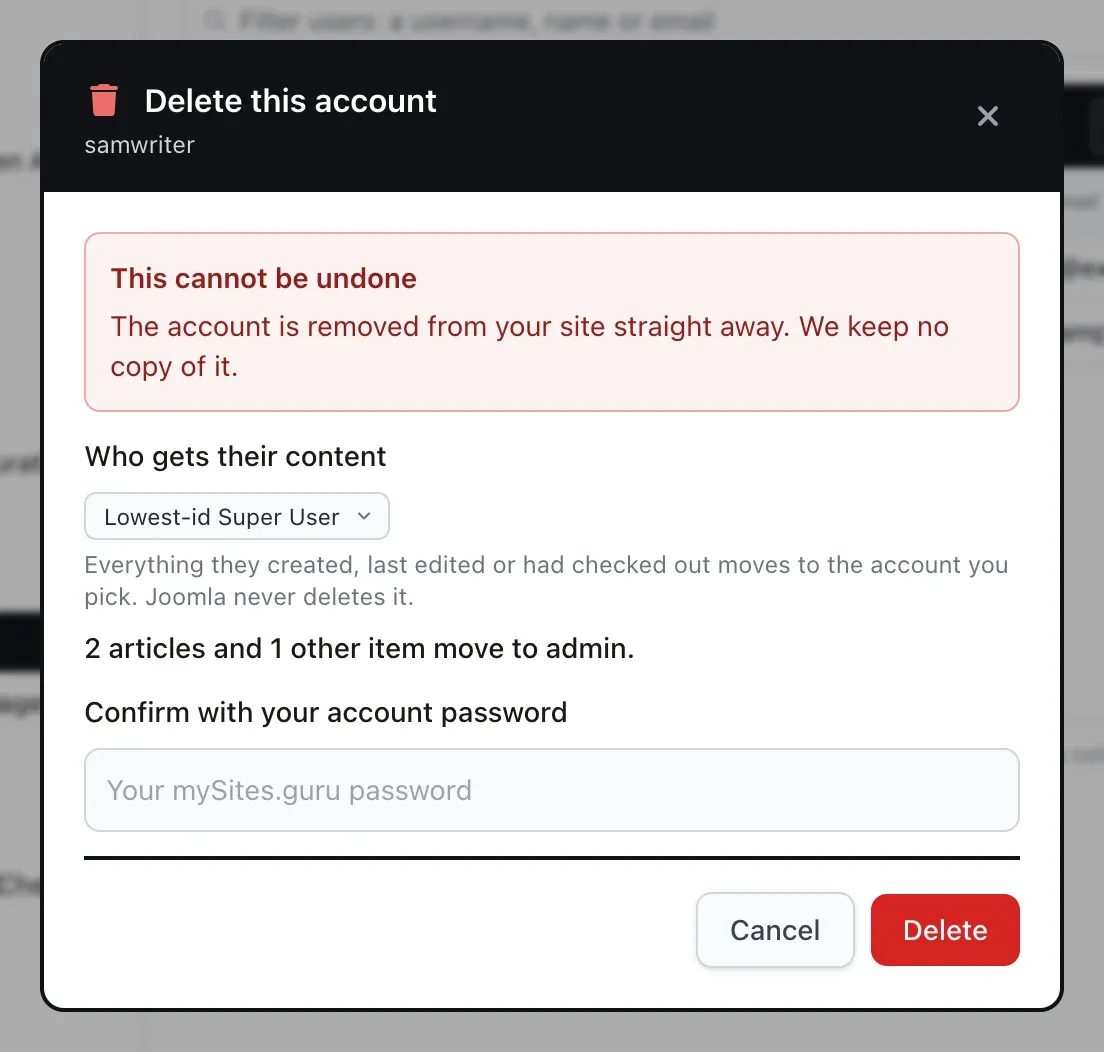
If nothing on the site belongs to the account, the line reads “Nothing on this site belongs to this account.” and no receiver is needed. The WordPress pane does the same with its own wording, “This account owns no posts or pages.”, and if you have chosen to delete the content there, it says the posts and pages are deleted with the account.
Deleting the same writer from every site at once
The single-site flow is for one account on one site. The agency case is one person on many sites, and that starts from the Universal User Management search: one box, matched against username, name and email on every connected Joomla and WordPress site, with results streaming in live from the sites because mySites.guru stores no user list of its own. Tick the accounts you want gone, across as many sites as they appear on, and press Delete.
The bulk dialog has one “Give their content to (username)” box. Type a username and it is looked up on each ticked site, with a row per site showing the match, so you can see that editor on one client’s site is the account you meant and not a stranger with the same login. WordPress rows can switch to deleting their content instead. Leave the box empty and each site applies its own default, which the dialog spells out underneath:
“If you pick no one, WordPress gives their posts and pages to its first remaining Administrator, and Joomla gives everything they created, last edited or had checked out to its lowest-id Super User. Content is only ever deleted on WordPress, and only if you choose that.”
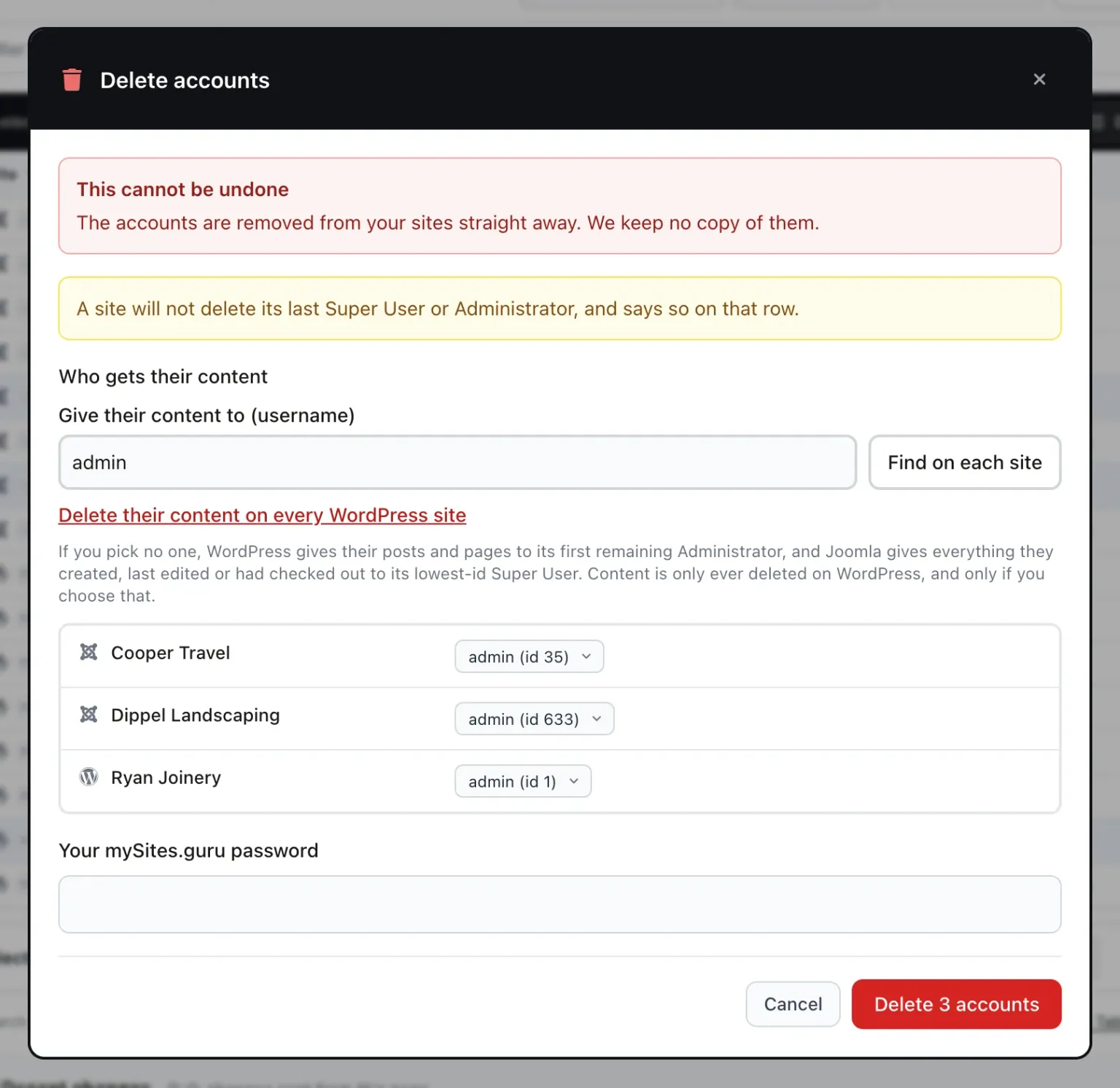
There is no dry-run line in bulk; the preview is a per-site feature. What moves on each Joomla site is the same as in the single-site delete, worked out by that site’s own connector from that site’s own tables.
| Joomla | WordPress | |
|---|---|---|
| What moves | Anything they created, last edited or had checked out | Posts of every type |
| Default receiver | Lowest-id active Super User | First remaining Administrator |
| Can content be deleted instead? | No | Yes, if you choose it |
| Preview on a single site | Yes | Yes |
| Preview in bulk | No | No |
Remove a writer from every site without losing a single article
Universal User Management finds the account on every connected Joomla and WordPress site and, when you delete it, gives everything they made to someone you choose. It is part of the mySites.guru subscription.
What else Universal User Management does
Deleting a writer is one end of a spectrum. Most of the time you want someone out without removing them, and the same search and bulk bar does that too. To keep the account and still hand over their articles, use Reassign Content, which also lets you choose which tables move. The full tour of the user manager goes through every control; this is the short version of what matters for people leaving.
Offboard, and undo it
The bulk bar on the search results offers Change details, Set password, Block, Unblock (Joomla), Set groups, Offboard and Delete. Offboard is one action: on Joomla you pick the group per site and the account is then blocked; on WordPress it removes every role.
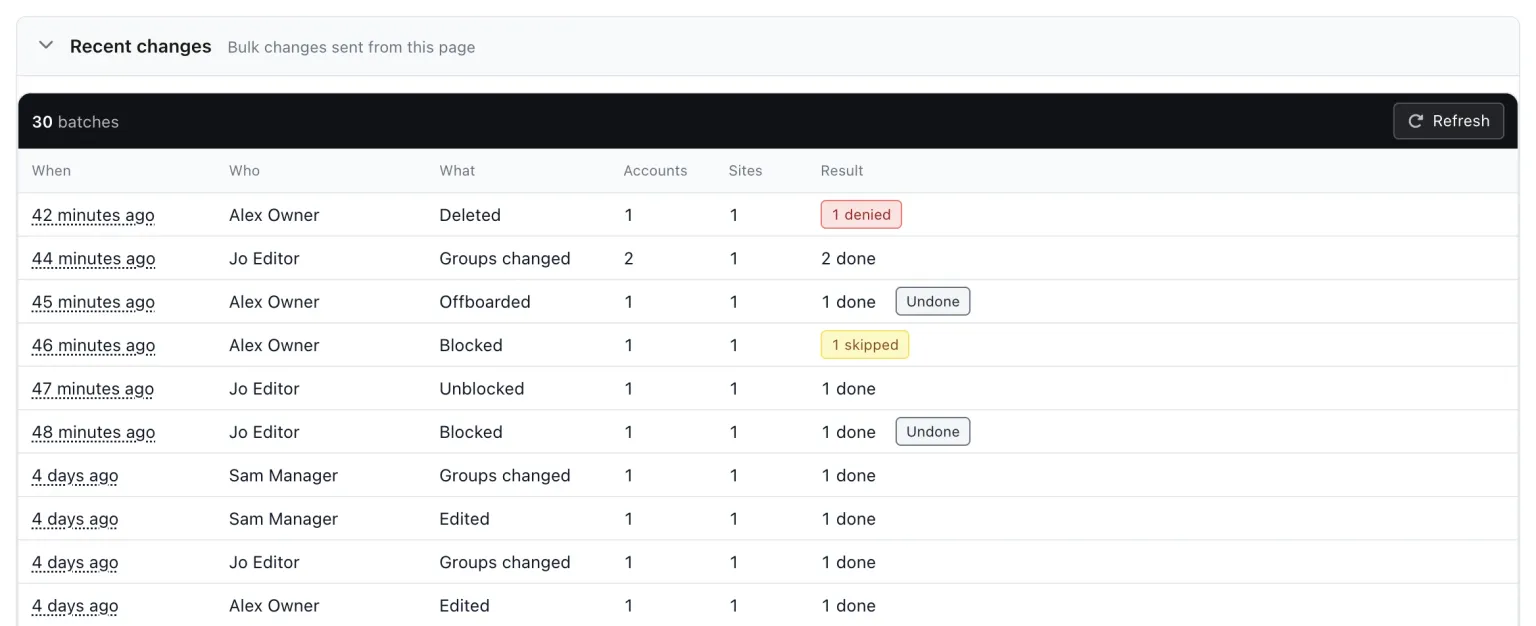
The result toast after a block, group change or offboard has an Undo button, and a “Recent changes” section on the Universal User Management page lists the last 30 batches, with when, who, what, the accounts, the sites and the result, each with Undo. Undo stays available for 30 days, puts back the previous groups and unblocks. It never overwrites an account someone has changed in the meantime; that row is skipped. Delete is not covered by Undo, which is the other reason the handover matters.
Changed since you looked
Before each write, every site rechecks the account against what you saw in the results: last login, blocked state, groups. If any of it has moved, nothing is written and the row says “Changed since you looked” with a Refresh. A client who promoted someone an hour ago does not get them demoted, with no warning, by a batch you built on stale data.
Set groups across sites
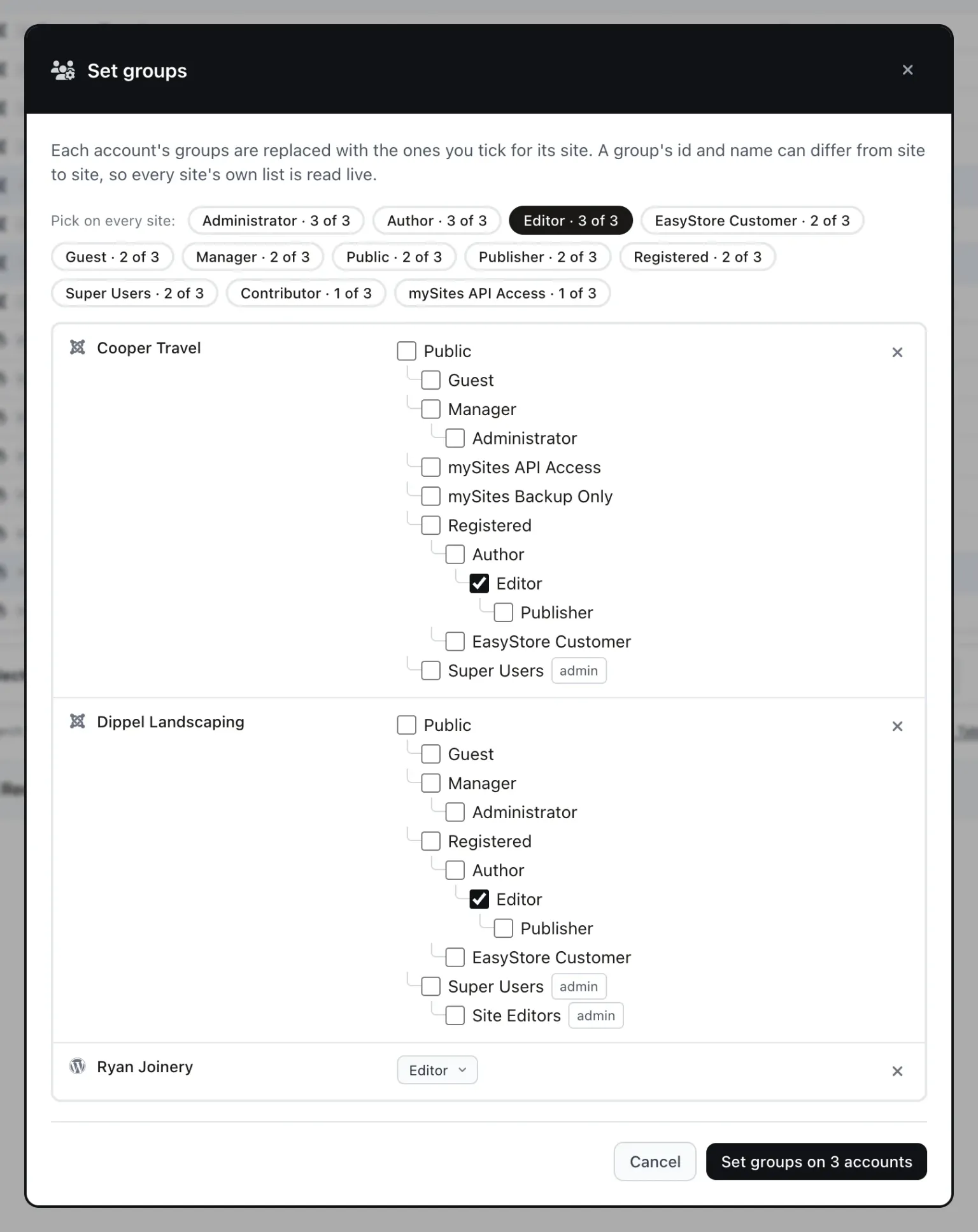
Set groups gives you one row per ticked site, each reading that site’s own groups live (on WordPress, its roles). Pick per site, or pick a group name once and it is matched by name across the sites; a site with no group of that name asks you to choose one there. It replaces the account’s groups, and on WordPress sets the one role.
Sessions end when you block
When mySites.guru blocks a Joomla account, changes its groups or sets its password, it also ends that account’s live sessions and remember-me tokens, the way Joomla’s own User Manager does when you block someone there. (Live sessions can only be found where Joomla keeps session metadata, which is its default.) Previously an account blocked through mySites.guru could stay signed in until its session expired. The same applies to the block and demote tools on the snapshot checks.
One credential this does not touch is API tokens. They are separate from sessions and need revoking on their own when someone leaves.
Find ex-staff
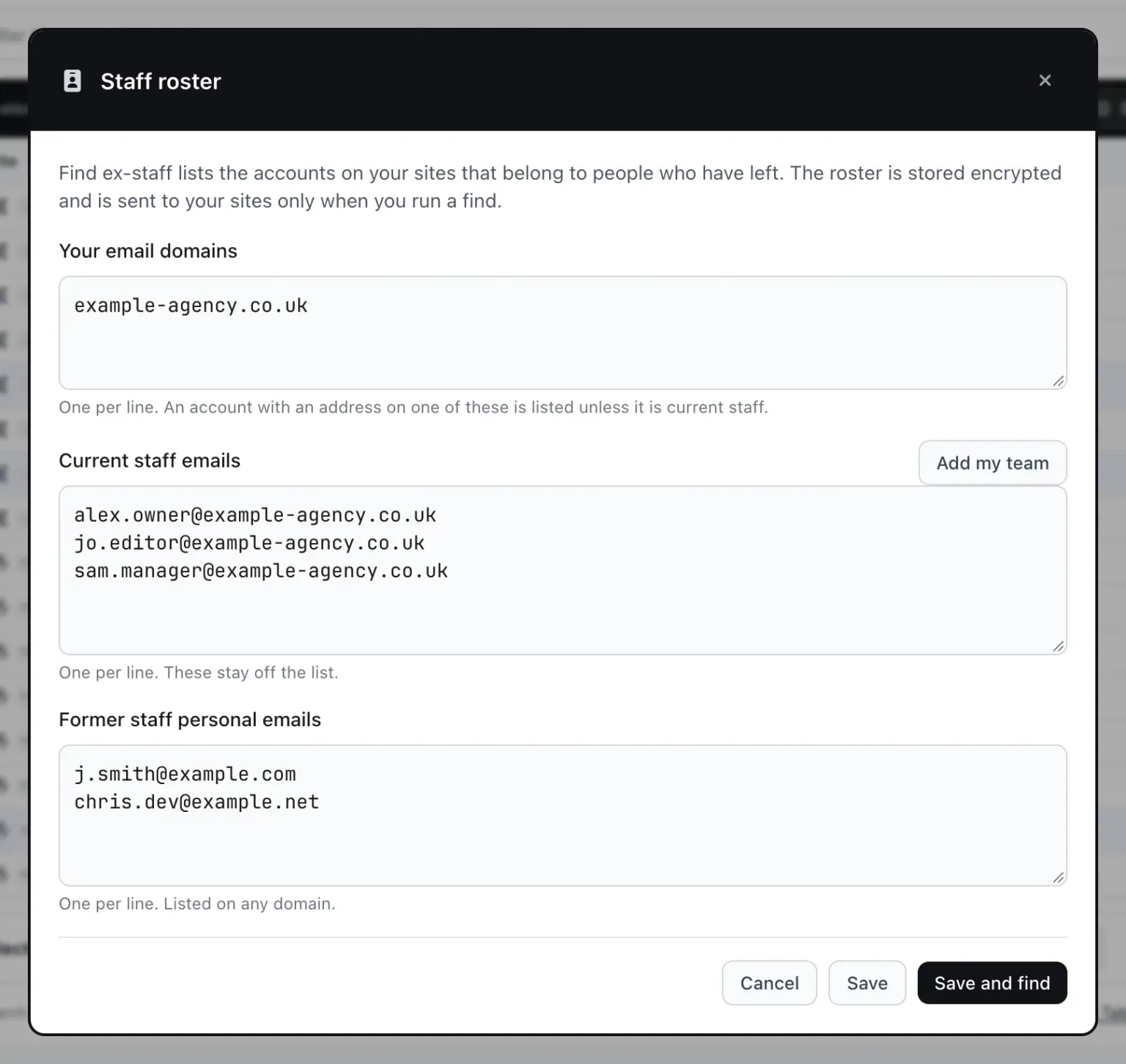
The staff roster, reached through Cmd+K with “Find ex-staff accounts”, takes your agency’s email domains, your current staff (who are kept off the list) and former staff personal addresses. “Add my team” pulls in your team logins. Find ex-staff then lists every account on your sites belonging to someone who has left, with an Ex-staff or Leaver pill, ready to Offboard, Block or Delete. The roster is stored encrypted and sent to your sites only when you run a find; the results are not stored. It is the companion to the audit that finds accounts you did not create, and the ex-staff offboarding walkthrough goes through a leaver from roster to Undo.
Dormant admins and missing access levels
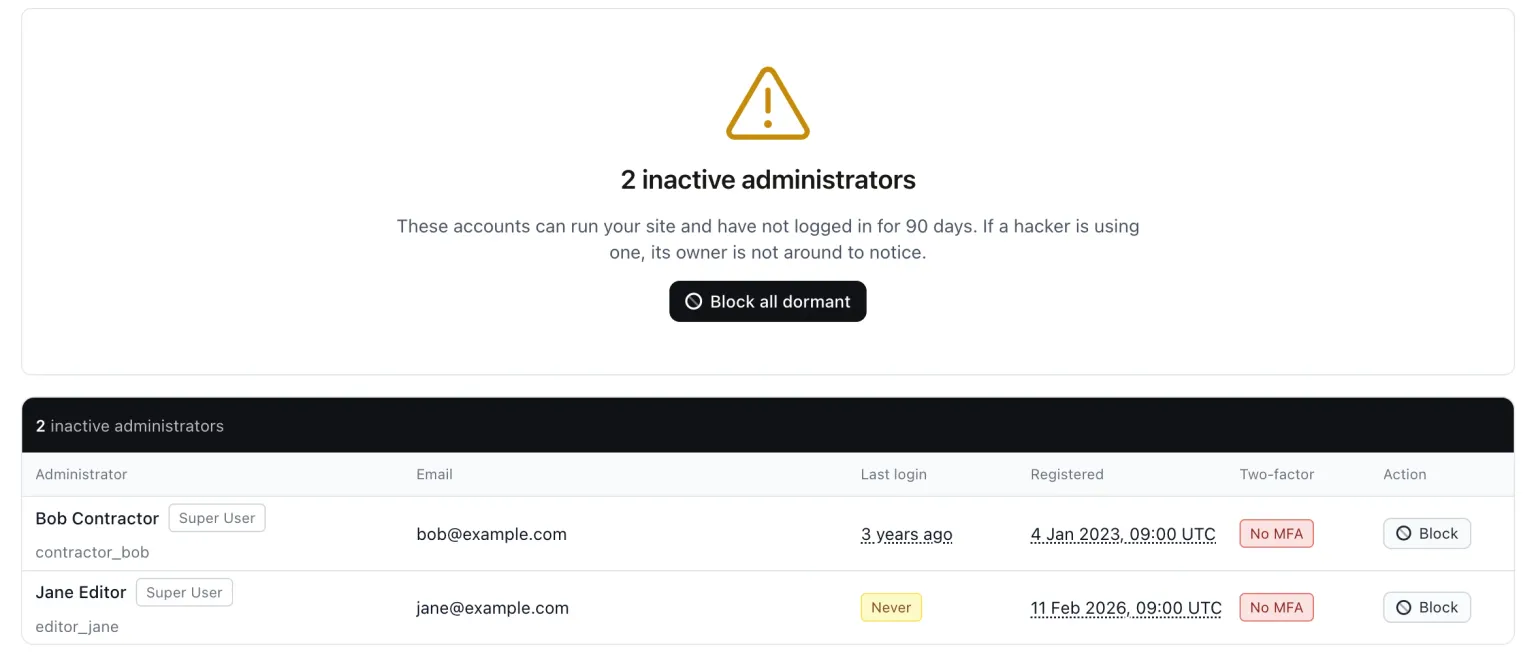
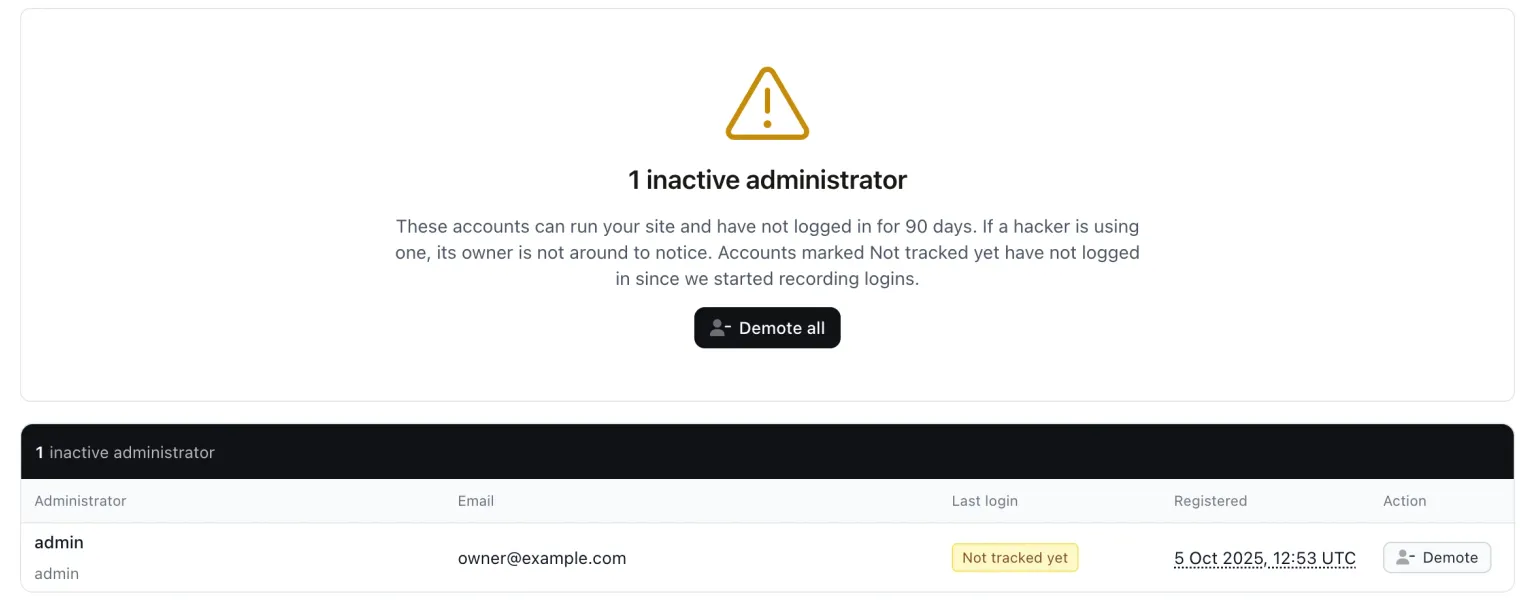
The “Inactive admins” snapshot check on Joomla and WordPress lists back-end-capable accounts not seen for 90 days, with Block or “Block all dormant” on Joomla and Demote or “Demote all” on WordPress (demote means Subscriber, with sessions ended). WordPress itself does not record logins, so the mySites.guru connector starts recording them with this update, and until it has seen one those rows read “Not tracked yet”. The inactive user accounts tool page covers the check in more detail.
The “Content with a missing access level” check on Joomla is a cousin of the orphaned-author problem: articles, categories, menu items, modules, fields, contacts, news feeds and tags whose access level was deleted, which hides them from visitors. You set an existing level per item or for all of them.
Audit trail, team limits, and adding people
Every batch gets an audit trail entry and a summary email, and team members only reach sites on their allow-list. Joining is as quick as leaving: the command palette entry “Add a user to many sites” creates the account on every site you pick in one go.
Does this work on WordPress?
Yes, all of it. WordPress has always put the question at delete time: its delete screen asks “What should be done with the content owned by this user?” and offers “Delete all content.” or “Attribute all content to another user.”, then moves the author on every post of every type. Joomla never asked. mySites.guru now asks it on both platforms, across every site at once, and the WordPress delete through mySites.guru has always offered “Give their content to” per site or “Delete their content on every site”.
The same search, bulk bar, Offboard, Undo, Find ex-staff and the Inactive admins check all work on WordPress sites too, so a mixed Joomla and WordPress client list is handled from one screen. All of it is part of the mySites.guru subscription at £19.99 per month for unlimited sites, and the full tour linked above shows the rest of the user manager with screenshots.
Further reading
- Joomla feature request #45026, “Batch - change authors for articles / categories” is the open thread on the core side, converted to a discussion in February 2026.
- Joomla PR #40751, “Change user before delete” is the closest core came to a reassign-on-delete option, closed unmerged in June 2023.
- One Search Finds That User on Every Site You Manage is the full tour of Universal User Management, with screenshots of each pane.
- Finding Rogue Admin Accounts Across Every Joomla Site You Manage covers the accounts you did not create, which Find ex-staff complements.
Frequently Asked Questions
What happens to a Joomla user's articles when the account is deleted?
Can Joomla reassign articles to another user when I delete the author?
What does mySites.guru move when it deletes a Joomla user?
What if there is no Super User left to receive the content?
Can I see what will be reassigned before I confirm?
Does the same thing work on WordPress sites?
 Written and edited by a human, with AI assistance. Our approach to AI