Autumn 2026: The Ten Biggest Changes to mySites.guru
Between 27 August and 2 November 2026 we added 114 new features to mySites.guru and made 174 improvements to ones that already existed. The summer edition of this series covered everything released, and promised autumn would get its own. A tour of 114 would run to a short book, so this one is different.
What follows is ten highlights: the changes we think matter most if you manage a lot of Joomla and WordPress sites for other people, each with a link into the tool or to the post that explains it properly. Everything else is in the changelog, and we point you at it near the end.
The Updates page, rebuilt
The Updates page is now one table of every extension, plugin and theme update across your sites. It opens with the results of your last check, re-checks anything older than six hours on its own, and lets you update one row, a whole extension, a server, a selection or everything. Shift+click selects a range of rows and a group’s box selects the whole group, so forty sites take one click instead of forty. Start at Updates.
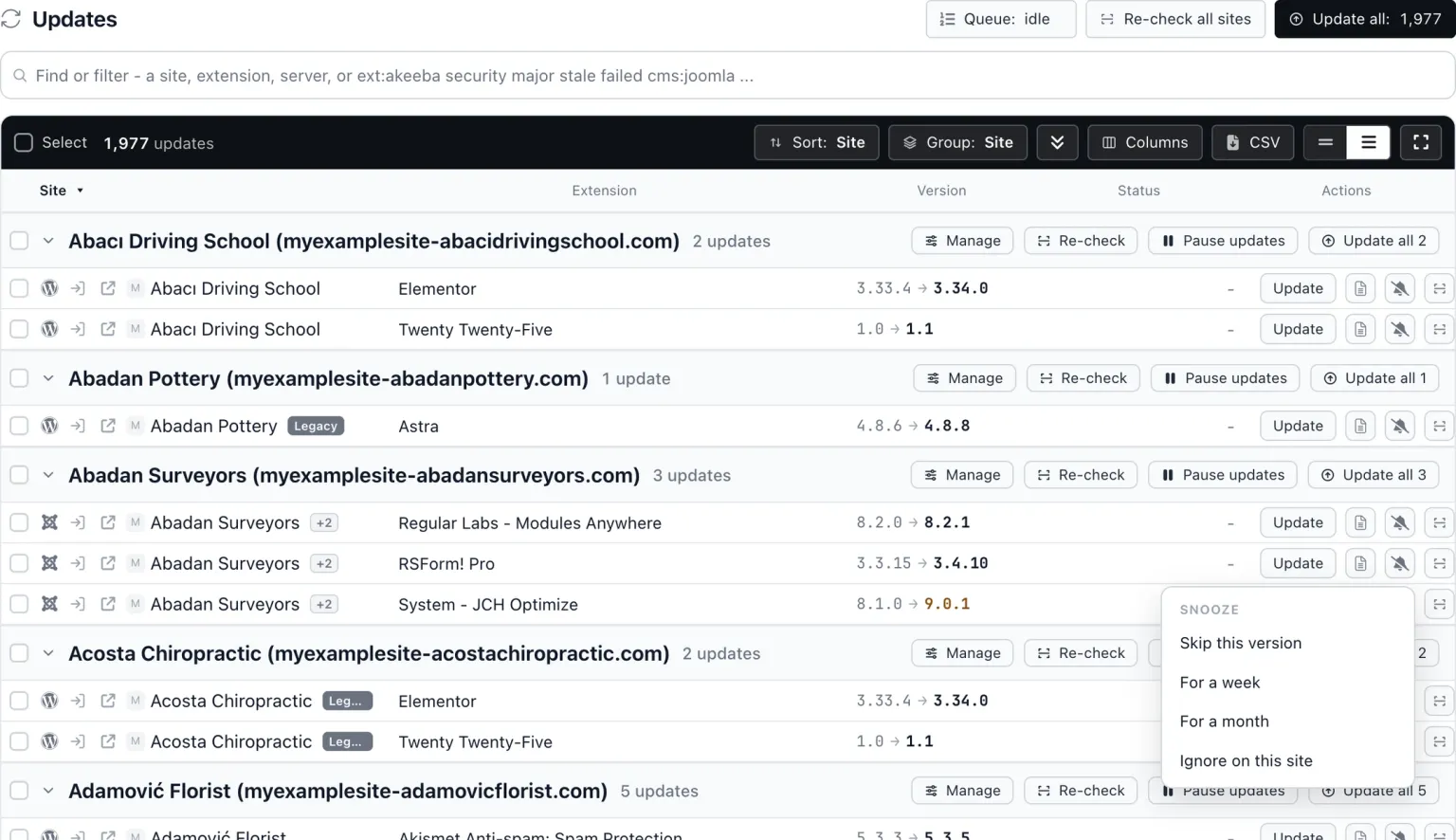
Around the table sit the things that used to be missing. Snooze an update for this version, a week, a month, or for good. Sites with Akeeba Backup or All-in-One WP Migration take a fresh backup before their updates run, and if the backup fails their updates are cancelled. Pause updates on a site, which Tim asked for, and it stays listed and monitored but nothing updates it: not Update all, not the API, not MCP, not the auto-updates that run with each snapshot. The pause and snooze post has the reasoning behind keeping those two switches separate.
Release notes open a popup showing just the changelog entries between your installed version and the new one, security fixes listed first, for wordpress.org plugins, premium WordPress plugins and Joomla extensions that publish a changelog. Thanks Gianluca. The Update log now shows the version each extension was updated from as well as to, so after a bad update you know which version to roll back to. Thanks Niels. And there is a new Download Keys page: save your vendor download keys (Akeeba, Regular Labs, YOOtheme and others) once and send them to the sites you pick, in the background. Joomla extensions missing their download key are flagged, and when you set one from mySites.guru we write it into Joomla and check for updates again straight away.
Pause Updates on One Site, or Snooze One Joomla Extension or WordPress PluginRead the full post
Permissions for each team member
Until now you could choose which sites a team member sees, but not what they can do on them. Ivan asked for something finer. A Permissions section on a team member’s page now sets each area (backups, extension updates, core upgrades, admin sign-in, file manager, site users, monitors, reports and more) to no access, view only or manage. Viewer and Operator presets give you a starting point, and anything a member cannot do is greyed out or hidden for them.
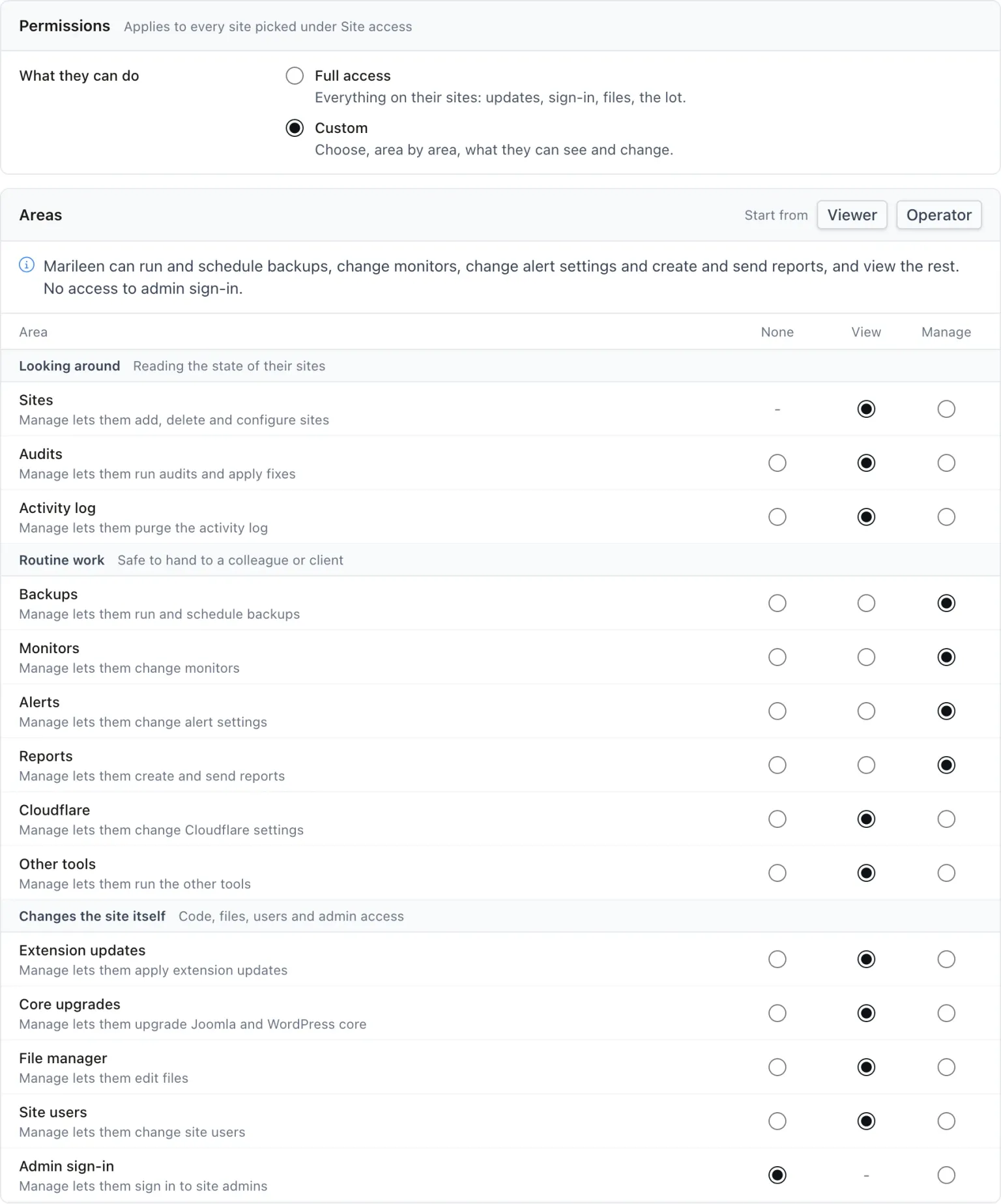
For an agency this is the piece that makes handing out logins safe. A junior can run backups and read reports without being able to sign in to a client’s administrator, and someone who only needs to watch uptime monitors can be given exactly that and nothing else. The subscription includes unlimited team members, so there is no reason left to pass one login around the office. Set it up under Teams.
Who has an account on which site?
Every site now has a User Manager tab. Browse that site’s accounts live, add, edit, block, unblock or delete them and change group membership, without logging in to the site. Joomla came first, WordPress soon after, and the two are at parity: browsing, creating, editing, deleting, password and role changes on both.
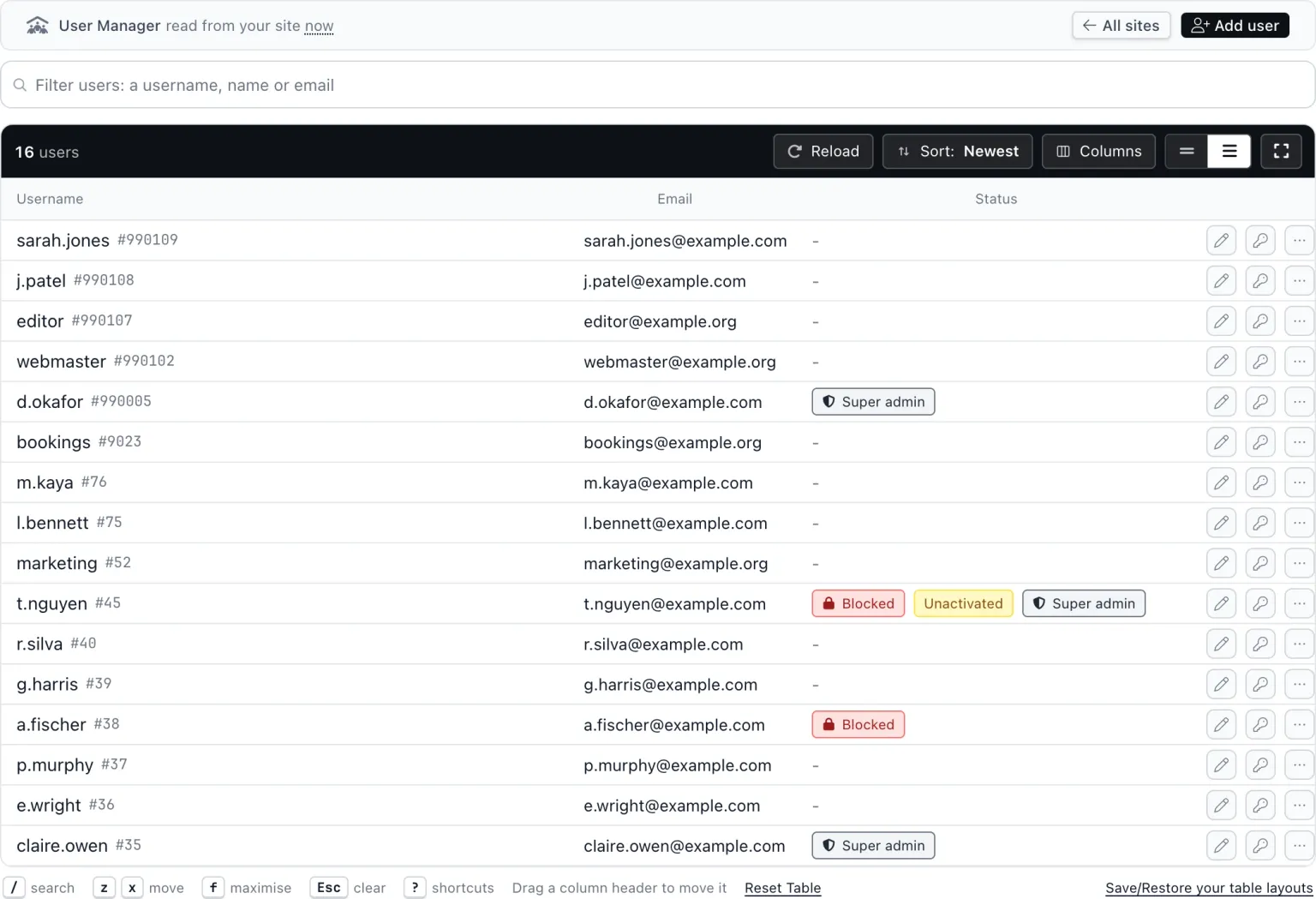
The part that saves an afternoon is the cross-site work. Add one user account to many Joomla and WordPress sites at once, choosing its group on each site, which is how a new colleague gets access to every client site before lunch. Universal User Management does the reverse: tick accounts across many sites and Set groups, Offboard or Delete them in one go. Offboard moves a Joomla account to the group you pick and blocks it, and removes every role on WordPress, so a leaver loses access everywhere in one action rather than being forgotten on the three sites no one checked. The full write-up covers the detail.
One Search Finds That User on Every Site You ManageRead the full post
A faster sites list, and Cmd+K
The sites list was rebuilt. It loads straight away, filters as you type, and you can group, sort and drag columns into your own order. Press F and it fills the browser window. A red Hacked button shows just the hacked sites, and clicking a vulnerable extension, core CVE or Joomla 3 patch badge shows every site with the same problem, which turns “which of my sites run this” from a search into a click.
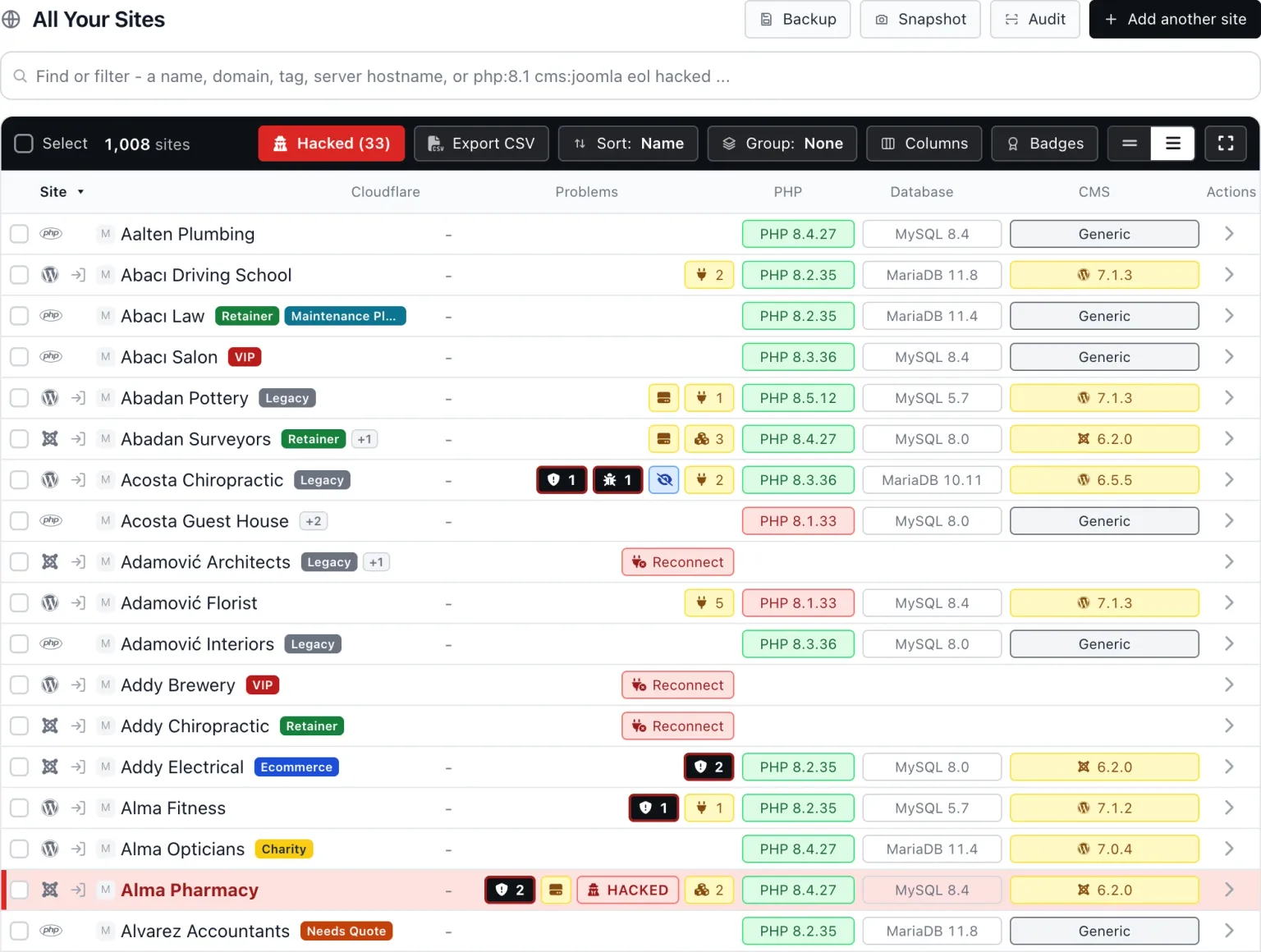
Steph asked to audit many sites at once, so the Audit button now queues a full audit for every site the list is showing. Filter first to audit just some. Audits start ten a minute, one at a time per server, so a shared host is not hit with everything at once.
Cmd+K (Ctrl+K on Windows) searches your sites, tools, tags, help pages, blog posts and the changelog from one box, and Enter on a site asks what you want to do with it. How it works. Christian asked for the main left menu to get out of the way, and it now folds to a narrow strip of icons. Every keyboard shortcut is on one searchable page.
Press Cmd+K, Type a Client's Name, Press EnterRead the full post
Why does a cleaned site get hacked again?
Because the thing that put the files there is still running. A site you cleaned on Monday is hacked again on Tuesday, and the files you deleted are back. Most of this autumn’s security work went on the places malware hides that a file scan cannot see.
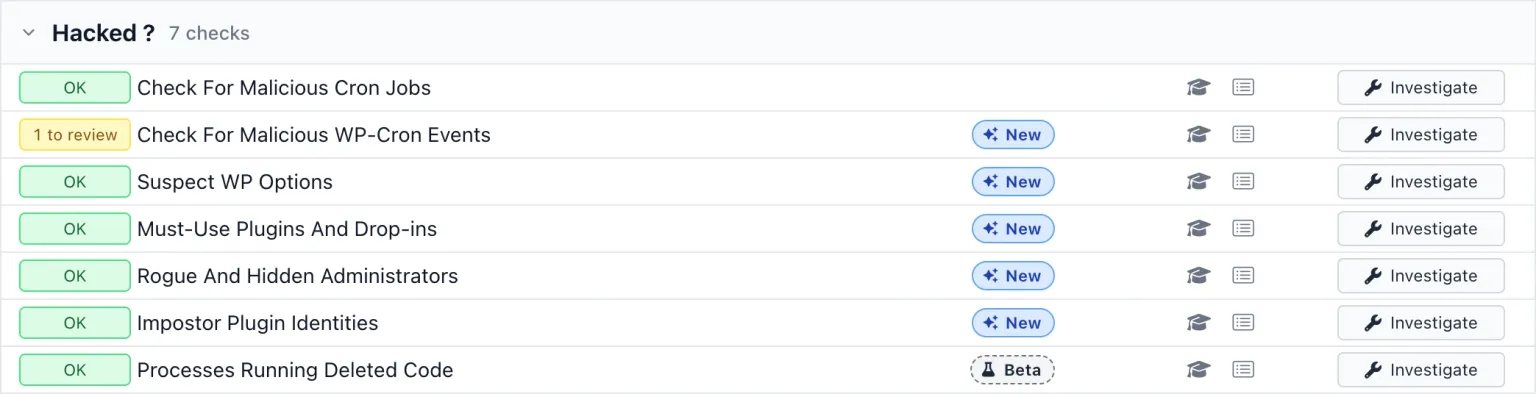
On WordPress, Scheduled Events are checked on every snapshot, because a growing family of malware keeps its payload in the database and schedules a job to rewrite the files a few minutes after you delete them. Suspect WP Options flags oversized and machine-named rows in wp_options for you to judge, and never returns the contents of a row. Rogue and Hidden Administrators now runs on WordPress as well as Joomla, reading the user table directly, so it shows an admin your own Users screen has been told to hide. Impostor Plugin Identities flags a plugin whose author and vendor domain look invented. On Joomla 4.1 and later, Joomla’s own Scheduled Tasks are read and each is checked against the task types your installed plugins register. The WordPress side is written up in WordPress hacks a file scan cannot see.
Then there is the check that reads memory rather than disk. Processes Running Deleted Code (Joomla, WordPress and Generic) finds a PHP process still running code you already deleted, which is how a site gets rewritten seconds after a clean. Every other check reads files or the database; this one reads memory. It is in beta, and where the host blocks the read it says so rather than showing a green tick. Why we built it.
After a hack, revoke every key. Pick a site to see who holds a Joomla API token or which WordPress Application Passwords exist, and revoke them all in one go. On Joomla 5.4 and later it can also replace the automated updates key, and on both platforms it can log everyone out. Each site also has an API Credentials page in the Manage menu with a revoke button per credential. There is a guide for Joomla API tokens and one for WordPress Application Passwords.
Five New Checks for WordPress Hacks a File Scan Cannot SeeRead the full post
Is your robots.txt turning search engines and AI assistants away?
A Search Engine Visibility section now sits on the Snapshot tab for Joomla and WordPress. We fetch your live robots.txt from our own servers and parse it, then tell you whether it shuts out every crawler, blocks Googlebot or Bingbot, blocks the AI crawlers that decide whether you can be cited in a ChatGPT, Claude, Perplexity or Apple answer, is reachable at all, sits where crawlers look for it, and names your sitemap.
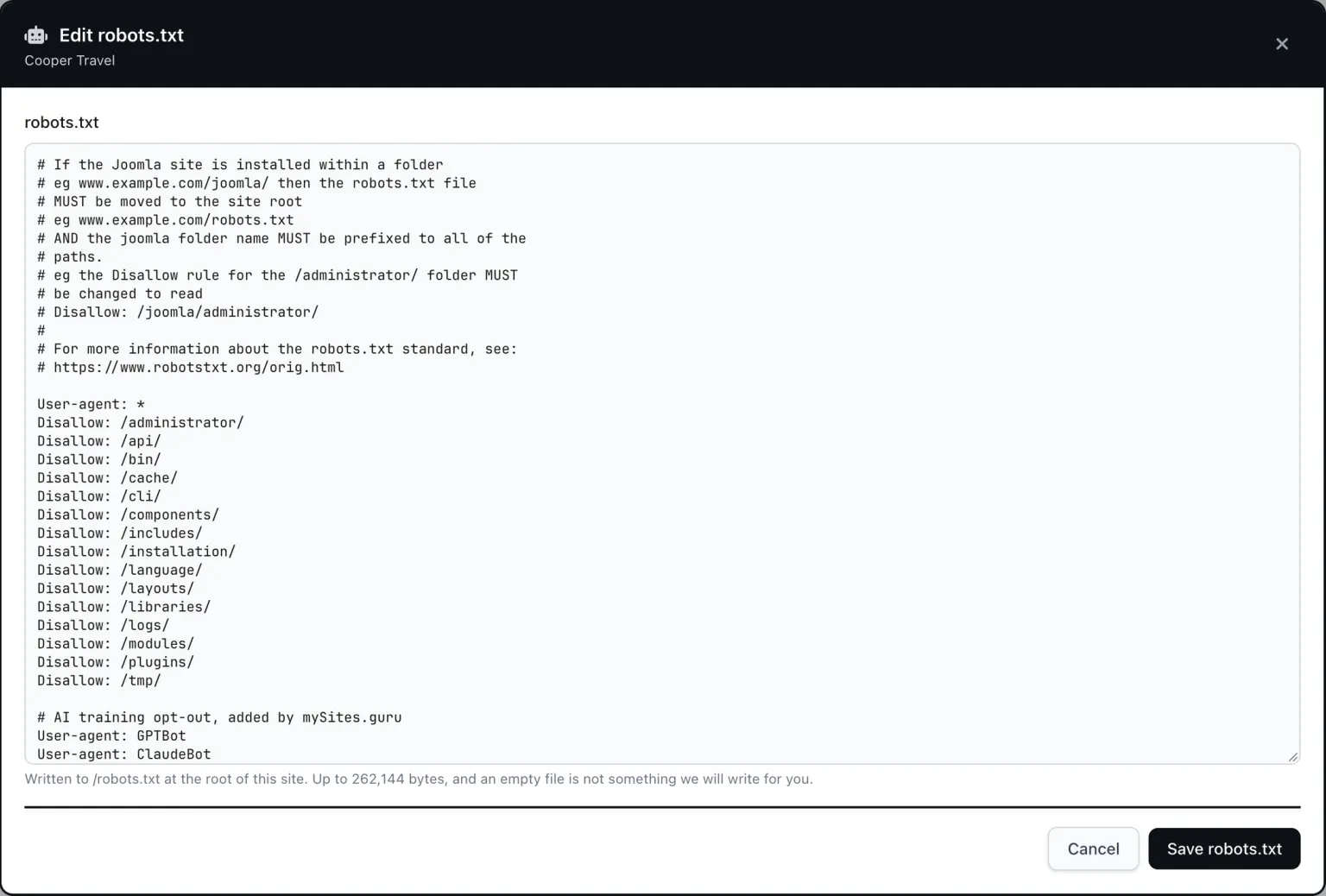
Blocking an AI training crawler costs you nothing in search, but blocking an answer crawler removes you from that assistant, and in the file the two are one word apart. Every site has its own robots.txt page showing the file annotated with what each rule does, the server copy beside the copy crawlers receive, a tester for whether a named crawler can fetch a URL, and a recommended file filled in with your sitemap address. Google retired its own robots.txt tester in 2023, so the tester fills a gap. There is an Edit robots.txt button, with warnings where editing the file on disk changes nothing: a CDN writing its own, an install below the domain root, WordPress serving a virtual one.
Across your account, one page lists every site whose robots.txt is turning search engines or AI assistants away, and restores access on as many as you pick. Site owners get an email when a site starts blocking, not every day it is blocked. The robots.txt post goes through the rules line by line.
Block AI training if you want. Never block AI answers.Read the full post
Which Joomla template overrides did that update change?
A Joomla update changes a core layout file, your template has an override of that file, and nothing tells you. Jaz asked for a way to see this without logging in to each site, and Template Overrides To Check shows which Joomla template overrides an update has changed across your sites, lets you compare each with the new Joomla core file, edit it and mark it checked, all from mySites.guru.
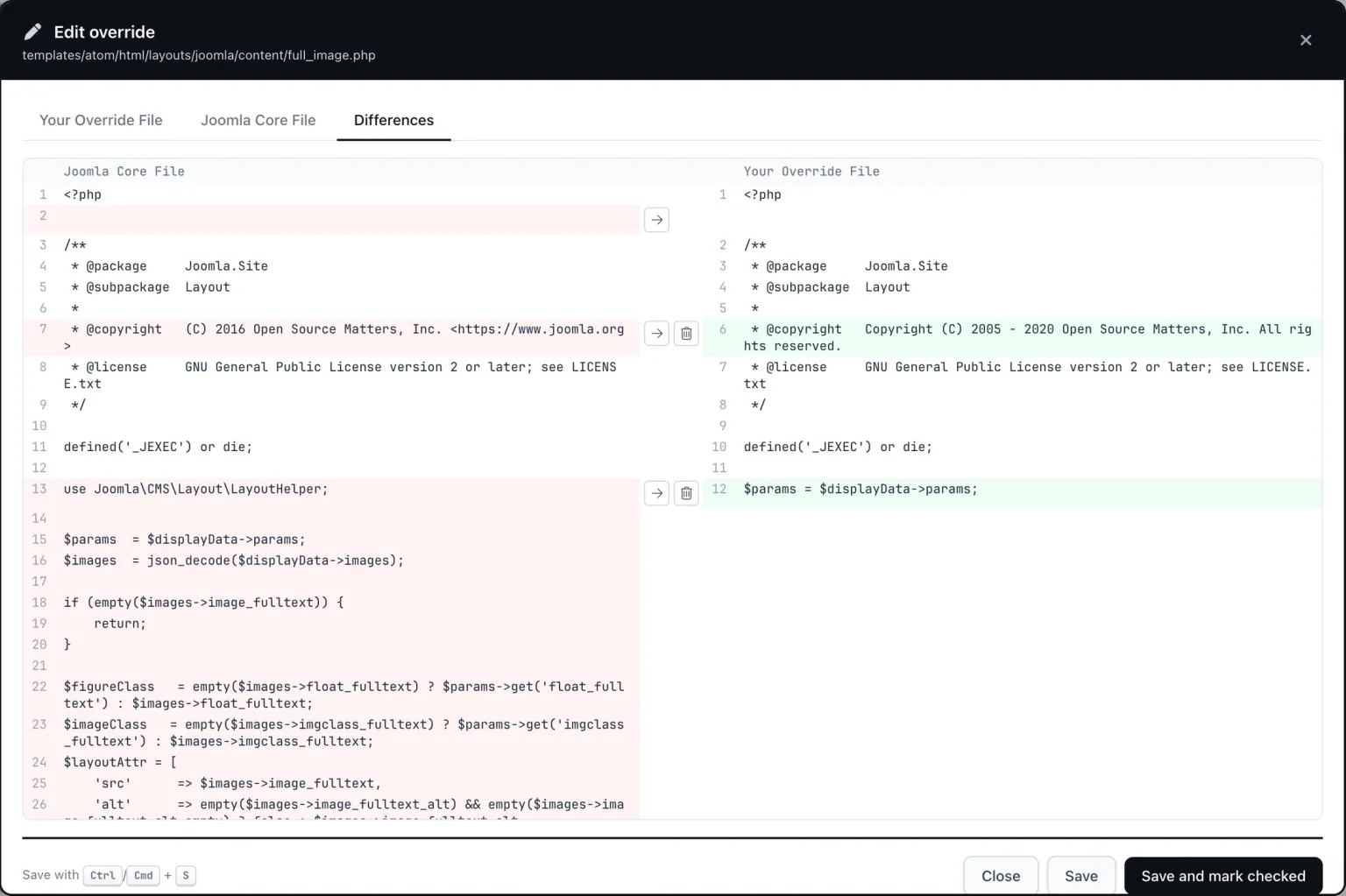
It depends on Joomla’s Installer - Override plugin being switched on, because without it Joomla records nothing when an update changes your overrides. Template Override Tracking shows whether that plugin is on for each site and lets you switch it. The post explains what to do when the compare shows a change.
How to Check Joomla Template Overrides Across 100+ Sites, With EaseRead the full post
The server under the site: PHP and database
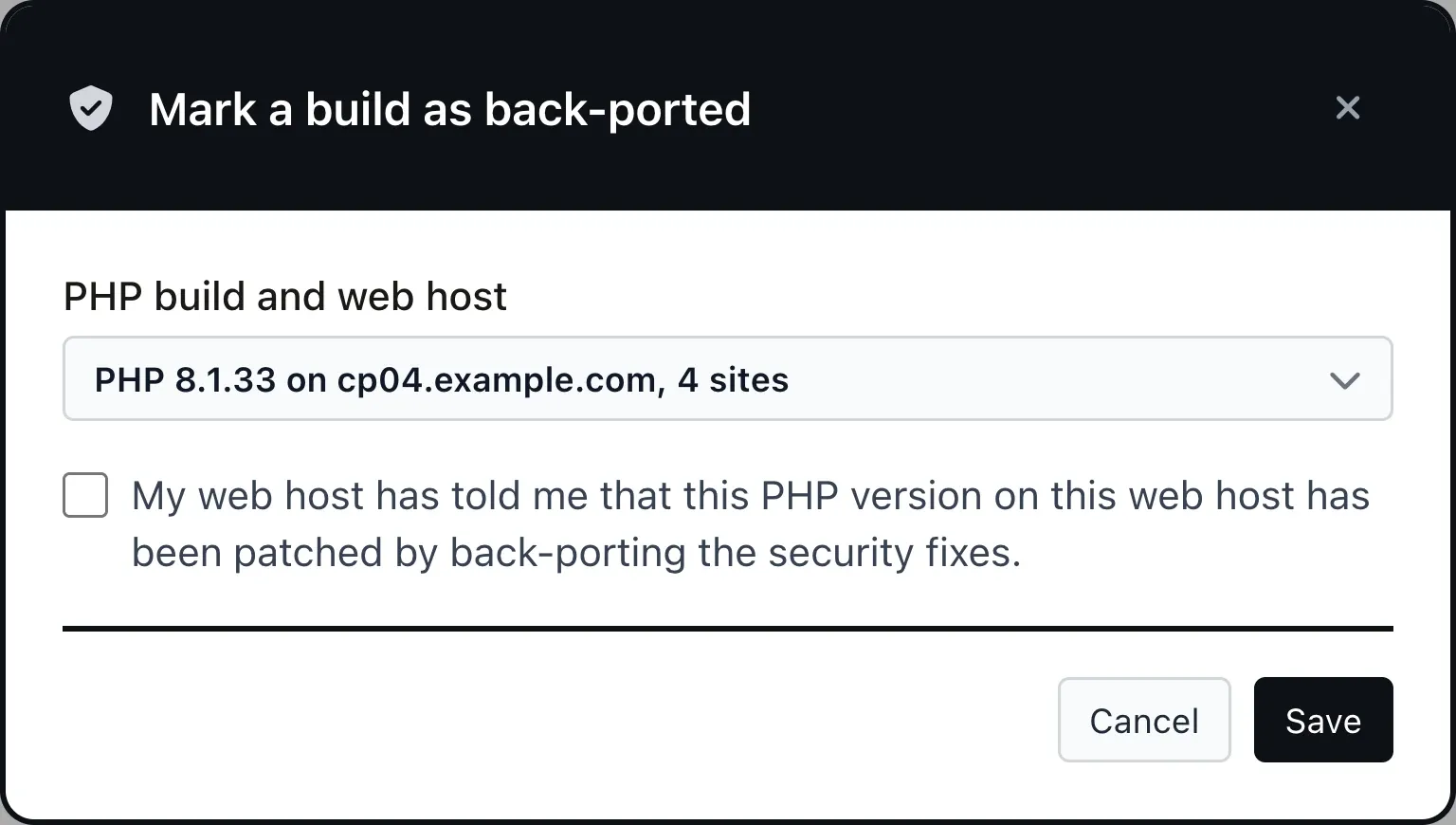
On 21 October 2026 the PHP project released a security fix, and some hosts back-ported it without changing the version number, which left their sites showing as unpatched. You can now mark a build and host as back-ported, and every site on that exact build counts as patched, with a shield on its PHP pill. The help page explains how, and the release post covers what the fix was for.
In the same area, PHP versions that PHP never released, such as the 7.4.34 some hosts offer when PHP’s last 7.4 was 7.4.33, are now marked as your host’s own build, and an Unofficial PHP build filter lists them. Sites on an end-of-life MySQL or MariaDB server show a red database badge, amber when end of life is under 90 days away; hover for when support ended and which LTS release to ask your host for. MariaDB vs MySQL has the background. And Server Requirements shows in the snapshot whether the server has the PHP extensions and php.ini settings your CMS needs, for Joomla 1.5 upwards and WordPress, with a live Recheck so you can confirm your host’s fix without waiting for the next snapshot.
PHP's Critical Security Release and Your Joomla or WordPress SiteRead the full post
Alerts where you want them
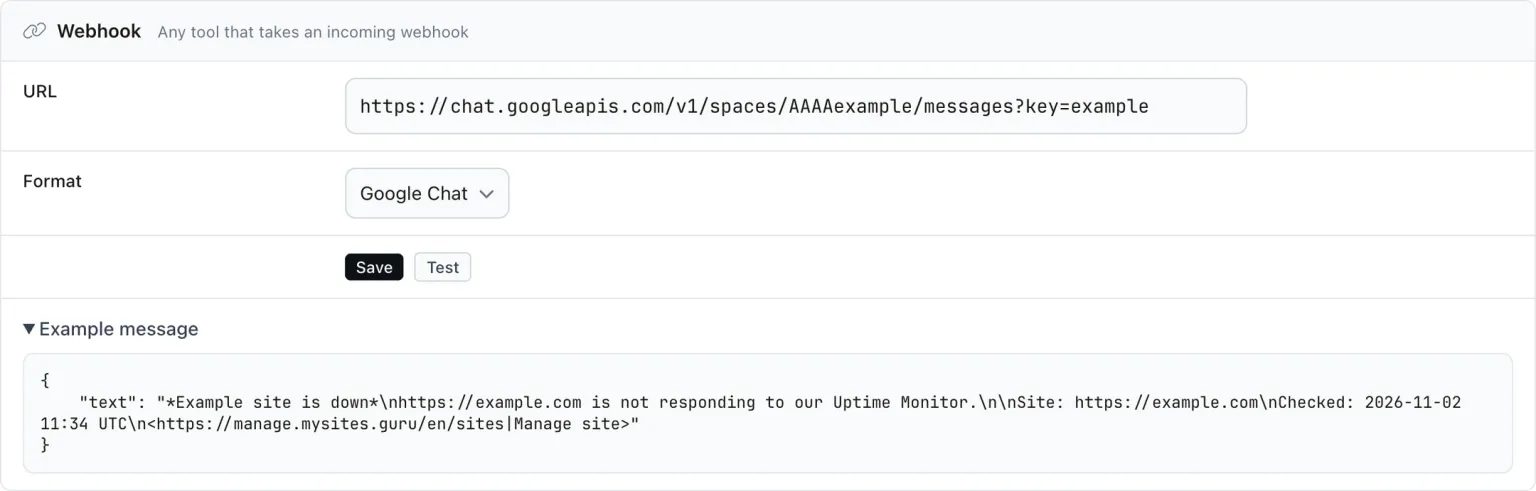
Uptime Monitor alerts can now go to any webhook, after a request from Stefan: Slack-compatible (Mattermost and Rocket.Chat too), Discord, Microsoft Teams, or signed JSON for n8n, Zapier and Make. Setting one up. Desktop notifications in your browser cover backups, audits, downtime and security alerts, chosen per browser, so the office machine can be noisy and the laptop quiet.
Two new emails. One tells you when an extension, plugin or theme is installed or removed on a Joomla or WordPress site, says who did it, and flags a known vulnerable version; every change also goes in the site’s Activity log, client reports and weekly summary even with the alert off. The other tells you when a Joomla or WordPress core upgrade fails.
And for the people who want fewer emails, Tim’s second request of the season: a Downtime alerts only switch that stops every email except site down and site back up. Every email you can switch off ends with a “Turn off this email” link. All of it is under Notifications.
Send Downtime Alerts to Teams, Google Chat, Discord or Your Own CodeRead the full post
Release Radar
Release Radar is a free public log of new Joomla and WordPress extension releases, including the paid ones no plugin directory covers. Inside mySites.guru, the Release Radar narrows the same log to the software your sites run, so it reads as your to-do list rather than everyone’s.
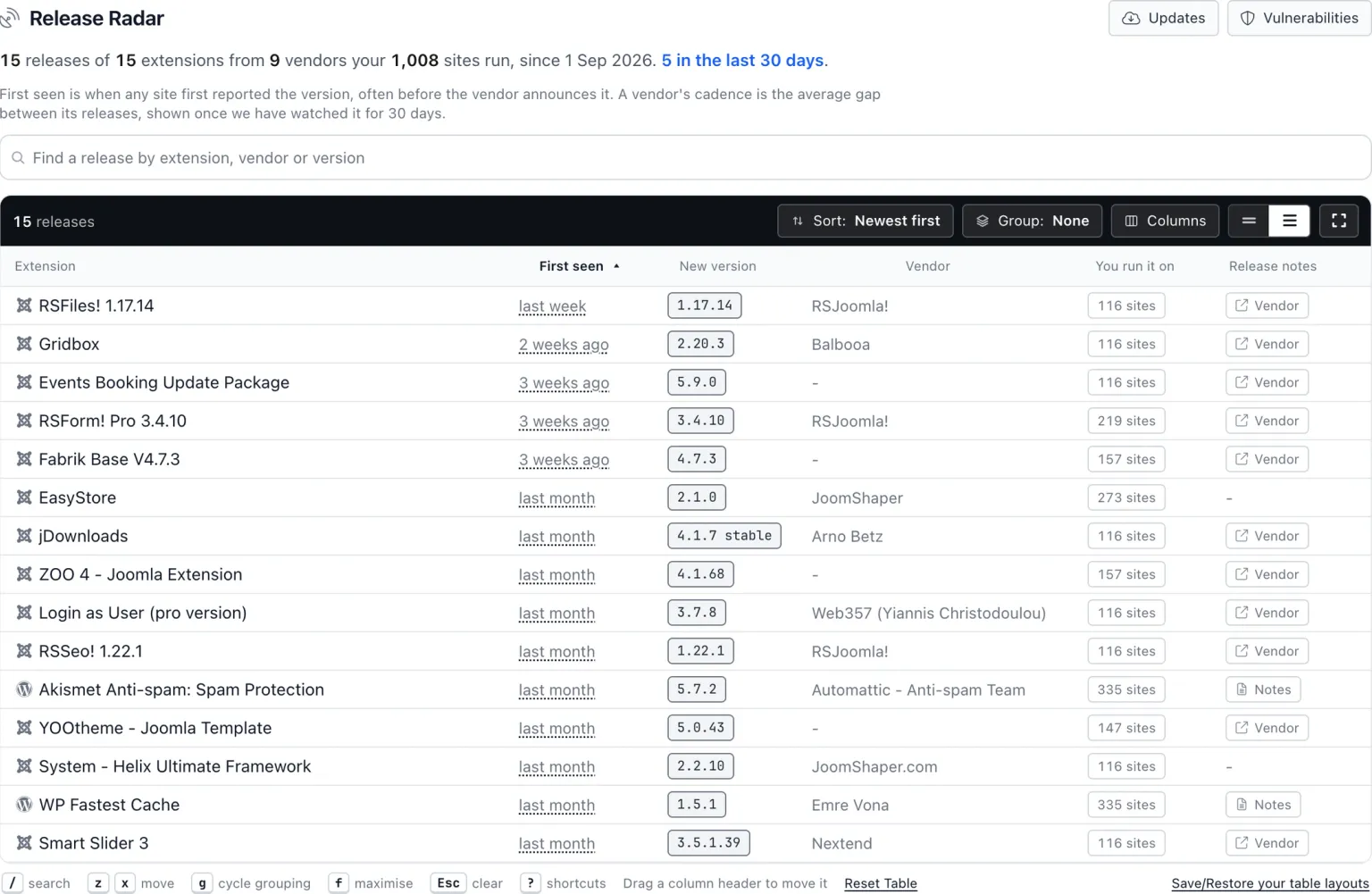
It gained a Notes button this autumn, which opens the vendor’s own notes for that version with security fixes listed first, so you can tell at a glance whether a release is a Tuesday job or a now job. Why we publish it.
Release Radar, a Free Joomla and WordPress Release TrackerRead the full post
The other hundred and four
Those are ten of 114. The rest, and the 174 improvements, are in the public changelog and in the Changelog entry in the left menu of your dashboard, posted the day each change goes live. A few worth a look: joomla3security.com, a new mySites.guru site (launch post) covering Joomla 3 end-of-life dates, every vendor’s Joomla 3 position and the core vulnerabilities Joomla never patched for 3.x; a web File Manager with drag-and-drop upload and a pop-out window; and connector requests now signed with Web Bot Auth, with a public page explaining every request we make to your sites.
Part of the subscription
Everything above is part of the mySites.guru subscription: £19.99 a month for unlimited sites, or £5 a month for a single site, details on the pricing page. None of it is a paid add-on, and none of it came with a price rise. The price has not changed since 2012, and we have never charged for the continual investment in the platform: this autumn’s 114 new features and 174 improvements went to every subscriber for the same money they paid last autumn, and the autumn before that.
If you are not a subscriber yet, the free audit is the place to start.
Tim, Ivan, Gianluca, Niels, Steph, Christian, Jaz and Stefan each appear above because something in this list started as their request, and the changelog credits them by first name. If something is missing from mySites.guru, the Feature Requests board is where to say so: suggest it, back it, and see why when the answer is no. A good share of the next edition will come from there.
Frequently Asked Questions
Does any of this cost extra?
Where is the full list of what changed this autumn?
Can I stop mySites.guru updating one particular site?
How do I ask for a feature?
 Written and edited by a human, with AI assistance. Our approach to AI