Pause Updates on One Site, or Snooze One Joomla Extension or WordPress Plugin
Every agency has an update it needs not to happen. A vendor shipped a release that broke a client’s checkout last week. A client is in a change freeze until their launch. Somebody patched a Joomla extension by hand and the next update would overwrite the patch. A plugin has jumped a major version and you want it on staging before it goes anywhere near production.
Hiding the notice is easy. The hard part is making sure nothing applies the update anyway: a colleague who selects everything on the Updates page and clicks Update all, a script running against the API, an AI assistant working through MCP, or the auto-updates that run with each snapshot. A note in a ticket does not stop any of those.
mySites.guru now has two controls for this. Snooze applies to one update on one site. Pause updates applies to every update on one site. Both are enforced on the server, on every route that applies updates.
Snooze One Update
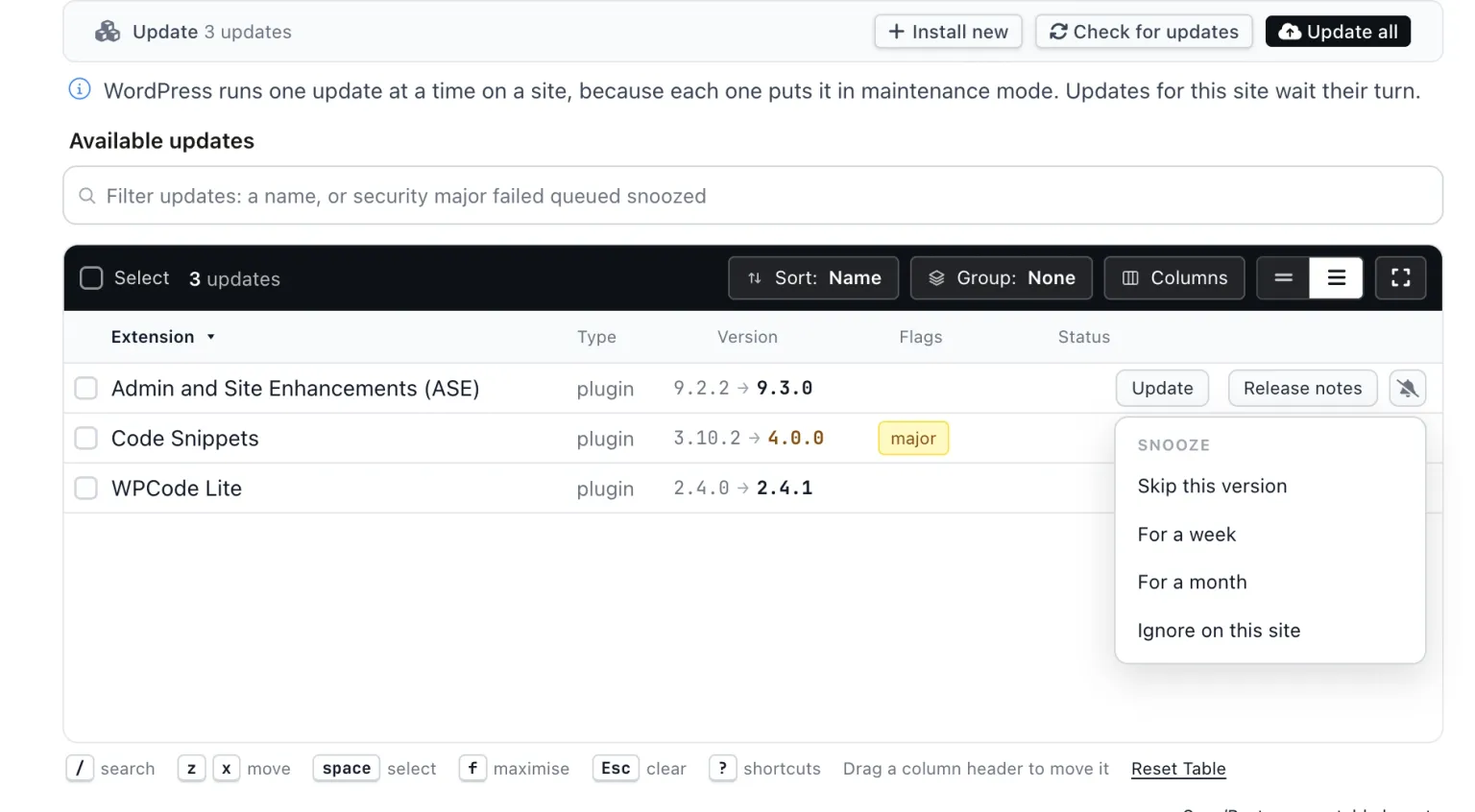
Snooze is a bell-slash icon at the end of each row’s Actions, on the Updates page (Updates To Do in the left menu, which lists every update on every site in one table) and on each site’s own Updates tab. Click it and pick one of four presets:
- Skip this version: the update disappears and comes back when a newer version is offered.
- For a week: back on the list in seven days.
- For a month: back on the list on that date.
- Ignore on this site: stays hidden on that site until you unsnooze it under the Snoozed filter.
Snoozing one row takes one click and shows an Undo toast. There is no dialog to confirm.
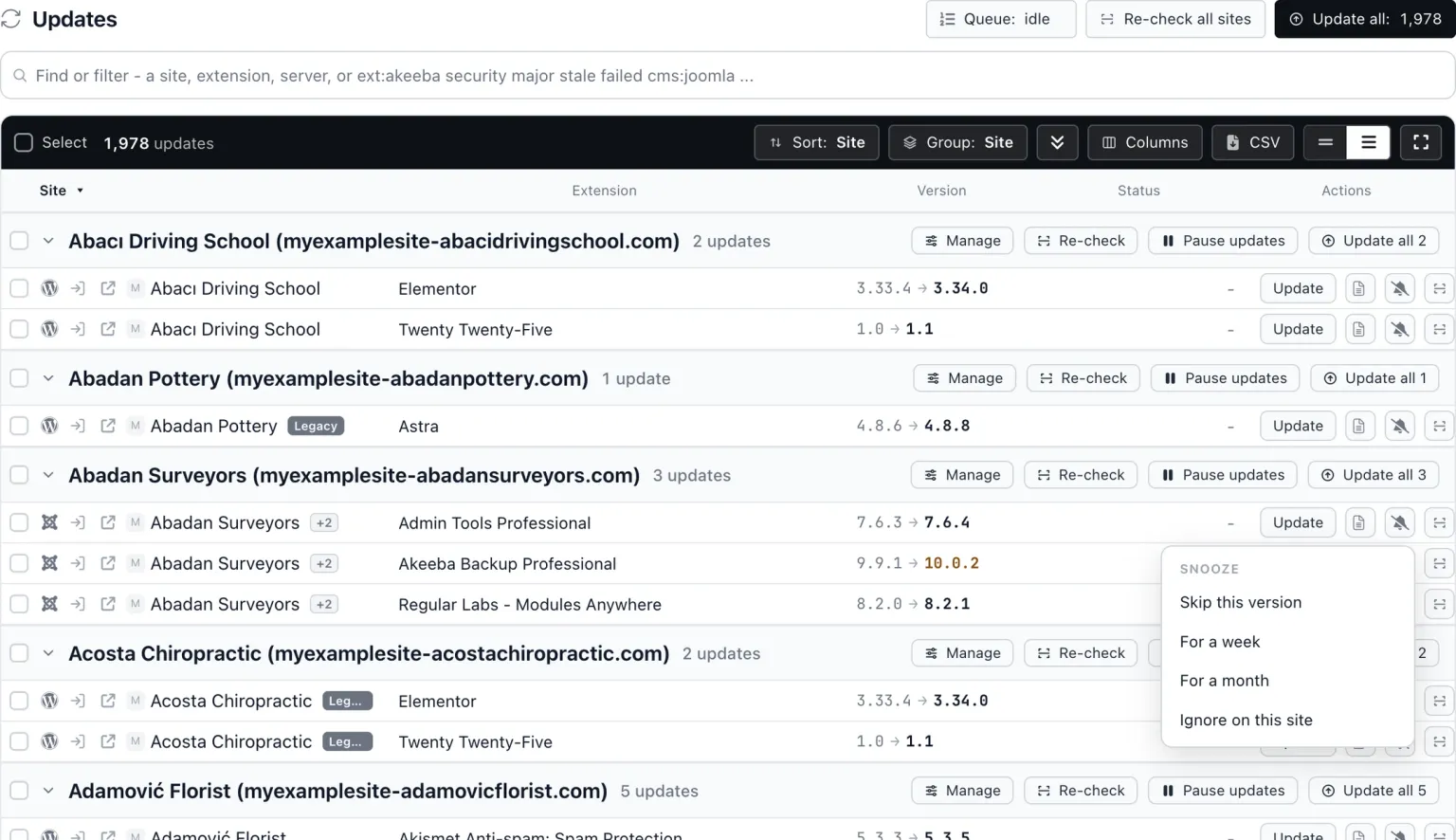
A snooze is per site. Snoozing Akeeba Backup on one client site does not touch the same extension on your other sites. If you want the same update snoozed across several sites, select the rows across those sites and snooze them together (more on that below).
Snoozed rows leave the default view of the Updates page. The Snoozed filter shows them, each with an Unsnooze button, so a snooze is never invisible: you can always see what is being held back and bring it back early.
On a phone, the same four presets are in the row menu.
Pause Every Update on One Site
Pause updates is a per-site switch for the change-freeze case, where no update of any kind should be applied to one site for a while. It works on Joomla and WordPress sites.
You set it in two places. In the site’s Config, under Checks and alerts, there is a Pause updates switch (it sits under Pause automated checks). Or, on the Updates page grouped by Site, each site’s header row has a Pause updates button.

A paused site stays listed and monitored, and its available updates are still shown, so you can see what is building up while the freeze is on. The site’s Updates tab shows “Updates are paused on this site. Change”, with the link going to the switch. Updates To Do counts a paused site as 0.
To undo it, click Turn updates back on in the group header, click Resume on any of the site’s rows, or flip the Config switch back.
Pause updates is not the same as Pause automated checks, which sits just above it. Pause automated checks stops snapshots and monitoring on a site, which is what the site summary API means by a paused site. Pause updates keeps checks, monitoring and the update list running, and only stops updates being applied. A site in a change freeze still needs to be watched; it just must not be changed.
What Actually Refuses a Snoozed Update?
One server-side check decides whether an update may be queued, and every route that applies updates asks it. That includes Update on a single row, Update all, the bulk Update, the per-extension update, the API trigger, the MCP update tool, and the auto-updates that run with each snapshot. A snoozed update, or any update on a paused site, is skipped and reported, never queued.
The point of doing it this way is that a snooze is not a filter on one page. It does not matter whether the request came from you, a colleague, a cron job or an AI assistant working through MCP: the same check runs, and the update does not reach the update queue.
On the page, the toast after an Update all or a bulk Update tells you how many updates were snoozed and not updated, so nobody wonders why the count came up short.
The API and MCP report the same thing in their replies. When you trigger updates, each skipped update is listed with "skipped": "snoozed" and the snooze details:
{"data": {"queued": 1, "status": "queued", "updates": [
  {"extension_key": "pkg_a", "queued": true},
  {"extension_key": "pkg_b", "queued": false, "skipped": "snoozed",
   "snoozed": {"until": null, "forever": false, "site": false}}
]}}
until holds the date a timed snooze ends, forever is true for Ignore on this site, and site is true when the whole site is paused. If every update you named is snoozed, the call returns HTTP 409 with the error snoozed, so a script cannot mistake a refusal for success. In the available-updates list, updates on a paused site have flags.snoozed set to true.
Snoozing Many Updates at Once
Tick the rows you want. Shift+click selects a range, and the box on a group header selects the whole group. Then choose Snooze in the selection bar and pick a preset. Bulk snoozing asks for confirmation first, because a bulk action is the one place a wrong click costs more than an Undo.
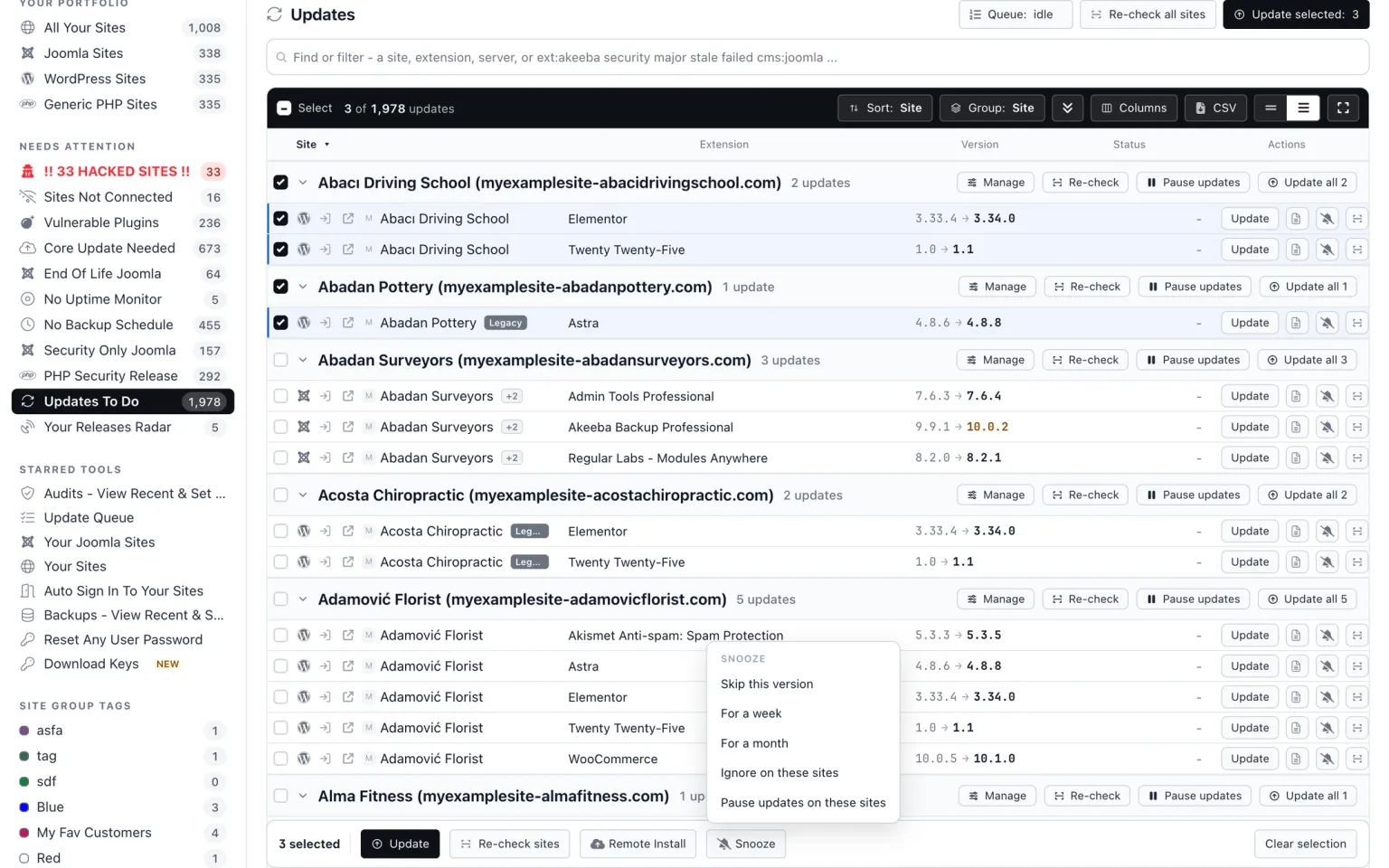
On the Updates page the bulk menu says Ignore on these sites rather than Ignore on this site, and adds Pause updates on these sites, so a selection across several clients’ sites can pause all of them in one go. That is the quickest way to snooze one extension across every site that runs it: filter to the extension, select all, snooze.
How Do WordPress and Joomla Handle This on Their Own?
Neither CMS has a per-update snooze. WordPress core has no way to skip one plugin update. Trac ticket #14522 asked for a skip-this-update option and was closed as “maybelater”. Since WordPress 5.5 you can switch auto-updates on or off plugin by plugin from the Plugins screen, but that only governs the unattended background update; the update is still offered, and anyone who clicks it gets it. (WordPress’s own auto-updater is a separate thing from the auto-updates mySites.guru applies with each snapshot, and we have a post on turning it off.)
The common code workaround removes the plugin’s entry from the site_transient_update_plugins transient. That hides the offer on that one site, has no expiry, and also hides that plugin’s future security releases, because it filters by plugin and not by version.
Joomla has no per-update ignore either. The usual workaround is disabling the extension’s update site under System > Update Sites. That works per update site, not per version, so you lose every future release along with the one you wanted to skip. Joomla can also disable an update site by itself after an error, which means a disabled update site does not tell you who disabled it or why. Six months later, nobody can say whether that extension is unpatched on purpose.
Both workarounds share the same three limits: they work on one site at a time, they never expire, and nobody can see later what was held back. A snooze can be set across many sites in one go, Skip this version and the timed presets end by themselves, and the Snoozed filter lists everything being held back, with when it ends.
When Should You Not Snooze?
Never snooze a security release for long. Patchstack’s State of WordPress Security in 2026 counted 11,334 new WordPress vulnerabilities found in 2025, and for heavily targeted vulnerabilities the weighted median time to first exploit was 5 hours. A month-long snooze on a patch like that is a month of exposure you chose.
The Updates page marks updates that close a known vulnerability (CVE), and the site tab has a Security fixes quick filter. Check that filter before you snooze anything. If the update you are about to hold back is on it, the conversation with the client changes from “can we wait” to “how fast can we test”.
Prefer Skip this version over Ignore on this site wherever you can. Skip this version comes back by itself when the vendor ships the next release, which is usually the one that fixes whatever made you snooze. Ignore on this site stays hidden until somebody remembers, and the Snoozed filter is the only thing standing between that and the Joomla disabled-update-site problem described above.
Further Reading
- WordPress Trac #14522 - the request for a skip-this-update option on plugins, closed as maybelater.
- Plugins and themes auto-updates - the WordPress documentation for the per-plugin auto-update switch added in 5.5.
- Joomla Update Sites - Joomlashack's walkthrough of System > Update Sites, the usual Joomla workaround.
- State of WordPress Security in 2026 - Patchstack's figures for 2025, including time to first exploit.
- Joomla 6.1.2 and 5.4.7 ignore article Options - the core release that made skipping one version a sensible move.
Frequently Asked Questions
What is the difference between snoozing an update and pausing updates on a site?
Does a snoozed update still get applied by Update all, the API or auto-updates?
Is pausing updates the same as pausing automated checks?
If I snooze a plugin on one client site, does it affect my other sites?
What does the API return for a snoozed update?
 Written and edited by a human, with AI assistance. Our approach to AI