The Fake Cloudflare Captcha Hiding in WordPress Core's functions.php
A visitor opens one of your pages and a box appears that looks like Cloudflare asking them to prove they are human. Instead of a tick box, it tells them to open the Windows Run dialog and paste a command. The ones who follow the instruction infect their own PC. You, the site owner, usually hear about it from that visitor, not from the usual signs a WordPress site is hacked, because in some of these campaigns the lure never shows itself to anyone logged in as an administrator.
On 19 October 2026 an agency customer sent us exactly that report about a WordPress site. We found the injection at the top of wp-includes/functions.php, a WordPress core file, rather than in a plugin or the theme. That is the one place most clean-up guides never tell you to open, and it is also the one place a malware hash list can never match. mySites.guru had already flagged the file twice before anyone here knew this variant existed, using checks that were never written for it, and since 19 October audits look for this exact variant too.
What the fake Cloudflare captcha does to a visitor’s PC
The lure is a social-engineering technique called ClickFix. Proofpoint first saw it in March 2024 and gave it the name, and by November 2024 it was describing the “Verify You Are Human” fake CAPTCHA variant flooding the threat landscape. The page shows a convincing verification box. Instead of a real check, it tells the visitor to open the Run box and paste a command the page hands them, and that command fetches and runs malware on their machine.
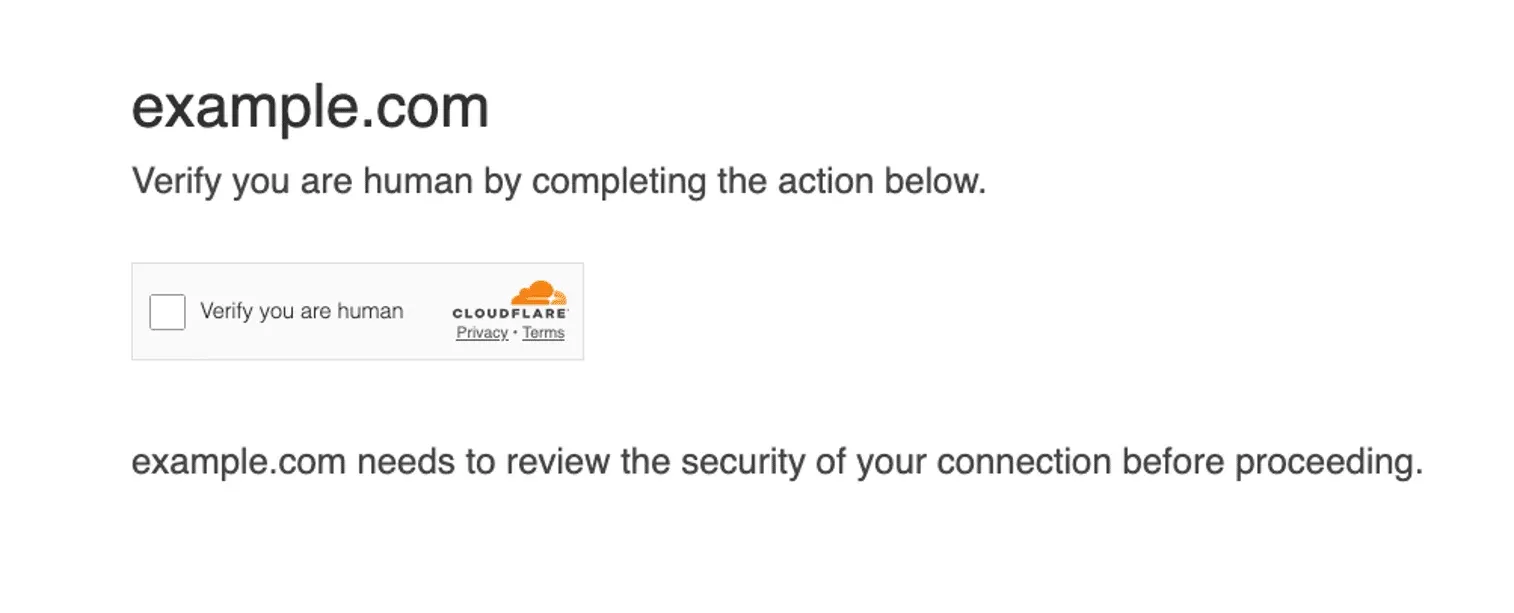
The payloads seen in these campaigns include infostealers such as Lumma and Vidar and remote-access tools such as NetSupport RAT, according to Proofpoint’s 2024 brief and Rapid7’s March 2026 report. Rapid7 counted 250+ WordPress sites in 12+ countries serving a fake Cloudflare CAPTCHA since December 2025, and noted that the script hid itself from logged-in administrators.
Microsoft Threat Intelligence lists compromised websites as one of ClickFix’s main arrival routes, and that is where your WordPress site comes in. The attacker is after your visitors rather than your site, and your domain is what lends the fake box its credibility. Our own inference from the Rapid7 finding: because the script hides from the one account that would recognise it as wrong, and only renders on the front end, the site owner is often the last person to see it.
Why hide a fake captcha in WordPress core instead of the theme?
Because no one opens core files. On the site we looked at, the loader sat right after the opening lines of wp-includes/functions.php, with the theme and the plugins untouched. Every public write-up we read puts this family somewhere else: a plugin, the theme’s functions.php or header.php, mu-plugins, or the database. Sucuri’s May 2025 write-up has the fake Cloudflare verification injected into the header.php of every installed theme, with victims told to press Win+R and paste a PowerShell command. None of the write-ups we read shows it inside a WordPress core file.
We think core is the better hiding place. A site owner never opens a core file and never edits one, so nothing about it looks changed to the person who built the site. A theme injection is gone the moment someone switches theme; a core injection is still there. And the only time WordPress replaces wp-includes/functions.php is a core update, so until the next one ships, the lure stays put.
The hook is the clever part. The injected function attaches to get_footer, so every front-end page that renders a footer prints the lure, whatever theme is active. The same lure has turned up on Joomla 3 sites running abandoned JoomShaper extensions, which is one reason the detection we built for this ships for every platform rather than WordPress alone.
How the WordPress core injection is built
Two parts, PHP and JavaScript. The PHP part is a small function with a random-looking name that drops out of PHP mode and prints a script block, plus one line hooking it onto get_footer. The script is a single line of about 179 KB that decodes itself three times in the browser before it runs, and the code it finally runs is obfuscated again. We decoded it offline and never ran it.
Why this post describes the code in words
A page that reproduces the loader’s own strings starts matching the scanners that look for them, and makes our own page look like the payload.
The security research teams have already taken these loaders apart in far more detail than we would print here. If you want to see the actual code, these are the write-ups to read, and why:
- Rapid7, March 2026: the most complete recent teardown. It shows the injected script checking for a logged-in administrator cookie so it can hide from you, base64-decoding its endpoints, and pulling a second-stage loader from the site’s own
admin-ajax.php. - Sucuri, February 2025: the fake reCAPTCHA variant, found in random five-character plugin folders, a fake analytics plugin and the theme’s
functions.php, with a misspelled.htaccessbackdoor alongside. Read it for the list of places to look besides core. - Sucuri, May 2025: the fake Cloudflare page this post’s screenshot comes from, injected into
header.phpof every installed theme. Read it for the visitor side: the exact steps the lure walks someone through. - GoDaddy, October 2024: attackers logging in with stolen admin passwords and installing fake plugins named after real security and caching plugins, which then hook the lure onto every page. Read it if you think a strong host stops this.
- Sekoia’s IClickFix analysis: a framework seen on thousands of WordPress sites that serves a fake Cloudflare Turnstile and NetSupport RAT. Read it for how the same lure is run as a managed campaign rather than a one-off hack.
- Trend Micro, March 2026: the KongTuke chain from injected JavaScript to fake CAPTCHA to PowerShell to a Python backdoor. Read it to see what happens on the visitor’s PC after they press Enter.
- Sucuri on mu-plugins malware, February 2025: code hidden in must-use plugins behind base64, ROT13 and AES layers. Read it for why a clean-up that skips
mu-pluginsis not finished.
Why can’t a malware hash list catch it?
Because a hash list matches the whole file, and an injection into a core file makes a different whole file on every site. mySites.guru’s Hacked Files tool lists a file only when the MD5 of the entire file matches a file already confirmed as hacked. That is what makes its results facts rather than guesses, and it is why that tool has no false positives. The cost of that certainty is that the injected bytes plus that version’s wp-includes/functions.php make a hash no other site shares, and the next WordPress release changes the core half again. We could confirm a thousand copies and the next one would still be a new hash.
Two other instruments do see it. The core file integrity check compares each core file against the release, so a modified wp-includes/functions.php is listed as modified, with the change shown and a revert to the original on offer. And Suspect content matches on what a file contains rather than what it hashes to, so the injected code matched a pattern. The difference between those two tools explains the gap: content matching saw the file, hash matching structurally could not, and only the hash match sets the site’s hacked flag.
Suspect content versus a hacked site
These two words get used as if they meant the same thing, and on this site the gap between them was the whole complaint. We wrote up the difference between Suspect content and Hacked files in full, and this case is the textbook example of it.
Suspect content means a file’s content matches one or more of our 1,500+ hand-written hack patterns, checked against every file in the webspace, line by line. It is a heuristic, so false positives are expected: legitimate code uses the same PHP functions hackers use. It also means something people tend to miss. The Suspect content list can hold real hacks that no one has confirmed yet, and a fresh injection like this one sits there first, because its content matches the moment it is scanned.
A hacked site, in mySites.guru terms, is one where a file has been confirmed: its whole-file hash matches a file already proven to be malware, or, since 19 October, it matches a fingerprint for a known family like this one. That is a fact, not a guess, and it is what turns the site’s hacked flag on and sends the alert.
So the order of work on any audit is the same. Treat anything in Hacked Files as a compromised site and start the clean-up. Then work down the Suspect content list, using the AI malware analysis on anything you cannot judge by eye, because a file there may be the next confirmed hack. Here, a modified core file plus a Suspect content match on the same file was enough to act on, before any flag went red.
mySites.guru was already catching it
No one at mySites.guru had seen this variant before the report arrived, and no check had been written for it. The audit flagged the file anyway, twice, because the checks that caught it do not need to know what a hack looks like in advance. The next variant will not look like this one either, and the same checks will be the first to see it.
- Core file integrity check
- Compares every WordPress core file on the site against the original from that release. It does not care what was added or why: any core file that differs is listed as modified, with the change shown and a one-click revert to the original. That is how wp-includes/functions.php was on the list before anyone had read a line of the injected code.
- Suspect content
- Reads every file in the webspace, line by line, and matches it against more than 1,500 hand-written patterns built from real hacks. None of them was written for this loader, and it matched anyway, because obfuscated code that decodes itself and runs the result looks like the hacks the patterns came from.
- AI malware analysis
- One click on a suspect file sends it to Claude or OpenAI with your own key and comes back with a safe, suspicious or malicious verdict. A malicious verdict adds the file's hash to the confirmed list, so it moves into Hacked Files for that site.
- Hacked Files (100% Certain)
- The one tool that did not list it, by design. It only names a file whose whole-file hash matches a file already confirmed as hacked, which is why it never raises a false alarm, and why an injection that hashes differently on every site can never appear there without a confirmation first.
What the customer saw before we changed a thing
The core file integrity check listed wp-includes/functions.php as modified, and Suspect content matched the injected code. Hacked Files was empty, so the site’s hacked flag stayed off. The customer’s complaint was fair: “I’d consider this site hacked.” So would we, which is why we changed it.
Now mySites.guru looks for this exact variant too
On 19 October 2026 the connector learned this family by name, for every platform mySites.guru manages: WordPress, Joomla 3, 4, 5 and 6, and Generic sites. Audits now recognise it by its content, using two independent fingerprints: the decode chain itself, and the PHP injector function hooked onto the theme by its own name. Either one marks the file hacked, and so the site, wherever the file sits: a core file, a theme file, or a standalone .js or .html file. Sites pick up the new check when their connector updates itself, which happens automatically.
Both fingerprints were tested before they shipped. They matched zero of the 1,390,834 PHP, JavaScript and HTML files we ran them against, a set made of vendor libraries, node modules and real site copies. They also ignore the near-misses that would otherwise generate noise: a lone base64 decode, a lone XOR loop, or a footer function hooked onto something else.
The general checks stay where they were, and they are still the ones that will catch the next variant first. The AI malware analysis prompt now names ClickFix fake-captcha lures explicitly, so a sample with a different decode chain still gets a malicious verdict. For the reported site I confirmed the infected files by hand, so a fresh audit shows them in Hacked Files.
How do I clean a fake captcha out of WordPress core?
Put the core file back first, then go looking for everything else, because the modified core file is the symptom you can see and the way in is the one you cannot.
- Put the core file back. The integrity check lists every core file modified since release, shows the change, and reverts it to the original. Without mySites.guru,
wp core verify-checksumslists every core file that differs from WordPress.org’s checksums, and you replace each one from a clean copy of the same version. - Check the usual places. The active theme’s
functions.phpandheader.php, the plugins folder, mu-plugins, and the database. The half of a WordPress hack that is not a file lives inwp_optionsrows, scheduled WP-Cron events, drop-ins and hidden administrators, and any of those can put the lure back after you revert the file, as can a crontab you did not write. Files added to folders that WordPress owns but never shipped are an impostor-file check of their own. - Look for a second WordPress install. The site in this post had one nested inside the live one, infected. A nested copy has its own files and its own database tables, and a clean-up that only touches the outer site leaves it running.
- Remove unknown administrators and reset passwords. Delete any administrator you did not create, then change the password on every account that remains, plus the database and hosting passwords.
- Find the way in, then re-audit. Close the entry point or the lure comes back. Run a full audit afterwards and keep running them, because a site cleaned yesterday is exploited again today when the door is still open.
The same checks run on every connected site from the WordPress malware scanner. If you would rather hand the whole job over, fix.mysites.guru takes a hacked site at a set fee.
A modified core file means the site is hacked, not just the file
Reverting wp-includes/functions.php takes the lure away from your visitors and leaves the way in exactly where it was. Treat the revert as the first step of a clean-up, and the audit after it as the one that counts.
How do I clean a fake captcha out of WordPress core with mySites.guru tools?
The same clean-up, without an FTP client or a WP-CLI session, from the audit that found the problem. Work down the list in this order, because each step removes something the next one would otherwise trip over.
- Revert the core file. Open the core file integrity check, click
wp-includes/functions.php, and you get a side-by-side diff with the original on the left and the infected copy on the right. Revert it to the original from there. - Clear the files. Start with Hacked Files, where every entry is confirmed, then work down Suspect content. Click any file to see the exact matched lines, then edit it in place or delete it. Anything you cannot judge by eye goes through the AI malware analysis. For anything outside the flagged lists, the opt-in web file manager lets you browse, edit, upload and delete files across the whole site with no SFTP client.
- Clear what is not a file. Malicious WP-Cron Events lets you unschedule the event that would rewrite what you just deleted. Suspect WP Options shows a flagged row a value at a time and deletes it. Must-Use Plugins and Drop-ins lists every must-use plugin and drop-in WordPress loads, with any hidden one flagged, and Malicious Cron Jobs reads the server crontab for a job that downloads the payload again.
- Remove the attacker’s way back in. Rogue and Hidden Administrators reads the administrator list straight from the database as well as the way your Users screen does, and deletes an account with its content reassigned to one that stays. A password reset never revokes Application Passwords, so revoke every WordPress Application Password in one click as well.
- Re-audit, and keep auditing. Run a fresh audit and check that Hacked Files is empty, the core file integrity check is clean and the Suspect content list holds nothing you have not already judged. Every connected site gets the same checks, so one fake captcha is a reason to look at the other sites in that hosting account too.
If the site is too far gone to do it yourself, fix.mysites.guru does the whole clean-up at a set fee.
How This Shows Up in Real Life
The report came in on 19 October 2026 from an agency customer. Visitors to one of their WordPress sites were being shown a fake Cloudflare “verify you are human” box telling them to open the Windows Run box and paste a command. While looking, the agency also found what they described as “an infected WP site inside the live WP site”: a second WordPress install, nested inside the first, and infected as well.
Their mySites.guru audit had already flagged the core file as modified and matched the injected code under Suspect content, with Hacked Files empty, and their complaint that they would consider the site hacked was the right one. By the end of the day the connector had the two new fingerprints, the AI prompt named the lure, and I had confirmed the infected files by hand, so a fresh audit lists them in Hacked Files.
We do not name the customer or the site in these posts. A fake Cloudflare captcha on a WordPress site is an attack on your visitors delivered through your domain. It can sit in a core file none of the guides tell you to open, and a scanner that only knows bad files by their hashes will never see it. If a visitor tells you they saw one, read the first few lines of wp-includes/functions.php before you read anything else, and then audit the whole site, because the file is never the whole hack.
Further Reading
- Security Brief: ClickFix Social Engineering Technique Floods Threat Landscape by Proofpoint, 18 November 2024 - the team that first saw the technique in March 2024 and named it, describing the "Verify You Are Human" fake CAPTCHA lure
- Think before you Click(Fix): Analyzing the ClickFix social engineering technique by Microsoft Threat Intelligence, 21 August 2025 - lists compromised websites as one of the main ways the lure reaches a victim
- Fake Cloudflare verification injected into theme header.php by Sucuri, 21 May 2025 - the same lure planted in the header.php of every installed theme, with victims told to press Win+R and paste a PowerShell command
- Malicious websites: WordPress compromise advances global stealer operation by Rapid7, 10 March 2026 - 250+ WordPress sites in 12+ countries serving a fake Cloudflare CAPTCHA since December 2025, with the script hiding itself from logged-in administrators
- wp core verify-checksums in the WP-CLI documentation - verifies every WordPress core file against WordPress.org's published checksums
Frequently Asked Questions
What is the fake Cloudflare captcha on my WordPress site?
Why can I not see the fake captcha when I log in to WordPress?
Where does the fake captcha code hide in WordPress?
Why did my malware scanner not flag the modified core file?
Is reverting wp-includes/functions.php enough to fix it?
Does mySites.guru flag the fake Cloudflare captcha as hacked now?
 Written and edited by a human, with AI assistance. Our approach to AI