Orphaned Asset Rows

Joomla keeps permissions in its assets table. Find permission rows left by deleted content, and articles and categories with no permission row.
How the orphaned asset rows check works
During each snapshot your site looks for two kinds of mismatch in the Joomla assets table.
- Leftover asset rows: a row named for an article, a category or a module (
com_content.article.N,com_x.category.Norcom_modules.module.N) where item N no longer exists. Category rows only count for components that keep their categories in Joomla’s own category table. Components with a category table of their own, such as jDownloads or Kunena, are left out. - Missing asset rows: an article or category that is not in the trash and has no asset row at all. The root category is left out.
Modules with no asset row are not counted. Extensions such as HikaShop and YOOtheme’s administrator Link module save modules that way as a matter of course, and Joomla works fine with them.
Asset rows for other components are never checked. If the site cannot report this, for example because its connector is older than the check, the row shows No Data rather than a pass.
Why asset rows go out of step
Joomla creates and removes asset rows itself when content is saved and deleted through its own screens. They go out of step when something works on the database directly: content deleted by hand in phpMyAdmin, an import or migration script, or an extension that inserts rows without going through Joomla.
A missing asset row is the one users notice. The item has no permission record of its own, and that can surface as a permissions error when someone saves it.
Permissions match the content
Every asset row the check looks at belongs to an item that exists, and every article and category has an asset row.
Fixing them
- Open the site in mySites.guru, go to the Snapshot tab and click Investigate on the Orphaned Asset Rows row.
- Each row says whether it is a Leftover asset row or a No asset row, with the item type, its name or title, and its ID. Articles link to their edit screen in the Joomla administrator.
- For an item with no asset row, open it in Joomla and save it. Joomla creates the asset row on save.
- Leftover rows do no harm on their own, so leave them unless there are a lot. If there are, find out what deleted the content outside Joomla.
- The next snapshot picks up the change.
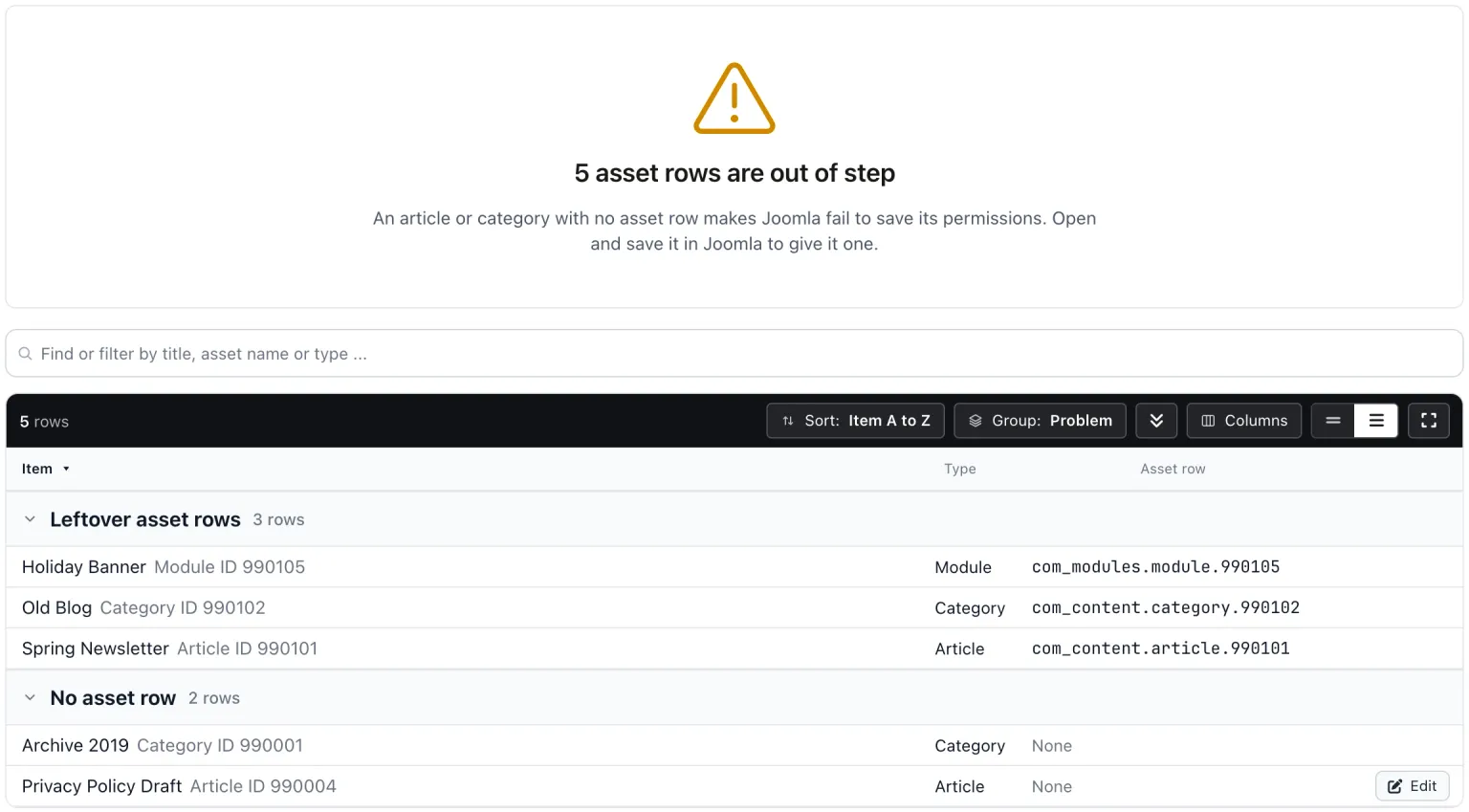
The list is read only. mySites.guru does not rebuild the asset tree, because that is risky on a live site.
Content deleted outside Joomla often leaves articles in a missing category as well.
Orphaned Asset Rows
mySites.guru checks every connected site for this automatically and flags it the moment it appears. These run twice a day on every connected site.
Frequently Asked Questions
What is the Joomla assets table?
Do leftover asset rows do any harm?
Why not rebuild the asset table?
 Written and edited by a human, with AI assistance. Our approach to AI