Crashed Database Tables
A crashed table makes every read and save on it fail until it is repaired. Find the Joomla and WordPress tables your database server cannot open.
How the crashed tables check works
During each snapshot your site asks the database server for the status of every one of its own tables, the ones with its table prefix. A table the server reports as crashed, or cannot open at all, is counted. On MySQL 8 your site asks for fresh status rather than the server’s cached copy, so a table that crashed since the last look is not missed. Views are skipped.
If your site cannot read the table status, the row shows No Data rather than a pass.
What a crashed table does to a site
A crashed table loses saves without telling the editor. Every read and every write on it fails until it is repaired, so depending on which table it is, articles or posts will not save, logins fail, or a page shows a database error. Of all the checks in this group it is the one most likely to be breaking the site right now, which is why it is shown as the most serious.
No crashed tables
The database server can open every one of the site’s own tables.
Repairing from mySites.guru
- Open the site, go to the Snapshot tab and click Investigate on the Crashed Database Tables row.
- Each row shows the table, its engine and the error the server gave.
- Take a backup if you can.
- Click Repair on a row, or Repair all listed. mySites.guru always asks first, because a repair rebuilds the table and drops rows it cannot read.
- Each table that is repaired fades out of the list. Any that failed are listed with the server’s message.
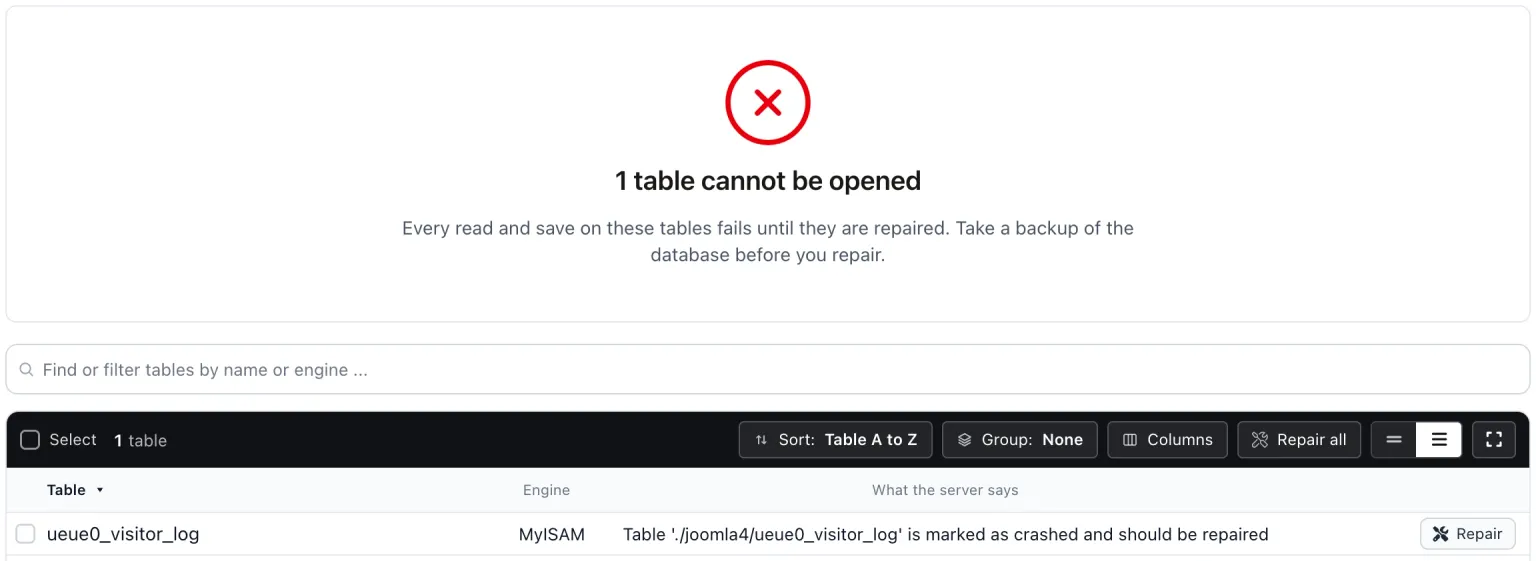
A repair runs at most 50 tables at a time, within a time limit, so a large table cannot hold the site up. If some are still waiting, the page tells you and you press Repair again. A table that cannot be repaired, such as an InnoDB table with a missing tablespace, shows “Restore from a backup” instead of a button.
The site gets a fresh snapshot afterwards, and the repair is recorded on the site’s activity timeline.
Stopping it happening again
Most crashed tables are MyISAM tables that were being written when the server stopped. Moving them to InnoDB, which has crash recovery, is the long-term fix. The tables not using InnoDB check lists them. If the same table keeps crashing, ask your host about disk space and server restarts.
Crashed Database Tables
mySites.guru checks every connected site for this automatically and flags it the moment it appears. These run twice a day on every connected site.
Further Reading
Frequently Asked Questions
Can every crashed table be repaired?
Can a repair lose data?
What causes a table to crash?
 Written and edited by a human, with AI assistance. Our approach to AI