Tables From Another Install In This Database
Old installs and staging copies left in the same database share its risk, so one SQL injection reaches both. Find tables with a prefix that is not your site's.
How the other install check works
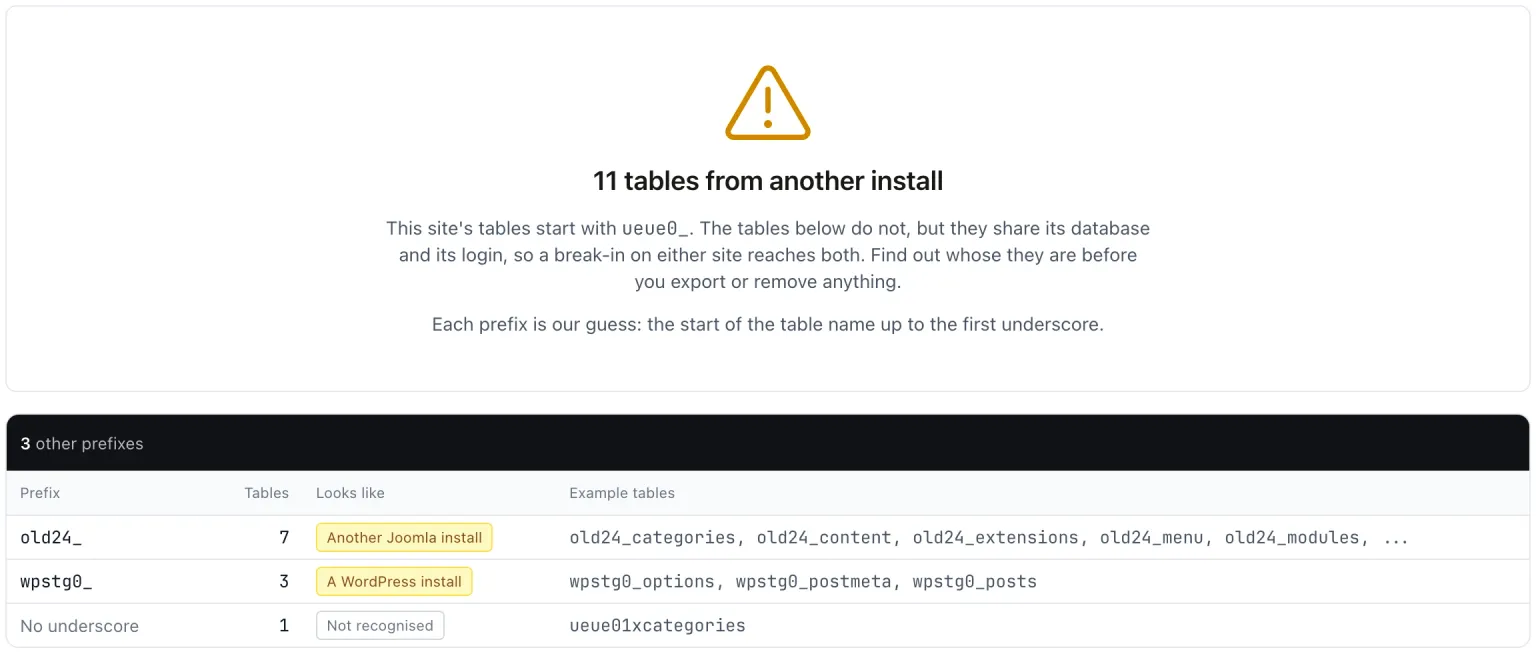
During each snapshot your site counts the tables in its database that do not start with its own table prefix. Views are skipped. Investigate groups those tables by their likely prefix, guessed from the text up to the first underscore, and shows each group’s table count, what it looks like, and up to five example table names.
A few tables are left out of the count:
- mySites.guru’s own connector tables.
- WordPress multisite tables such as
wp_2_options, which start with the site’s prefix and so belong to it. - On Joomla,
bak_tables, because the backup tables check already reports them. WordPress has no such check, so there they appear as a group labelled Backup copies.
If your site cannot read the table list, the row shows No Data rather than a pass.
What a second install shares with yours
Old installs, test copies and staging sites often end up in the same database as the live site, because it was the database that was to hand. Once they are there, no one updates them, and they share everything with the live site: the same database user, the same backups and the same risk. One SQL injection on either site reads both. An old copy also keeps old password hashes and old customer data that the live site may have long since cleaned up.
Only this site’s tables here
No other install’s tables are in the database.
Removing another install’s tables
- Open the site in mySites.guru, go to the Snapshot tab and click Investigate on the Tables From Another Install In This Database row.
- Read the groups. The prefix is a guess, so check each one with whoever set the site up before removing anything.
- Export the tables you want to remove with phpMyAdmin or your host’s database tool, and keep the export somewhere safe.
- Drop them.
- The next snapshot picks up the change.
mySites.guru does not automate this, because the tables are not this site’s to delete.
Limits of the check
A prefix that begins with yours counts as yours: with jos_ as your prefix, tables named jos_old_ are treated as this site’s.
This check pairs with the default database prefix check and the check for a database user that can see other databases.
Tables From Another Install In This Database
mySites.guru checks every connected site for this automatically and flags it the moment it appears. These run twice a day on every connected site.
Further Reading
Frequently Asked Questions
Does mySites.guru read the data in these tables?
Why does mySites.guru not delete them?
How does it decide what the other install is?
 Written and edited by a human, with AI assistance. Our approach to AI