Tables Not Using utf8mb4
Tables not on utf8mb4 cut off emoji and some languages on save, and mixed collations cause Illegal mix of collations errors. Find them on every site.
How the utf8mb4 check works
During each snapshot your site reads the collation of every one of its own tables, the ones with its table prefix. Any table whose collation does not start with utf8mb4_ is counted. Views are skipped, and crashed tables are left to the crashed tables check.
Investigate also lists every distinct collation in use. When there is more than one, the page says so, because that is what causes the mixed collation error. If your site cannot read the table list, the row shows No Data rather than a pass.
What goes wrong on an older character set
A table on utf8 (or latin1) cannot store characters that need four bytes. An editor pastes in a heading with an emoji, or a contact form receives a name in a script the table cannot hold, and the text is cut off at that character or the save fails. The editor gets no warning beforehand.
Mixed collations are a separate problem that shows up the same way: a page or a search that worked for years starts failing with “Illegal mix of collations” after an extension adds a table with a different collation, or after a migration converts some tables and not others.
Every table uses utf8mb4
All of the site’s own tables have a utf8mb4 collation.
Converting a table
Converting a table’s character set is safe for most tables, but not all. Text that an extension stored in the wrong encoding, usually UTF-8 saved into a latin1 table, can come out as garbage such as é instead of é. On older servers MySQL can also refuse a conversion because an index becomes too long. So mySites.guru keeps a copy of each table and lets you check the result before anything is final.
- Open the site in mySites.guru, go to the Snapshot tab and click Investigate on the Tables Not Using utf8mb4 row.
- Each row shows the table, its current collation and its size.
- Press Convert on a row, or tick several. mySites.guru copies the table to a backup table in the same database, checks the copy has every row, then converts the original with
CONVERT TO CHARACTER SET utf8mb4, using the utf8mb4 collation your site already uses, orutf8mb4_unicode_ciif it has none. - The row then says Awaiting your review. Open it to see up to 20 rows that hold accented or non-Latin text, before and after side by side, with any value that changed marked.
- If the text looks right, press Accept and the backup table is dropped. If anything looks wrong, press Roll back. The backup is swapped back in place of the converted table in one step, so the table is exactly as it was.
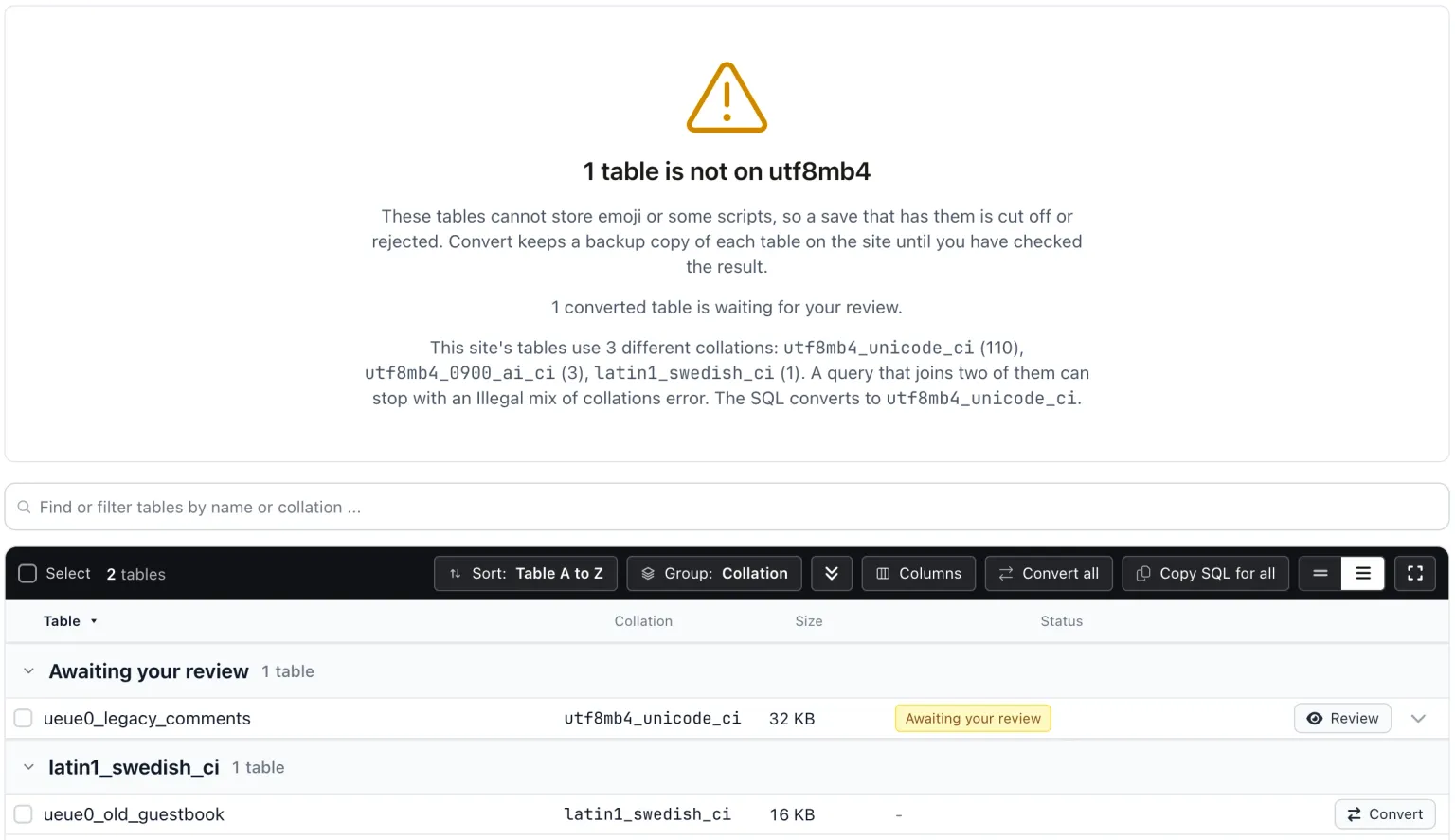

A backup that is still waiting for your review stays on this page until you accept or roll it back, even weeks later, so a conversion is never left half decided.
Copy SQL is still there if you would rather run the statement yourself in phpMyAdmin or your host’s database tool. Take a full database backup first.
Large tables
MySQL converts a table by copying it, and the table is locked for writes until it finishes. The backup copy doubles the space the table takes until you accept or roll back. On a large table the conversion can take longer than mySites.guru waits for a reply. MySQL keeps running it anyway, the row says it is still converting on the server, and the review becomes available once it is done. Convert big tables when the site is quiet.
On Joomla 3, the Fix button on the Database page of the Extension Manager also converts Joomla’s own core tables to utf8mb4, and on Joomla 4 the Update Structure button under System, Maintenance, Database does the same, as long as the schema check finds no errors. Joomla 5 and later no longer convert tables there. WordPress converts its core tables to utf8mb4 during upgrades when the server supports it. Tables that belong to extensions and plugins are the ones most often left behind, and those are what this page converts.
Limits of the check
Only tables that start with your site’s prefix are counted, so if another install’s prefix begins with yours, its tables count as yours. Collation is checked per table, not per column.
Tables Not Using utf8mb4
mySites.guru checks every connected site for this automatically and flags it the moment it appears. These run twice a day on every connected site.
Further Reading
Frequently Asked Questions
What is the difference between utf8 and utf8mb4?
What does Illegal mix of collations mean?
Can I undo a conversion?
Does this check every column?
 Written and edited by a human, with AI assistance. Our approach to AI