Items In The Trash
Joomla keeps trashed articles, categories, modules and menu items in the database until someone empties the trash. See what is there and empty it safely.
How the trash check works
During each snapshot your site counts the items in Joomla’s trash:
- trashed articles
- trashed categories, apart from the root category
- trashed modules, for both the site and the administrator
- trashed menu items in the site menus
The count is for information only. The row shows how many items are in the trash, never in a warning colour. If the site cannot report this, the row shows No Data rather than a pass.
Why the trash fills up
Trashing an item in Joomla only changes its state. The item stays in the database, with its permissions, its search index entries and everything else attached, until someone empties the trash. On a site with several editors, no one feels it is their job, so trashed items from years ago pile up and turn up in every database backup and export.
The trash is empty
There are no trashed articles, categories, modules or site menu items.
Emptying the trash from mySites.guru
- Open the site, go to the Snapshot tab and click Investigate on the Items In The Trash row.
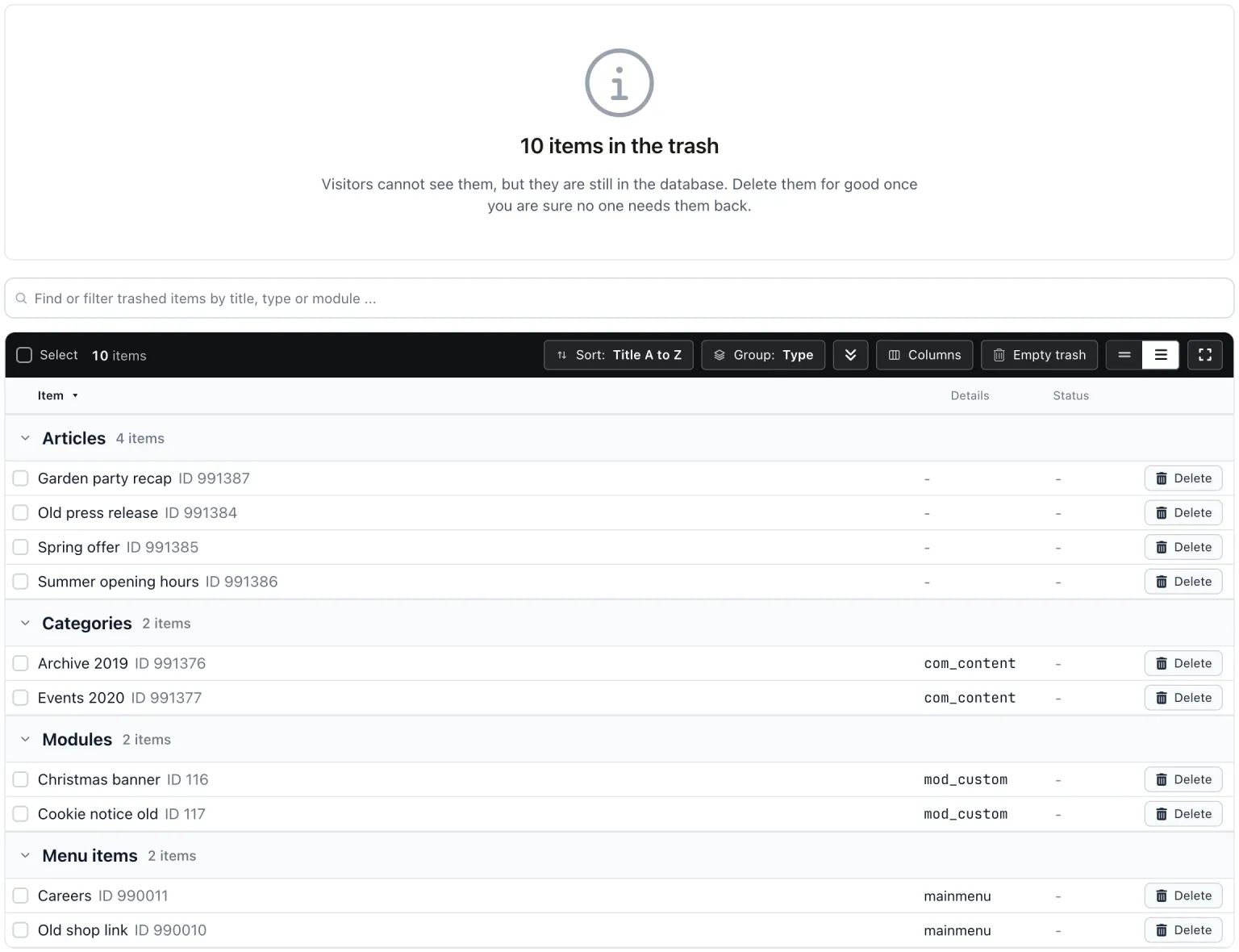
- The list groups items by type: Articles, Categories, Modules and Menu items. Each row shows the title and details such as the menu, the module type, whether it is an administrator module, and how many items sit under it.
- Take a backup.
- Click Delete on a row, tick several and delete those, or click Empty trash to delete everything listed. Each asks first.
- When the run ends, mySites.guru tells you how many items were deleted and lists anything Joomla kept, with Joomla’s reason and a link to that trash in the Joomla administrator.
Every delete runs through Joomla’s own administrator code, the same as Empty Trash in the Joomla administrator. That way permissions, featured flags, module assignments and search entries are tidied up the way Joomla tidies them. Child items are deleted before their parents, so a trashed category or menu item with trashed children can be emptied in one run. There is no raw database delete behind it.
The site gets a fresh snapshot afterwards, and the delete is recorded on the site’s activity timeline. Joomla’s own action log does not record these deletes.
Doing it in Joomla
In each manager (articles, categories, modules, menu items), open Filter Options, set the status filter to Trashed, select the items and press Empty Trash. mySites.guru saves you opening each manager in turn on every site.
Before you empty the trash, check menu items for uninstalled components: that check moves broken menu items here, and this is where they are removed for good.
Items In The Trash
mySites.guru checks every connected site for this automatically and flags it the moment it appears. These run twice a day on every connected site.
Frequently Asked Questions
Is having items in the trash a problem?
Can I undo a delete?
Why did Joomla keep some items?
 Written and edited by a human, with AI assistance. Our approach to AI